| MC537415 | Profanity filtering on/off control for Live Captions in Teams meetings |
|---|
| Classification | stayInformed |
|---|---|
| Last Updated | 04/05/2023 03:34:36 |
| Start Time | 04/05/2023 03:34:22 |
| End Time | 08/24/2023 07:00:00 |
| Message Content |
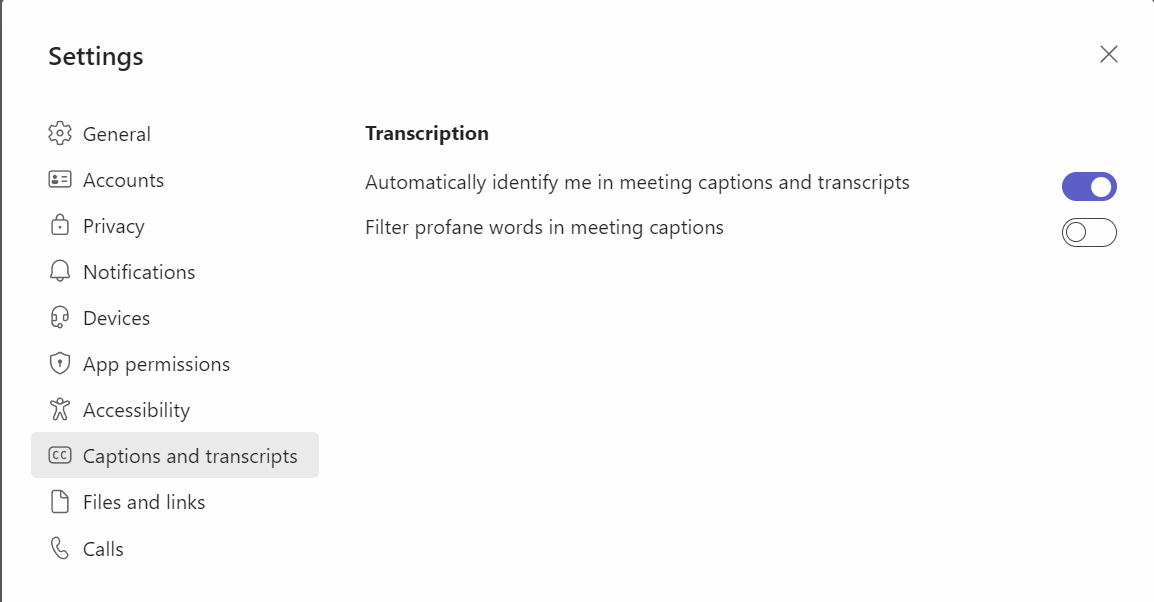
With the newly introduced toggle for turn on/off profanity filtering in Live Captions, users will now be able to control whether they want to continue to leverage the profanity filtering capability provided out of the box, or if they want to see every word as-is. This message is associated with Microsoft 365 Roadmap ID 113412. [When this will happen:] Targeted Release (Public preview): We will begin rolling out early April and expect to complete by mid-April. Standard Release: We will begin rolling out early May and expect to complete by mid-May.
GCC-High and DoD: We will begin rolling out early July and expect to complete by mid-July. [How this will affect your organization:] Users now have a new option to turn off the profanity filtering and be able to see the Captions as is. They can control this option via Settings in Teams > Captions and transcripts > Filter profane words in meeting captions.
[What you need to do to prepare:] You may consider updating the training materials for you users to inform this feature is now available. |
| Machine Translation |
ライブキャプションで不適切な表現のフィルタリングをオン/オフするトグルが新たに導入されたことで、ユーザーは、すぐに使用できる不適切な表現のフィルタリング機能を引き続き活用するか、すべての単語をそのまま表示するかを制御できるようになりました。 このメッセージは、Microsoft 365 ロードマップ ID 113412に関連付けられています。 [これが起こるとき:] 対象指定リリース (パブリック プレビュー): 4 月上旬にロールアウトを開始し、4 月中旬までに完了する予定です。 標準リリース: 5 月初旬にロールアウトを開始し、5 月中旬までに完了する予定です。
GCC-Highおよび国防総省:7月初旬に展開を開始し、7月中旬までに完了する予定です。 [これが組織に与える影響:] ユーザーは、冒とく的な表現のフィルタリングをオフにして、キャプションをそのまま表示できるようにする新しいオプションを使用できるようになりました。このオプションは、Teams の [設定] > キャプションとトランスクリプト > 会議 のキャプション内の不適切な単語をフィルター処理することで制御できます。
[準備するために必要なこと:] この機能が利用可能になったことを知らせるために、ユーザーのトレーニング資料を更新することを検討してください。 |