| MC544793 | AntiMalware: Default Policy (only): Common attachment filter: Configuration Change |
|---|
| Classification | planForChange |
|---|---|
| Last Updated | 04/22/2023 00:01:56 |
| Start Time | 04/22/2023 00:01:00 |
| End Time | 06/30/2023 07:00:00 |
| Message Content |
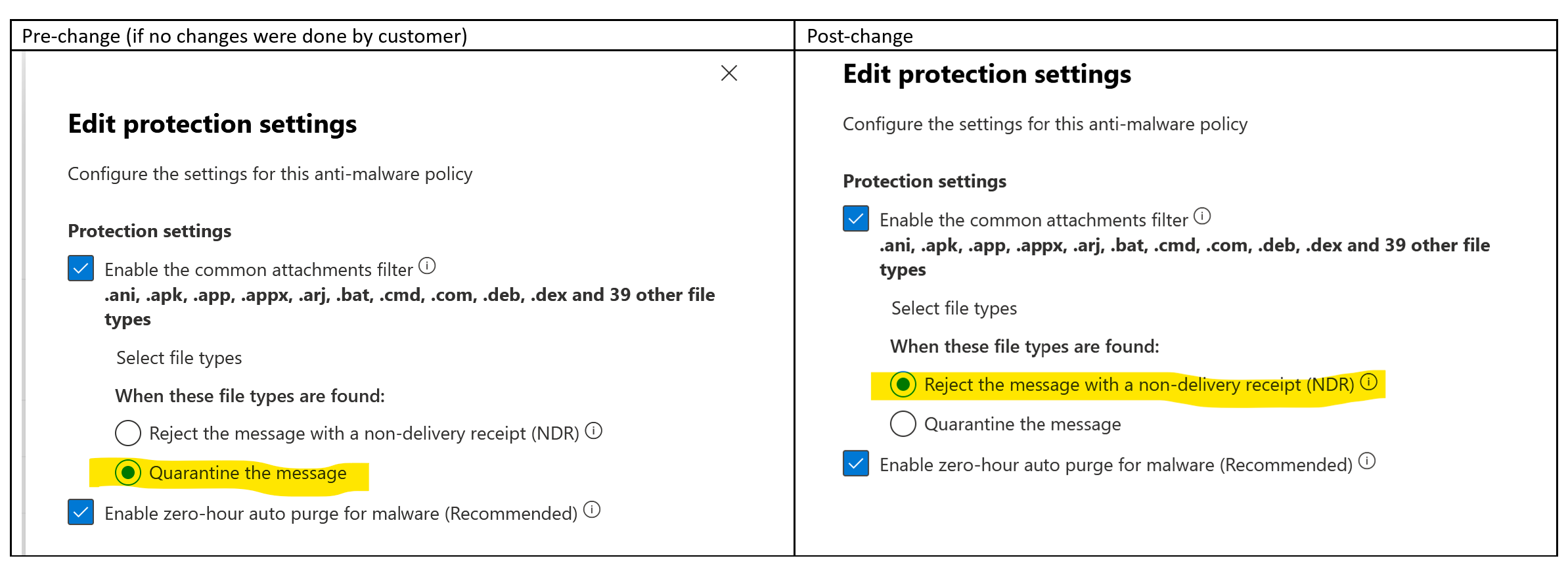
We’re making some changes to common attachment filter settings for the Default policy (only) in the Anti-malware policy. The earlier default selection value of the ‘Quarantine the message’ is changed to ‘Reject the message with NDR’. In Anti-malware policies, under the protection settings for ‘Enable the common attachment filter’, there are two notification options when an email contains any attachment matching the configured file types. They are:
These two notification options are added to the common attachments filter few months ago. When this was added, the option ‘Quarantine the message’ was selected in the default policy. The change now being introduced is to update this option to ‘Reject the message with a non-delivery receipt (NDR)’ for all customers. This change is to allow faster response on the part of the sender to resend any important emails which might be quarantined (and delayed to the intended receipt) due to any attachment with matching blocked file type. We’re also aligning the setting for this control in the Standard and Strict preset security policies to ‘Reject the message with a non-delivery receipt (NDR)’. This change will also reduce the messages in quarantine. Quarantined messages need to be reviewed and released by the SecOps team and allow the sender to take action. [When will this happen:] We will begin rolling this out early May and expect to complete by mid-June. [How this will affect your organization:] This change will update the specific setting in the default policy. Any message which was quarantined until now because of the matching file type will now be rejected with an NDR. If you would rather quarantine the messages, then you will need to create a new policy with ‘Quarantine the message’ selected or, you need to revert the selection to ‘Quarantine the message’ after this change is rolled out. [What you need to do to prepare:] If you would rather quarantine the messages, then you are requested need to create a new policy with ‘Quarantine the message’ selected or, you need to revert the selection to ‘Quarantine the message’ after this change is rolled out. Please click Additional Information to learn more. |
| Machine Translation |
マルウェア対策ポリシーの既定のポリシー (のみ) の一般的な添付ファイル フィルター設定にいくつかの変更を加えています。以前の既定の選択値である [メッセージを検疫する] が [NDR でメッセージを拒否する] に変更されました。 マルウェア対策ポリシーの [共通の添付ファイル フィルターを有効にする] の保護設定の下に、構成されたファイルの種類に一致する添付ファイルが電子メールに含まれている場合の通知オプションがあります。彼らです:
これらの2つの通知オプションは、数か月前に一般的な添付ファイルフィルターに追加されました。これが追加されると、既定のポリシーで [メッセージを検疫する] オプションが選択されました。 現在導入されている変更は、すべての顧客に対してこのオプションを “配信不能確認 (NDR) でメッセージを拒否する” に更新することです。この変更は、ブロックされたファイルの種類が一致する添付ファイルが原因で隔離される(および意図した受信に遅れる)可能性のある重要な電子メールを再送信するための送信者側の応答を高速化できるようにするためです。また、Standard および Strict プリセット セキュリティ ポリシーのこのコントロールの設定を [配信不能確認 (NDR) でメッセージを拒否する] に調整しています。この変更により、検疫内のメッセージも減少します。検疫されたメッセージは、SecOps チームによって確認および解放され、送信者がアクションを実行できるようにする必要があります。 [これはいつ起こりますか:] これは5月上旬に展開を開始し、6月中旬までに完了する予定です。 [これが組織に与える影響:] この変更により、既定のポリシーの特定の設定が更新されます。ファイルの種類が一致するためにこれまで検疫されていたメッセージは、NDR で拒否されるようになりました。 メッセージを検疫する場合は、[メッセージを検疫する] を選択して新しいポリシーを作成するか、この変更がロールアウトされた後に選択を [メッセージを検疫する] に戻す必要があります。 [準備するために必要なこと:] メッセージを検疫する場合は、[メッセージの検疫] を選択して新しいポリシーを作成するか、この変更のロールアウト後に選択を [メッセージの検疫] に戻す必要があります。 詳細については、[追加情報]をクリックしてください。 |