| MC509577 | (Updated) Visio Personal App in Teams |
|---|
| Classification | stayInformed |
|---|---|
| Last Updated | 05/19/2023 20:18:04 |
| Start Time | 01/31/2023 00:31:04 |
| End Time | 08/31/2023 07:00:00 |
| Message Content |
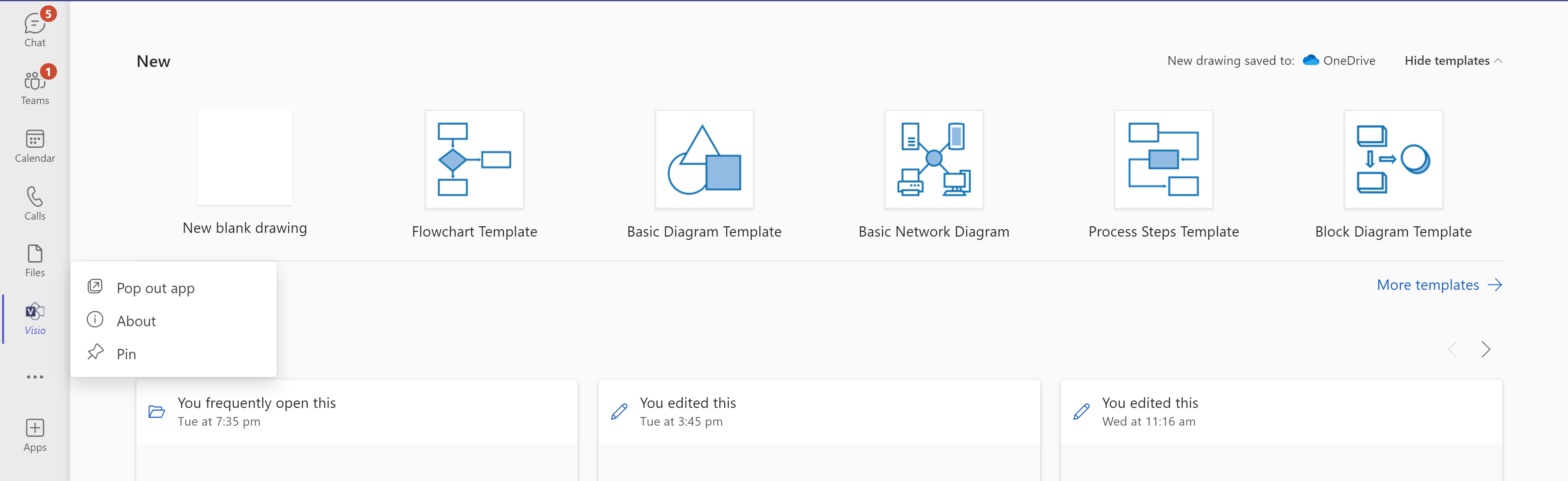
Updated May 19, 2023: We have updated the rollout timeline below. Thank you for your patience. Visio will be available soon as a Teams Personal App. There are no changes to the existing file open behavior, however there are new abilities that the Visio Personal App can provide. Additionally, this change comes with a number of UX improvements to the Office ribbon in Teams to provide a decluttered experience consistent with Office for the Web.
This message is associated with Microsoft 365 Roadmap ID 109596
[When this will happen:] App rollout has begun and is expected to be completed by mid-July 2023. [How this will affect your organization:] The Visio personal app will come pre-installed for all users. New abilities that Visio Personal App will provide include:
Changes to the Office ribbon in Teams include:
[What you need to do to prepare:]
No action is required from admins at this time; the Visio personal app will be available to all users. |
| Machine Translation |
2023 年 5 月 19 日更新: 以下のロールアウトのタイムラインを更新しました。お待ちいただきありがとうございます。 Visio は、Teams 個人用アプリとしてまもなく利用できるようになります。既存のファイルを開く動作に変更はありませんが、Visio 個人用アプリで提供できる新しい機能があります。さらに、この変更には、Teams の Office リボンに対する多くの UX の改善が伴い、Office for the Web と一貫性のあるすっきりとしたエクスペリエンスが提供されます。
このメッセージは、Microsoft 365 ロードマップ ID に関連付けられています109596
[これが起こるとき:] アプリのロールアウトが開始され、2023 年 7 月中旬までに完了する予定です。 [これが組織に与える影響:] Visio 個人用アプリは、すべてのユーザーにプレインストールされます。Visio 個人用アプリが提供する新しい機能は次のとおりです。
Teams の Office リボンに対する変更点は次のとおりです。
[準備するために必要なこと:]
現時点では、管理者からのアクションは必要ありません。Visio 個人用アプリは、すべてのユーザーが利用できるようになります。 |