| MC1426716 | Neutral-themed SharePoint UI in page editing and property panes |
|---|
| Classification | stayInformed |
|---|---|
| Last Updated | 07/13/2026 22:04:53 |
| Start Time | 07/13/2026 22:04:43 |
| End Time | 10/01/2026 07:00:00 |
| Message Content |
[What and Why:] We are updating the SharePoint page editing experience with a neutral-themed UI for system controls, including web part toolbars and property panes. With this change, editing tools will use standard, neutral colors instead of inheriting site branding. This creates a clearer distinction between system controls and user-authored content, improving usability, accessibility, and consistency across light and dark themes as part of the SharePoint visual refresh. This message is associated with Roadmap ID 566698. [Rollout Schedule:]
[Impact on Your Organization:]
Who is affected: Users who create or edit SharePoint pages and developers/admins managing custom or third-party SharePoint Framework web parts. Platforms/Services: SharePoint (Web) What will happen:
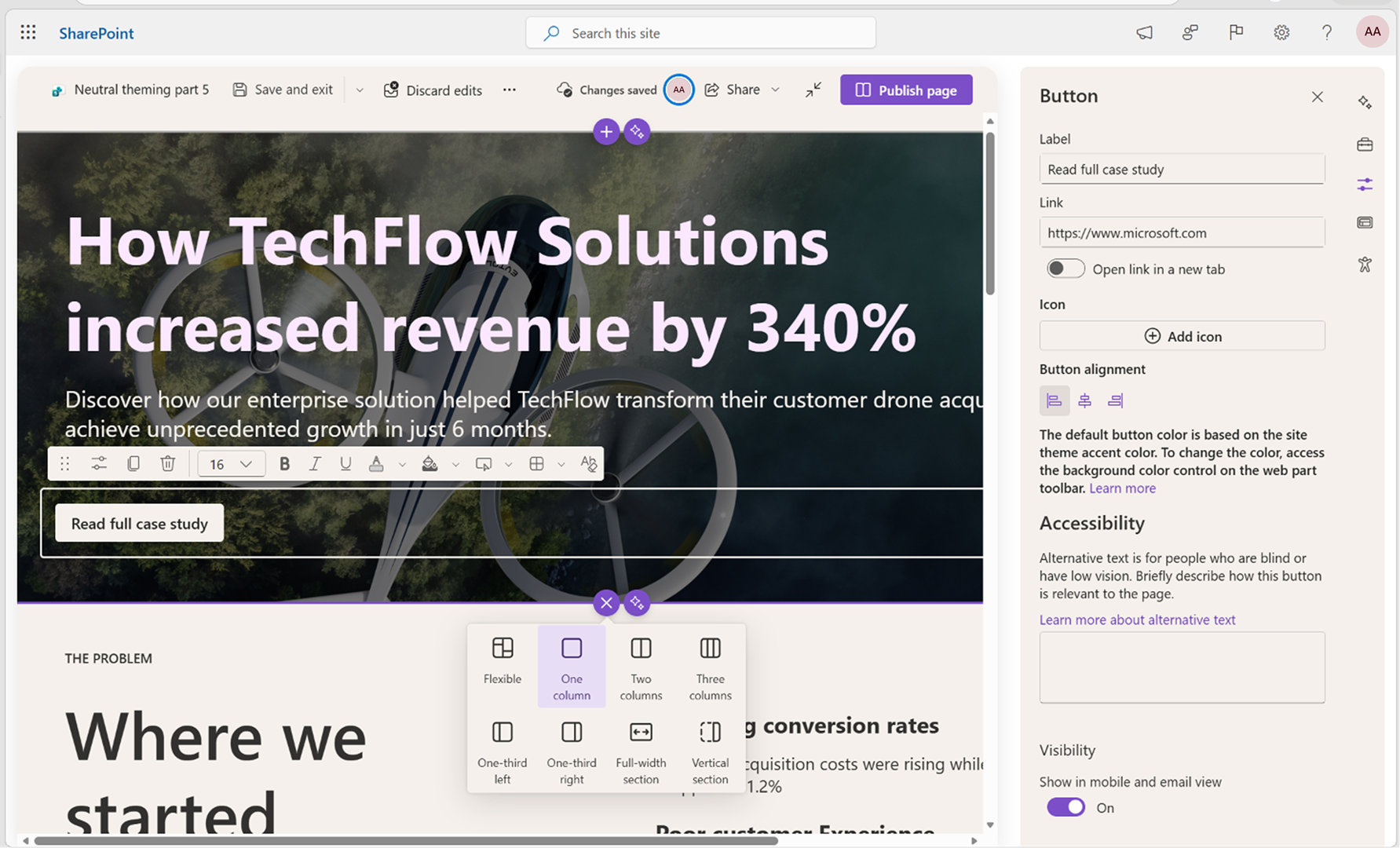
Screenshot 1: Before: The System Control inherits the site’s Custom Theme colors, including the light-yellow background and purple accent color:
Screenshot 2: After: The System Control now uses neutral theme colors. The previously applied Custom Theme colors (light yellow and purple accents) have been replaced:
Action Required/Recommendations:
No admin action is required for Microsoft-provided SharePoint experiences. If your organization uses custom or third-party web parts, we recommend:
Learn more:
Compliance considerations: No compliance considerations identified, review as appropriate for your organization. |
| Machine Translation |
[何となぜ:] SharePointのページ編集体験を、ウェブパーツのツールバーやプロパティパネルを含む中 立的なテーマのUI でシステムコントロールにアップデートしています。 この変更により、編集ツールはサイトのブランディングを引き継ぐ代わりに 標準のニュートラルカラー を使用します。これにより 、システム制御とユーザー作成コンテンツの区別がより明確になり、SharePointのビジュアルリフレッシュの一環として、明暗テーマの使いやすさ、アクセシビリティ、一貫性が向上します。 このメッセージはロードマップID 566698に関連付けられています。 [展開スケジュール:]
[組織への影響:]
影響を受ける人物: SharePointページを作成または編集するユーザーや、カスタムまたはサードパーティのSharePoint Frameworkウェブパーツを管理する開発者・管理者。 プラットフォーム/サービス: SharePoint(ウェブ) 今後の展開:
スクリーンショット1: 以前:システムコントロールはサイトのカスタムテーマカラー、例えばライトイエローの背景と紫のアクセントカラーを引き継ぎます:
スクリーンショット2: その後: システムコントロールはニュートラルなテーマカラーを使用しています。以前に適用されていたカスタムテーマカラー(ライトイエローとパープルのアクセント)は置き換えられています。
必要な行動/推奨事項:
Microsoftが提供するSharePoint体験には管理者の操作は不要です。 御社がカスタムまたはサードパーティのウェブパーツを使用している場合、以下を推奨します:
詳しくはこちら:
コンプライアンスの考慮事項: コンプライアンス上の懸念事項は特定されず、組織に応じてレビューしてください。 |