| MC564195 | Introducing zooming controls while viewing screenshare |
|---|
| Classification | stayInformed |
|---|---|
| Last Updated | 05/31/2023 00:07:13 |
| Start Time | 05/31/2023 00:07:04 |
| End Time | 10/18/2023 07:00:00 |
| Message Content |
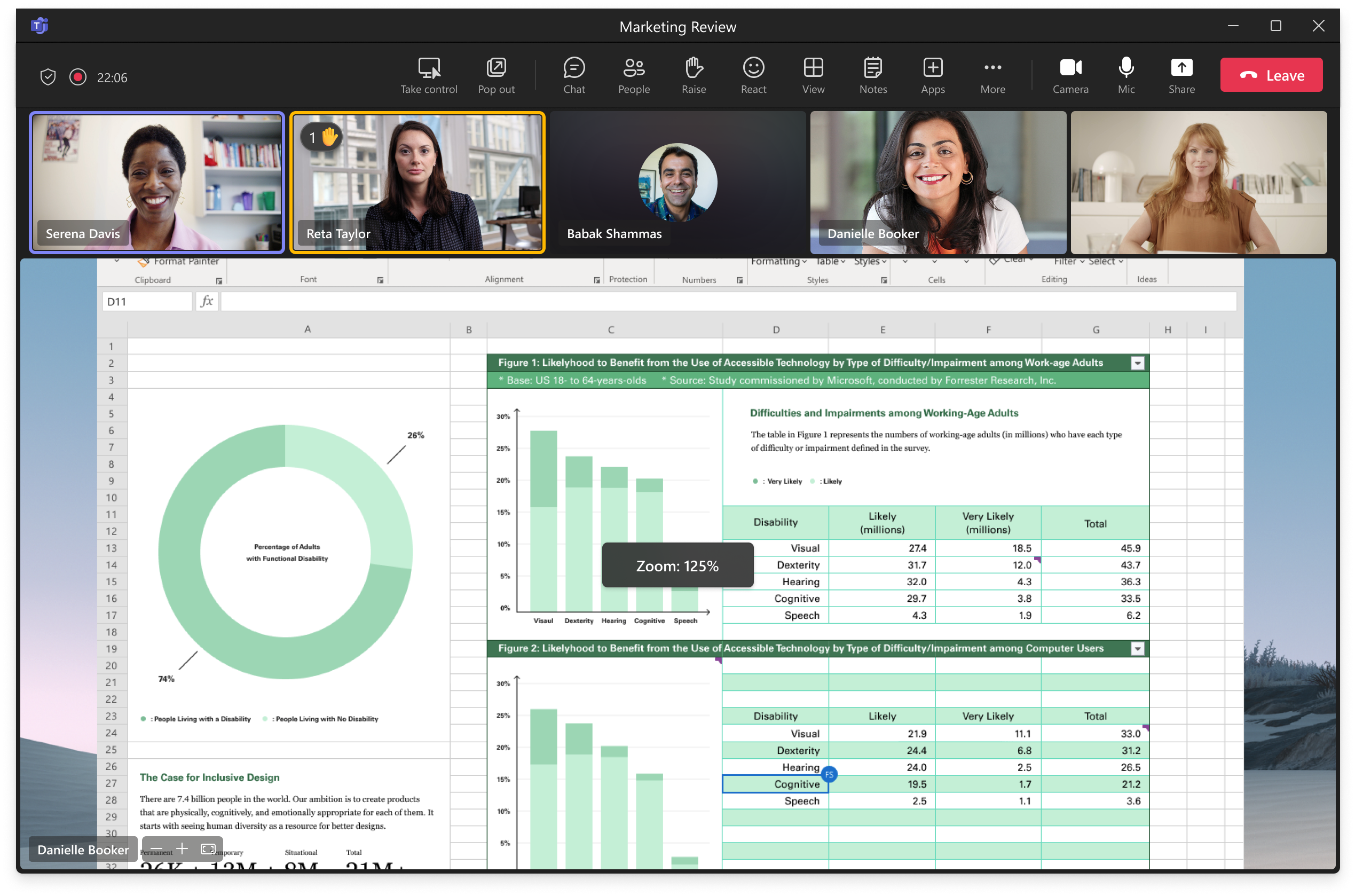
This change is applicable to Microsoft Teams users using meetings and calls. Users in a Teams call or meeting will now see new buttons to zoom in, zoom out and restore the original size of the incoming screenshare. This will greatly enhance the experience of users viewing screenshare. (Ability to zoom was previously only available using pinch to zoom gesture on trackpad or other shortcuts.) This message is associated with Microsoft 365 Roadmap ID 116010. [When this will happen:] Targeted Release: We will begin rolling out early June and expect to complete by mid-June. Public Preview: We will begin rolling out early June and expect to complete by mid-June. Standard Release: We will begin rolling out early July and expect to complete by mid-July. GCC-High and DoD: We will begin rolling out in late August and expect to complete rollout by mid-September. [How this will affect your organization:] This experience has no impact on tenant/admin. Users can now use new buttons to zoom in, zoom out and restore the original size of the incoming screenshare instead of using gestures/shortcuts.
Note: This feature is currently not available when watermark (applicable for Teams Premium only) is enabled.
[What you need to do to prepare:]
You can update your support and/or knowledgebase articles as necessary. |
| Machine Translation |
この変更は、会議と通話を使用するMicrosoft Teamsユーザーに適用されます。 Teams の通話または会議のユーザーには、ズームイン、ズームアウト、および受信画面共有の元のサイズを復元するための新しいボタンが表示されるようになりました。これにより、画面共有を表示するユーザーのエクスペリエンスが大幅に向上します。(ズーム機能は、以前はトラックパッドまたはその他のショートカットでピンチしてズームするジェスチャを使用してのみ使用できました。 このメッセージは、Microsoft 365 ロードマップ ID 116010 に関連付けられています。 [これが起こるとき:] ターゲット リリース: 6 月上旬にロールアウトを開始し、6 月中旬までに完了する予定です。 パブリック プレビュー: 6 月上旬にロールアウトを開始し、6 月中旬までに完了する予定です。 標準リリース: 7 月上旬にロールアウトを開始し、7 月中旬までに完了する予定です。 GCC-High および DoD: 8 月下旬にロールアウトを開始し、9 月中旬までにロールアウトを完了する予定です。 [これが組織に与える影響:] このエクスペリエンスは、テナント/管理者には影響しません。ユーザーは、ジェスチャー/ショートカットを使用する代わりに、新しいボタンを使用してズームイン、ズームアウトし、受信画面共有の元のサイズに戻すことができるようになりました。
注: この機能は現在、透かし (Teams Premium にのみ適用可能) が有効になっている場合は使用できません。
[準備するために必要なこと:]
必要に応じて、サポート記事やナレッジベース記事を更新できます。 |