| Message Content |
[What and why]
Planner Agent chat is coming to Microsoft Planner basic plans. This feature brings Planner Agent directly into the Planner experience, allowing users to ask questions about their plans, understand priorities, and take action without leaving Planner.
Planner Agent chat helps users stay organized by providing quick access to plan status, work that requires attention, and actionable insights. It can also help users create and manage plans using information from Microsoft 365 resources.
This message is associated with Microsoft 365 Roadmap ID 567671.
[Rollout schedule]
- Targeted Release: Beginning in late August 2026 and expected to complete by early September 2026
- General Availability (Worldwide): Beginning in late August 2026 and expected to complete by late September 2026
[Impact on your organization]
Who is affected
- Users with an active Microsoft 365 Copilot license
- Organizations that allow access to Planner Agent
Platforms and services
- Microsoft Planner
- Microsoft 365 Copilot
- Web
What will happen
Eligible users will be able to access Planner Agent chat directly within Planner while working in basic plans.
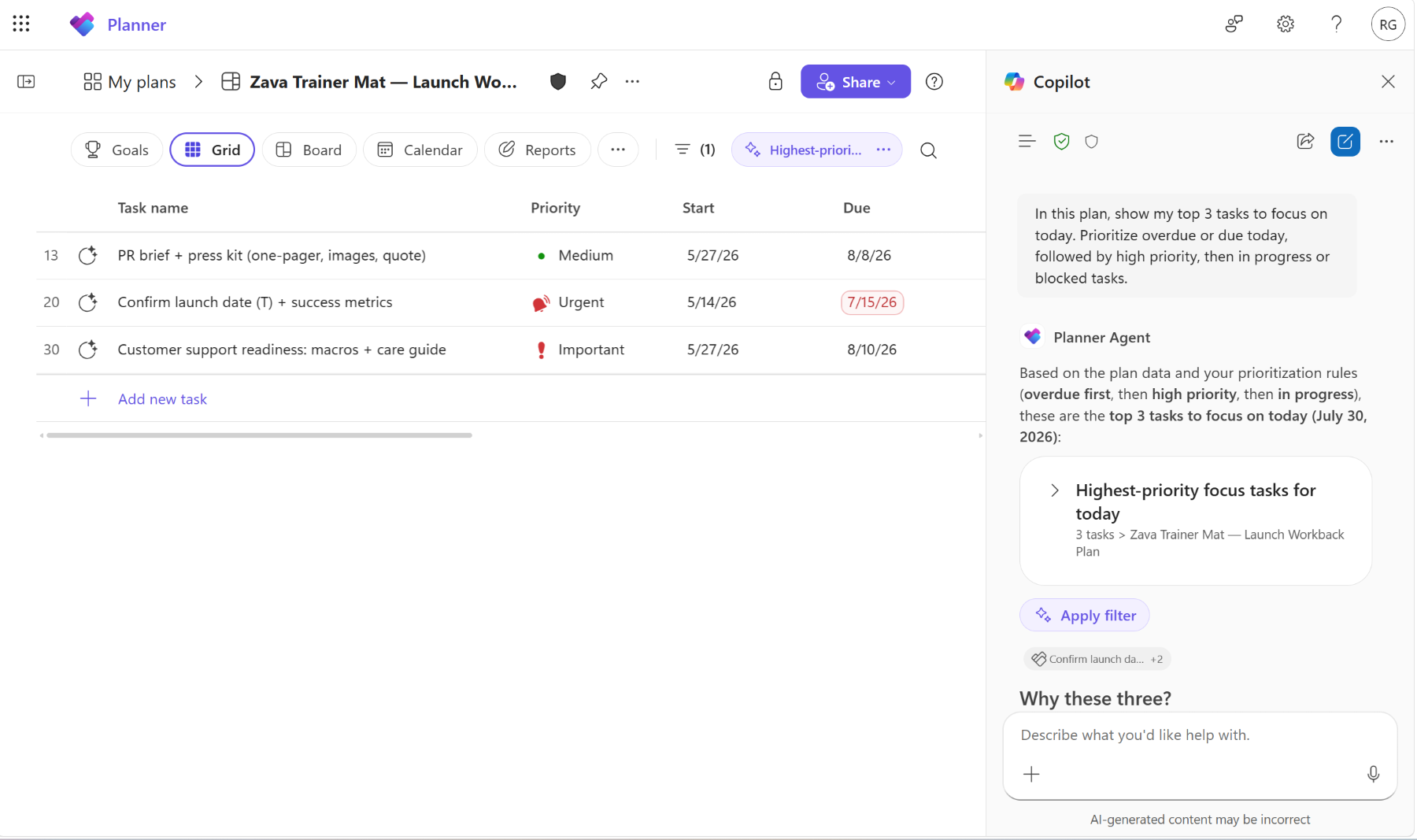
Users will be able to:
- Ask questions about plan status, priorities, and upcoming work.
- Apply AI-generated filters to identify important work more quickly.
- Use interactive task cards to draft updates, review tasks, and track progress.
- Receive insights about high-priority work, upcoming deadlines, and at-risk tasks.
- Create new Planner plans organized by goals and buckets.
- Use information from Microsoft 365 resources such as emails, meetings, and files when working with Planner Agent.
- Use natural language prompts such as: “Show me my recent high-priority tasks and what is due this week.”
[Action required and recommendations]
Review whether your organization wants users to have access to Planner Agent.
Confirm that users who should use this feature have an active Microsoft 365 Copilot license.
- Review Planner Agent settings in the Microsoft 365 admin center.
- If Planner Agent is blocked, users will not have access to this capability.
- Update internal documentation and user guidance as appropriate.
No additional action is required before rollout.
Learn more
[Compliance considerations]
| Question |
Answer |
| Does this change introduce or significantly modify AI, machine learning, or agent capabilities that interact with customer data? |
Yes. This feature introduces Planner Agent chat, an AI-powered experience that interacts with Planner data and can use existing Microsoft 365 resources, including emails, meetings, and files, to provide insights, answer questions, and help users take action. |
| Does this change provide end users with a new way to interact with generative AI? |
Yes. Users can interact with Planner Agent chat using natural language prompts to analyze plans, identify priorities, create plans, manage tasks, and receive AI-generated insights directly within Planner. |
| Does this change alter how existing customer data is accessed or processed? |
Yes. Planner Agent chat can access and process existing Planner data and Microsoft 365 content that users already have permission to access in order to generate responses, recommendations, and insights. |
| Is there an administrative control available for this feature? |
Yes. Administrators can control access to this capability through agent settings. Blocking the Planner Agent removes access to the feature. |
| Can this feature be enabled or disabled by administrators? |
Yes. Administrators can manage availability of the feature through Planner Agent configuration and access controls. |
| Does this change affect how users access information within Microsoft 365? |
Yes. Users gain a new conversational interface that enables them to access and interact with Planner information and related Microsoft 365 content through natural language requests. |
|
| Machine Translation |
[何となぜ]
Planner AgentチャットがMicrosoft Plannerの基本プランにも登場します。この機能により、Planner AgentはPlannerの体験に直接取り入れられ、ユーザーはプランナーを離れることなく自分のプランについて質問したり、優先事項を理解したり、行動を取ることができます。
プランナーエージェントチャットは、プランの状況や注意が必要な作業、実行可能なインサイトへの迅速なアクセスを提供することで、ユーザーが整理整頓を保つのを支援します。また、Microsoft 365のリソースから情報を使ってプランを作成・管理する手助けもできます。
このメッセージはMicrosoft 365 Roadmap ID 567671に関連付けられています。
[展開スケジュール]
- リリース予定:2026年8月下旬から始まり、2026年9月初旬までに完了する予定です
- 一般稼働(世界): 2026年8月下旬から始まり、2026年9月下旬までに完了予定です
[組織への影響]
影響を受ける人物
- 有効なMicrosoft 365 Copilotライセンスを持つユーザー
- プランナーエージェントへのアクセスを許可する組織
ホームとサービス
- Microsoft プランナー
- Microsoft 365 Copilot
- ウェブ
何が起こるのか
対象となるユーザーは、ベーシックプランで作業しながらPlanner内で直接Plannerエージェントチャットにアクセスできます。
ユーザーは以下ができるようになります:
- プランの状況、優先事項、今後の仕事について質問してください。
- AI生成フィルターを適用して重要な作業をより迅速に特定しましょう。
- インタラクティブなタスクカードを使って、更新内容を作成したり、タスクを確認したり、進捗を追跡したりできます。
- 優先度の高い作業、今後の締め切り、リスクの高いタスクに関する洞察を受け取ります。
- 目標やバケツごとに整理された新しいプランナープランを作成しましょう。
- Planner Agentを使う際は、メール、会議、ファイルなどのMicrosoft 365リソースの情報を活用しましょう。
- 「最近の優先度の高いタスクと今週の締め切りを見せてください」といった自然な言語のプロンプトを活用してください。
[行動が必要と提言]
組織がユーザーにPlanner Agentへのアクセスを許可したいかどうかを確認しましょう。
この機能を使うべきユーザーが有効なMicrosoft 365 Copilotライセンスを持っているか確認してください。
- Microsoft 365管理センターでPlanner Agentの設定を確認してください。
- プランナーエージェントがブロックされている場合、ユーザーはこの機能にアクセスできなくなります。
- 内部ドキュメントやユーザーガイダンスは適宜更新してください。
展開前に追加の行動は必要ありません。
詳しくはこちら
[コンプライアンスの考慮事項]
| 質問 |
回答 |
| この変更は、顧客データとやり取りするAI、機械学習、エージェントの機能を導入または大幅に変更するものでしょうか? |
はい。この機能はPlanner Agentチャットを導入します。これはAI搭載の体験で、Plannerのデータとやり取りし、既存のMicrosoft 365リソース(メール、会議、ファイルなど)を使って洞察を提供し、質問に答え、ユーザーの行動支援を行います。 |
| この変更はエンドユーザーに生成AIと新たな関わり方をもたらすのでしょうか? |
はい。ユーザーは自然言語プロンプトを使ってPlanner Agentチャットとやり取りし、計画を分析し、優先事項を特定し、計画を作成し、タスクを管理し、AI生成の洞察をPlanner内で直接受け取ることができます。 |
| この変更は既存の顧客データのアクセスや処理方法を変えますか? |
はい。Planner Agentチャットは、ユーザーがすでにアクセス権限を持つ既存のPlannerデータやMicrosoft 365コンテンツにアクセスし、応答、推奨、洞察を生成することができます。 |
| この機能に対して管理上の管理権限はありますか? |
はい。管理者はエージェント設定を通じてこの機能へのアクセスを制御できます。プランナーエージェントをブロックすると、この機能へのアクセスが失われます。 |
| この機能は管理者によって有効化または無効化できますか? |
はい。管理者はPlanner Agentの設定やアクセス制御を通じて機能の利用可能性を管理できます。 |
| この変更はMicrosoft 365内でユーザーの情報アクセスに影響しますか? |
はい。ユーザーは自然言語リクエストを通じてPlanner情報や関連するMicrosoft 365コンテンツにアクセスし、やり取りできる新しい会話型インターフェースを得られます。 |
|