SHD / MC Checker

MC1442612 | (Updated) Microsoft PowerPoint: Access your organization’s brand templates in PowerPoint


MC1442612 | (Updated) Microsoft PowerPoint: Access your organization’s brand templates in PowerPoint

Classification stayInformed
Last Updated 07/31/2026 16:31:23
Start Time 07/29/2026 23:08:07
End Time 10/26/2026 07:00:00
Message Content

Updated July 31, 2026: We have updated the timeline. Thank you for your patience. 

[What and why]

To help users create presentations that are consistent with organizational branding, Microsoft is introducing access to brand templates directly from PowerPoint Backstage on Windows. This update enables users to discover and use brand templates more easily, reducing time spent searching for templates and helping organizations maintain brand consistency across presentations. Organizations that use Brand kits can make approved templates readily available to users through PowerPoint.

[Rollout schedule]

  • General Availability (Worldwide): Beginning in late August 2026 (previously early August) and expected to complete by mid-September 2026 (previously late August)

[Impact on your organization]

Who is affected

  • Users with a Microsoft 365 Copilot (Premium) license who use PowerPoint for Windows
  • Organizations that have configured Brand kits
  • Organizations currently using Organizational Asset Libraries (OAL)

Platforms and services

  • PowerPoint for Windows
  • Microsoft 365 Copilot
  • Brand kits
  • Organizational Asset Libraries (OAL)

What will happen

  • Eligible users will be able to access brand templates directly from PowerPoint Backstage on Windows.
  • Brand templates from users’ available Brand kits, including official and personal Brand kits, will be available in PowerPoint.
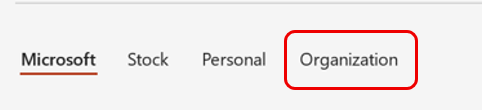
  • Existing Organizational Asset Library (OAL) templates will continue to be available through the Organization tab (screenshot 1): 

  • The feature is available to users with a Microsoft 365 Copilot (Premium) license.
  • No existing OAL templates or assets will be removed as part of this change.

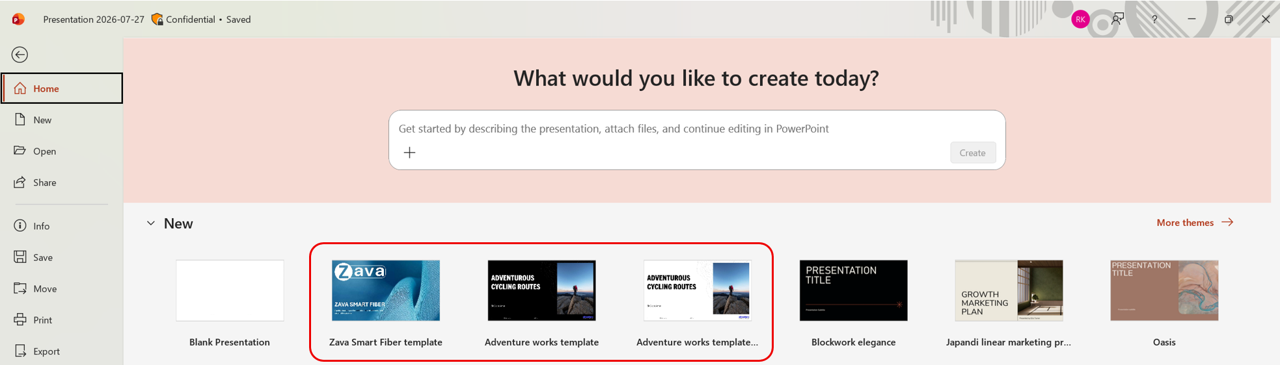
Brand templates in the Backstage Home tab view (screenshot 2): 


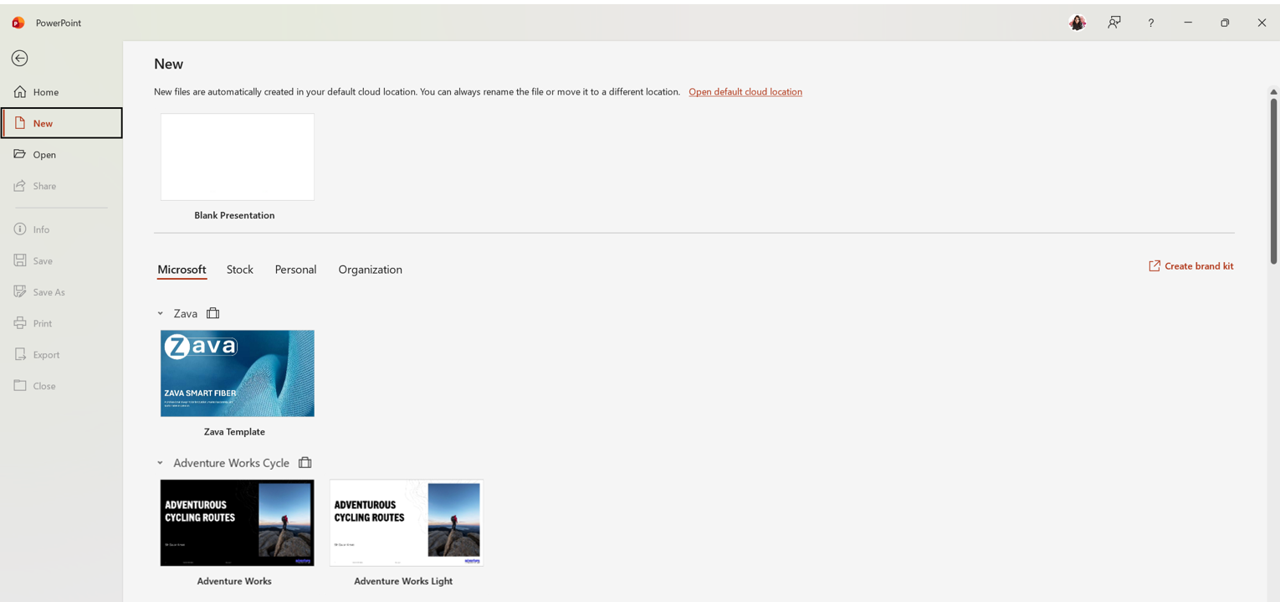
Brand templates in the Backstage New tab view (screenshot 3): 


[Action required and recommendations]

No action is required to receive this feature.

To make organizational brand templates available to your users:

  • Review your organization’s Brand kit configuration.
  • Create and publish official Brand kits that include PowerPoint templates.
  • Configure the Enterprise Brand Manager policy and designate approved brand managers through a mail-enabled security group.
  • Communicate this change to users who create presentations and rely on organizational branding.

Learn more

[Compliance considerations]

Question Answer
Does the change include an admin control? Yes. Administrators can configure the Enterprise Brand Manager policy and assign designated brand managers through a mail-enabled security group.
Can the feature be controlled through Entra ID group membership? Yes. Access to publishing and managing official Brand kits is controlled through membership in the configured mail-enabled security group.
Does the change allow a user to enable and disable the feature themselves? Yes. Users can create and manage personal Brand kits for their own use. Official Brand kit management remains restricted to designated brand managers

Machine Translation

2026年7月31日更新:タイムラインを更新しました。ご辛抱いただきありがとうございます。 

[何となぜ]

組織のブランディングに沿ったプレゼンテーションを作成できるように、MicrosoftはWindowsのPowerPoint Backstageからブランドテンプレートを直接利用できるようにしています。このアップデートにより、ユーザーはブランドテンプレートをより簡単に発見・利用できるようになり、テンプレート検索にかかる時間を短縮し、プレゼンテーション間でのブランド一貫性を維持できます。ブランドキットを使用する組織は、PowerPointを通じて承認済みテンプレートをユーザーに容易に提供できます。

[展開スケジュール]

  • 一般稼働開始(世界展開):  2026年8月下旬 (以前 は8月初旬) から9 月中旬 (以前 は8月下旬)までに完了予定です。

[組織への影響]

影響を受ける人物

  • Windows for Windows PowerPoint を使用するMicrosoft 365 Copilot(プレミアム)ライセンスを持つユーザー
  • ブランドキットを構成している組織
  • 現在組織資産ライブラリ(OAL)を使用している組織

ホームとサービス

  • Windows版PowerPoint
  • Microsoft 365 Copilot
  • ブランドキット
  • 組織資産ライブラリ(OAL)

何が起こるのか

  • 対象となるユーザーは、WindowsのPowerPoint Backstageからブランドテンプレートに直接アクセスできるようになります。
  • ユーザーが入手可能なブランドキット(公式および個人ブランドキットを含む)からブランドテンプレートがPowerPointで利用可能です。
  • 既存の組織資産ライブラリ(OAL)テンプレートは組織タブ(スクリーンショット1)から引き続き利用可能です。 

  • この機能はMicrosoft 365 Copilot(プレミアム)ライセンスを持つユーザーに提供されています。
  • この変更の一環として既存のOALテンプレートやアセットは削除されません。

Backstage Homeタブビューのブランドテンプレート(スクリーンショット2): 


Backstageの新設タブビューのブランドテンプレート(スクリーンショット3): 


[行動が必要と提言]

この機能を受け取るためには、いかなるアクションも必要ありません。

組織ブランドテンプレートをユーザーに提供するために:

  • 組織のブランドキット構成を見直しましょう。
  • PowerPointテンプレートを含む公式ブランドキットを作成・公開しましょう。
  • エンタープライズブランドマネージャーポリシーを設定し、メール対応のセキュリティグループを通じて承認されたブランドマネージャーを指定します。
  • プレゼンテーションを作成し組織のブランディングに依存するユーザーにこの変化を伝えましょう。

詳しくはこちら

[コンプライアンスの考慮事項]

質問 回答
変更には管理者管理も含まれていますか? はい。管理者はエンタープライズブランドマネージャーポリシーを設定し、メール対応のセキュリティグループを通じて指定されたブランドマネージャーを割り当てることができます。
この機能はEntra IDのグループメンバーシップを通じて制御できますか? はい。公式ブランドキットへのアクセスと管理は、設定済みのメール対応セキュリティグループのメンバーシップを通じて管理されます。
この変更により、ユーザーは自分でその機能を有効・無効にできるのでしょうか? はい。ユーザーは自分で使用するためのパーソナルブランドキットを作成・管理できます。公式ブランドキットの管理は、指定されたブランドマネージャーに限定されています