| MC1422054 | Microsoft Planner: Task details side pane experience |
|---|
| Classification | stayInformed |
|---|---|
| Last Updated | 08/03/2026 18:59:37 |
| Start Time | 07/09/2026 21:45:32 |
| End Time | 09/13/2026 07:00:00 |
| Message Content |
Updated August 3, 2026: We have updated the content. Thank you for your patience. [What and Why:] We are introducing a new task details side pane in Microsoft Planner that enables users to view and edit task details without leaving their Board, Grid, or My Tasks view. This update improves productivity by reducing context switching and allowing faster task updates. This message is associated with Microsoft 365 Roadmap ID 566866. [Rollout Schedule:] General Availability (Worldwide): Rollout begins in late July 2026; expected to complete by mid-August 2026 [Impact on Your Organization:] Who is affected: All users with access to Microsoft Planner Platforms/Services:
What will happen:
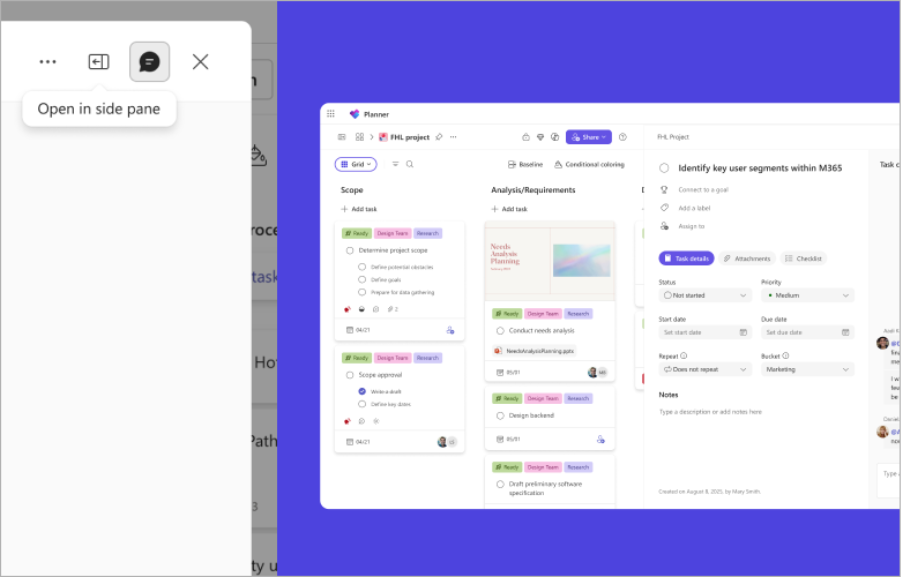
Screenshot – The “Open in side pane” tooltip on a task details dialog, with the Planner Grid view visible behind it.
[Action Required/Recommendations:]
No admin action is required. Recommended actions:
[Compliance considerations:] No compliance considerations identified, review as appropriate for your organization. |
| Machine Translation |
2026年8月3日更新:内容を更新しました。ご辛抱いただきありがとうございます。 [何となぜ:] Microsoft Plannerに新しいタスク詳細のサイドペインを導入し、ユーザーがボード、グリッド、マイタスクのビューから離れずにタスクの詳細を閲覧・編集できるようにします。このアップデートはコンテキスト切り替えを減らし、より高速なタスク更新を可能にすることで生産性を向上させます。 このメッセージはMicrosoft 365ロードマップID 566866に関連付けられています。 [展開スケジュール:] 一般向け可用性(世界展開):2026年7月下旬に展開開始;2026年8月中旬までに完了予定です [組織への影響:] 影響を受ける対象: Microsoft Plannerにアクセスできるすべてのユーザー プラットフォーム/サービス:
今後の展開:
スクリーンショット – タスク詳細ダイアログの「サイドペインで開く」ツールチップで、その背後にプランナーグリッドビューが表示されます。
[必要な行動/推奨事項:]
管理者の対応は不要です。 推奨される行動:
[コンプライアンス上の考慮事項:] コンプライアンス上の懸念事項は特定されず、組織に応じてレビューしてください。 |