| Message Content |
[What and Why]
Microsoft Teams is introducing a new capability that allows admins to configure mandatory pre-meeting consent for participants. This feature helps organizations meet compliance and regulatory requirements by ensuring attendees acknowledge custom terms or disclaimers before joining meetings, such as recording notices or responsible AI usage guidelines. Consent acknowledgments are recorded in audit logs to support governance, investigations, and transparency.
This message is associated with Microsoft 365 Roadmap ID 561914.
[Rollout Schedule]
General Availability
- Targeted Release: Beginning in September 2026
- Worldwide and GCC: Beginning in mid-October 2026 and expected to complete by mid-November 2026
- GCC High, and DoD: Beginning in mid-November 2026 and expected to complete by mid-December 2026
[Impact on Your Organization]
Who is affected
- Admins managing Microsoft Teams policies and all meeting participants, including organizers, in organizations that enable this feature
Platforms/Services
- Microsoft Teams
- Teams Admin Center
- Audit logs
What will happen
- Admins can configure a mandatory pre-meeting consent experience in Teams admin center:

- Custom content such as disclaimers, terms and conditions, or compliance notices can be defined:
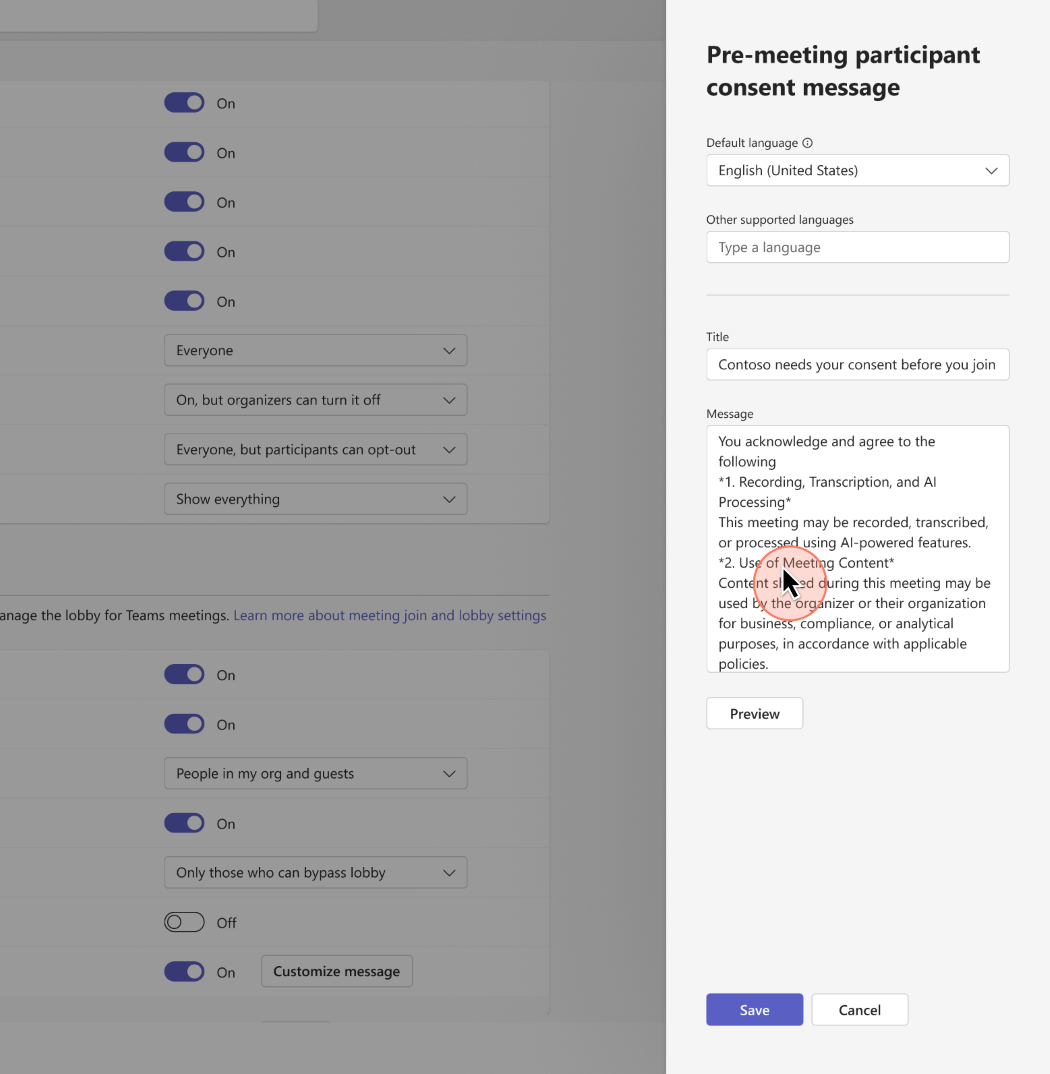
- Admins can preview how consent content will appear to participants before enabling:
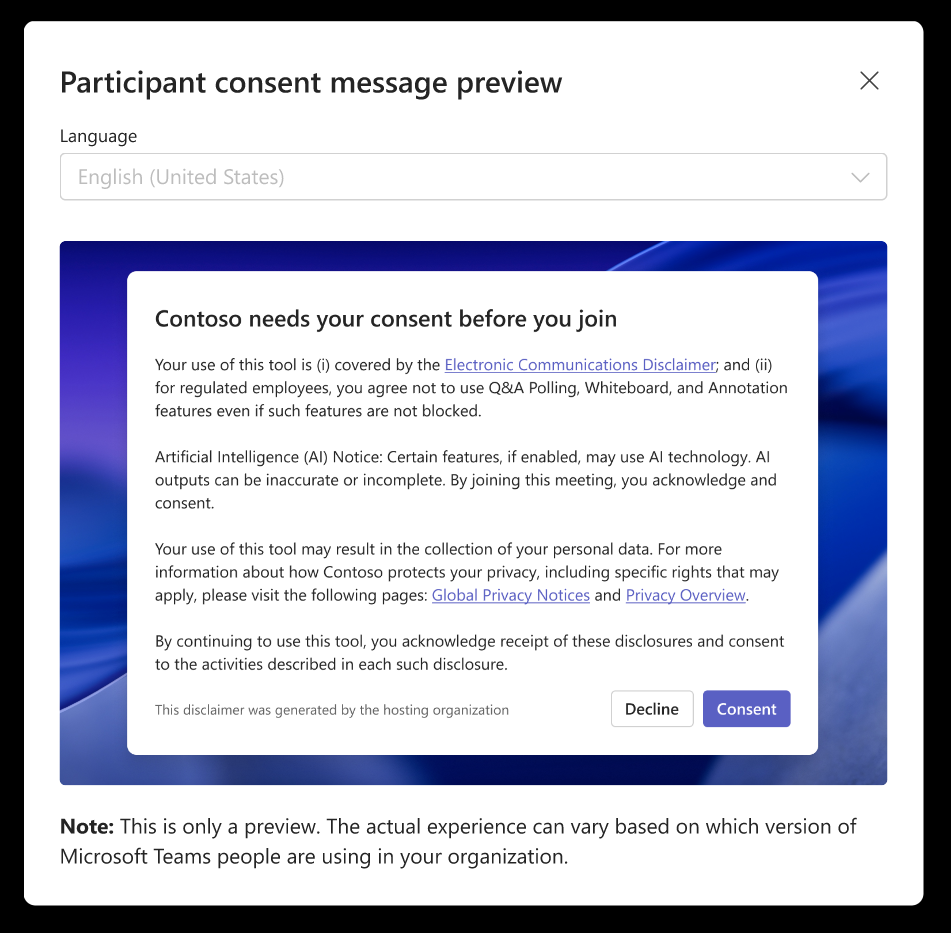
- All meeting participants—including organizers, internal users, external users, and anonymous attendees—must accept the configured consent before joining meetings where the policy is enabled.
- Meeting organizers are not exempt from the policy and must also accept the consent experience when joining meetings governed by the configured policy.
- The feature is disabled by default and requires admin configuration:
- Admins can configure one default language and up to four additional languages:
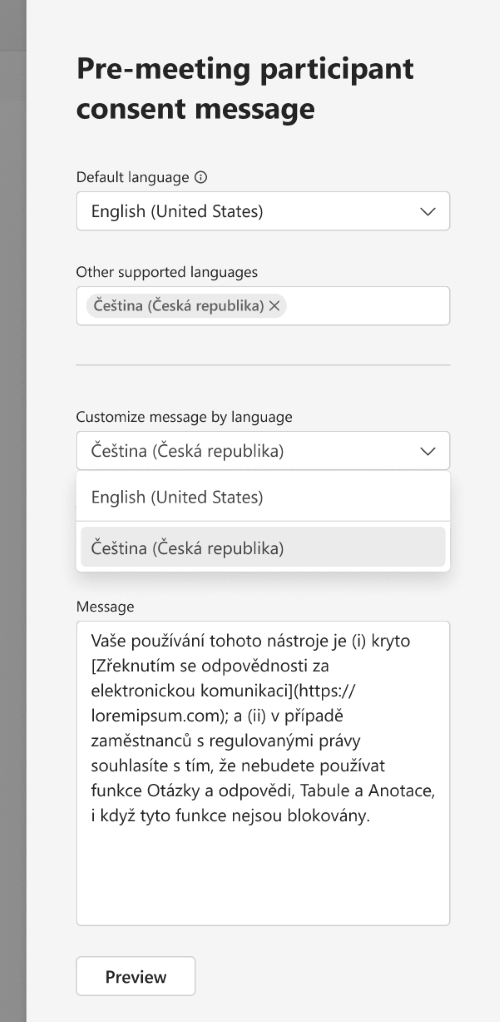
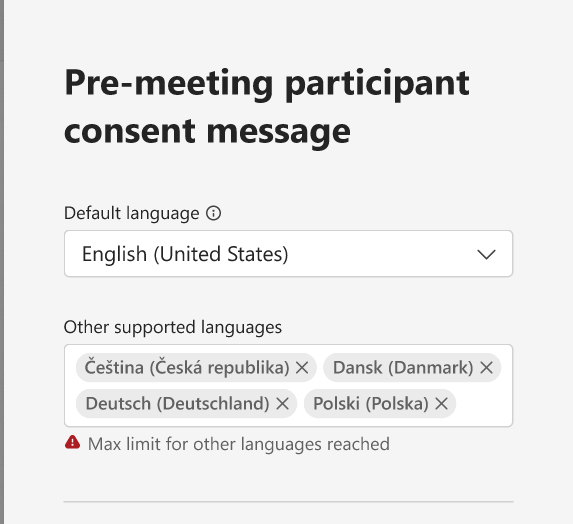
- Participants see consent content based on their device language settings; if unavailable, the default language is shown.
- User consent is recorded in audit logs for compliance and reporting purposes.
- No impact to users or meetings unless the feature is enabled by admins.
[Action Required/Recommendations]
No action is required if you do not plan to use this feature.
If you plan to enable this capability:
- Review compliance and legal requirements for your organization.
- Configure pre-meeting consent policies in Teams admin center.
- Define, validate, and preview consent messaging across supported languages.
- Communicate this change to users so that they understand the new meeting join requirement.
- Update internal documentation and helpdesk guidance as needed.
Learn more
Supporting Learn documentation is expected closer to General Availability rollout.
[Compliance considerations]
| Question |
Answer |
| Does the change store new customer data? |
Yes. Participant consent acknowledgments are stored in audit logs for compliance and auditing purposes. |
| Does the change alter admin monitoring or reporting? |
Yes. Adds visibility into participant consent via audit logs, enhancing compliance monitoring. |
| Does the change include an admin control? |
Yes. Admins can enable and configure the feature in Teams admin center. |
|
| Machine Translation |
【何となぜ】
Microsoft Teamsは、管理者が参加者に対して必須の事前会議同意を設定できる新機能を導入します。この機能は、参加者が会議に参加前に通知の記録や責任あるAI使用ガイドラインなどのカスタム用語や免責事項を必ず確認することで、組織がコンプライアンスや規制要件を満たすのに役立ちます。同意確認は監査ログに記録され、ガバナンス、調査、透明性を支援します。
このメッセージはMicrosoft 365ロードマップID 561914に関連付けられています。
[展開スケジュール]
一般提供状況
- リリース予定: 2026年9月から開始
- 世界およびGCC: 2026年10月 中旬から始まり、2026年11月 中旬までに 完了する予定です
- GCCハイと国防総省:2026年11月中旬に開始し、2026年12月中旬までに完了予定です
[組織への影響]
影響を受ける人物
- 管理者がMicrosoft Teamsのポリシーを管理し、この機能を有効にする組織内のすべての会議参加者(主催者を含む)を管理しています
プラットフォーム/サービス
- Microsoft Teams
- Teams管理センター
- 監査ログ
何が起こるのか
- 管理者はTeams管理センターで必須の事前会議同意体験を設定できます :
- 免責事項、利用規約、遵守通知などのカスタムコンテンツは定義可能です:
- 管理者は、以下を有効にする前に同意コンテンツがどのように参加者に表示されるかをプレビューできます:
- すべての会議参加者( 主催者、内部ユーザー、外部ユーザー、匿名参加者を含む)は、ポリシーが有効な会議に参加する前に、設定された同意を受け入れなければなりません。
- 会議主催者はこの方針から免除されず、設定されたポリシーに基づく会議に参加する際には同意体験を受け入れなければなりません。
- この機能は デフォルトで無効化されており、管理者設定が必要です:
- 管理者はデフォルト言語を1つ設定し、さらに最大4言語まで設定できます:
- 参加者はデバイスの言語設定に基づいて同意コンテンツを確認できます。利用できない場合は、デフォルトの言語が表示されます。
- ユーザーの同意はコンプライアンスおよび報告目的で 監査ログ に記録されます。
- 管理者が有効化していない限り、ユーザーや会議には影響がありません。
[行動が必要/提言]
この機能を使う予定がない場合は、何の対応も必要ありません。
この機能を有効にする予定がある場合:
- 組織のコンプライアンスおよび法的要件をレビューしてください。
- Teams管理センターで事前会議同意ポリシーを設定してください。
- サポート言語間で同意メッセージを定義、検証、プレビューできます。
- この変更をユーザーに伝え、新しいミーティング参加要件を理解してもらう。
- 必要に応じて内部ドキュメントやヘルプデスクのガイダンスを更新してください。
詳しくはこちら
サポート・ラーンのドキュメントは、一般公開開始が近づくにつれて期待されています。
[コンプライアンスの考慮事項]
| 質問 |
回答 |
| 変更は新しい顧客データを保存しますか? |
はい。参加者の同意確認は、コンプライアンスおよび監査目的のために監査ログに保存されます。 |
| この変更は管理者の監視や報告に影響を与えますか? |
はい。監査ログを通じて参加者の同意を可視化し、コンプライアンス監視を強化します。 |
| 変更には管理者管理も含まれていますか? |
はい。管理者は Teams管理センターでこの機能を有効化・設定できます。 |
|