| MC1423118 | (Updated) OneDrive for the web: Document library views now available in OneDrive |
|---|
| Classification | stayInformed |
|---|---|
| Last Updated | 08/20/2026 18:53:30 |
| Start Time | 07/10/2026 22:54:17 |
| End Time | 09/28/2026 07:00:00 |
| Message Content |
Updated August 20, 2026: We have updated the timeline. Thank you for your patience. [What and Why:] We’re enhancing the OneDrive experience by enabling users to access and manage SharePoint document library views directly within OneDrive. This update improves team productivity by allowing users to organize, filter, and view shared content without switching between services. By bringing familiar SharePoint capabilities into OneDrive, Microsoft is streamlining workflows and helping teams surface the most relevant information faster. This message is associated with Roadmap ID 566313. [Rollout Schedule:]
[Impact on Your Organization:]
Who is affected: All users who access SharePoint document libraries through OneDrive Platforms/Services:
What will happen:
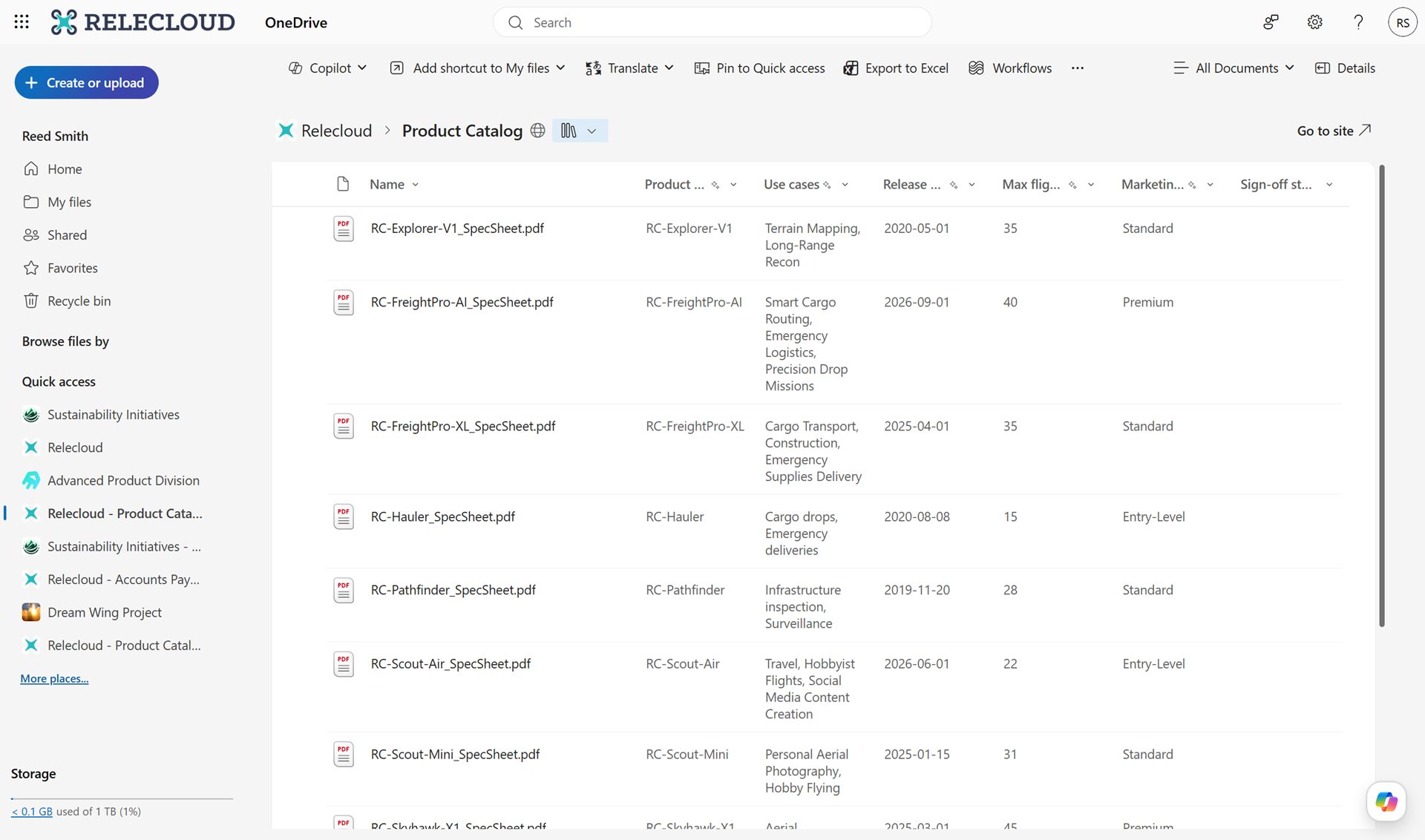
Screenshot 1: Users will continue to see the default view when they initially navigate to a Document Library in OneDrive:
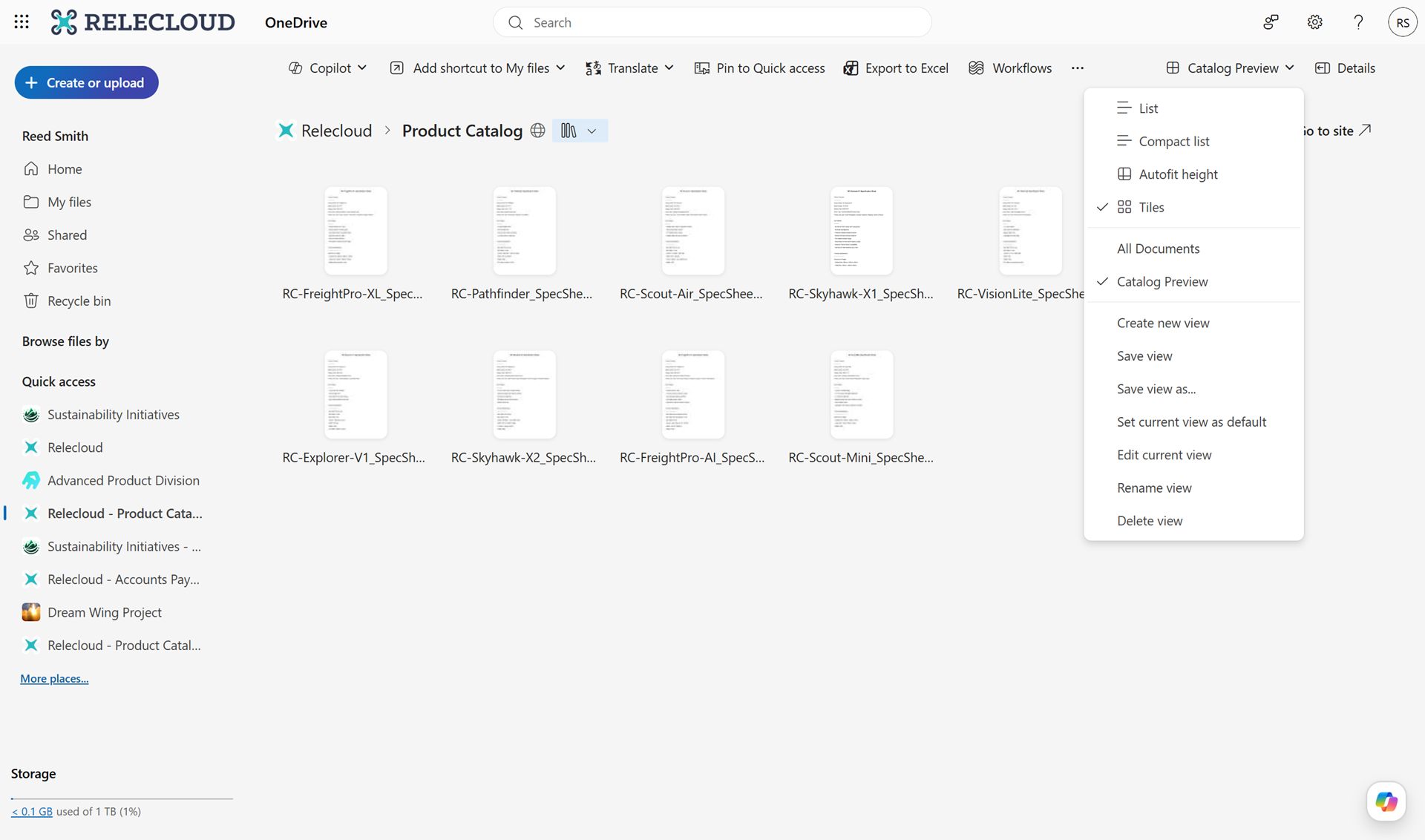
Screenshot 2: Users can now switch between views or create custom views in their Document Libraries in OneDrive:
[Action Required/Recommendations:]
No action is required However, you may consider the following:
[Compliance considerations:] No compliance concerns beyond changes to how users view and access existing data. |
| Machine Translation |
2026年8月20日更新:タイムラインを更新しました。ご辛抱いただきありがとうございます。 [何となぜ:] OneDrive内でユーザーが SharePointドキュメントライブラリビューに直接アクセス・管理できるようにすることで、OneDriveの体験を向上させています。このアップデートにより、ユーザーがサービスを切り替えることなく共有コンテンツを整理・フィルタリング・閲覧できるようになり、チームの生産性が向上します。Microsoftは、慣れ親しんだSharePoint機能をOneDriveに取り入れることで、ワークフローを効率化し、チームが最も関連性の高い情報をより早く獲得できるよう支援しています。 このメッセージはロードマップID 566313に関連付けられています。 [展開スケジュール:]
[組織への影響:]
影響を受ける人: OneDriveを通じてSharePointドキュメントライブラリにアクセスするすべてのユーザー プラットフォーム/サービス:
今後の展開:
スクリーンショット1: ユーザーはOneDriveのドキュメントライブラリに初めて移動してもデフォルトのビューを引き続き見ることができます:
スクリーンショット2: ユーザーはOneDriveのドキュメントライブラリ内でビューを切り替えたり、カスタムビューを作成したりできます:
[必要な行動/推奨事項:]
何の対応も必要ありません しかし、以下の点を考慮することができます。
[コンプライアンス上の考慮事項:] ユーザーが既存データの閲覧やアクセス方法を変更する以外、コンプライアンス上の懸念はありません。 |