| MC1458470 | Simplified Copilot experience in Microsoft Outlook |
|---|
| Classification | stayInformed |
|---|---|
| Last Updated | 08/21/2026 00:35:50 |
| Start Time | 08/21/2026 00:35:32 |
| End Time | 11/02/2026 08:00:00 |
| Message Content |
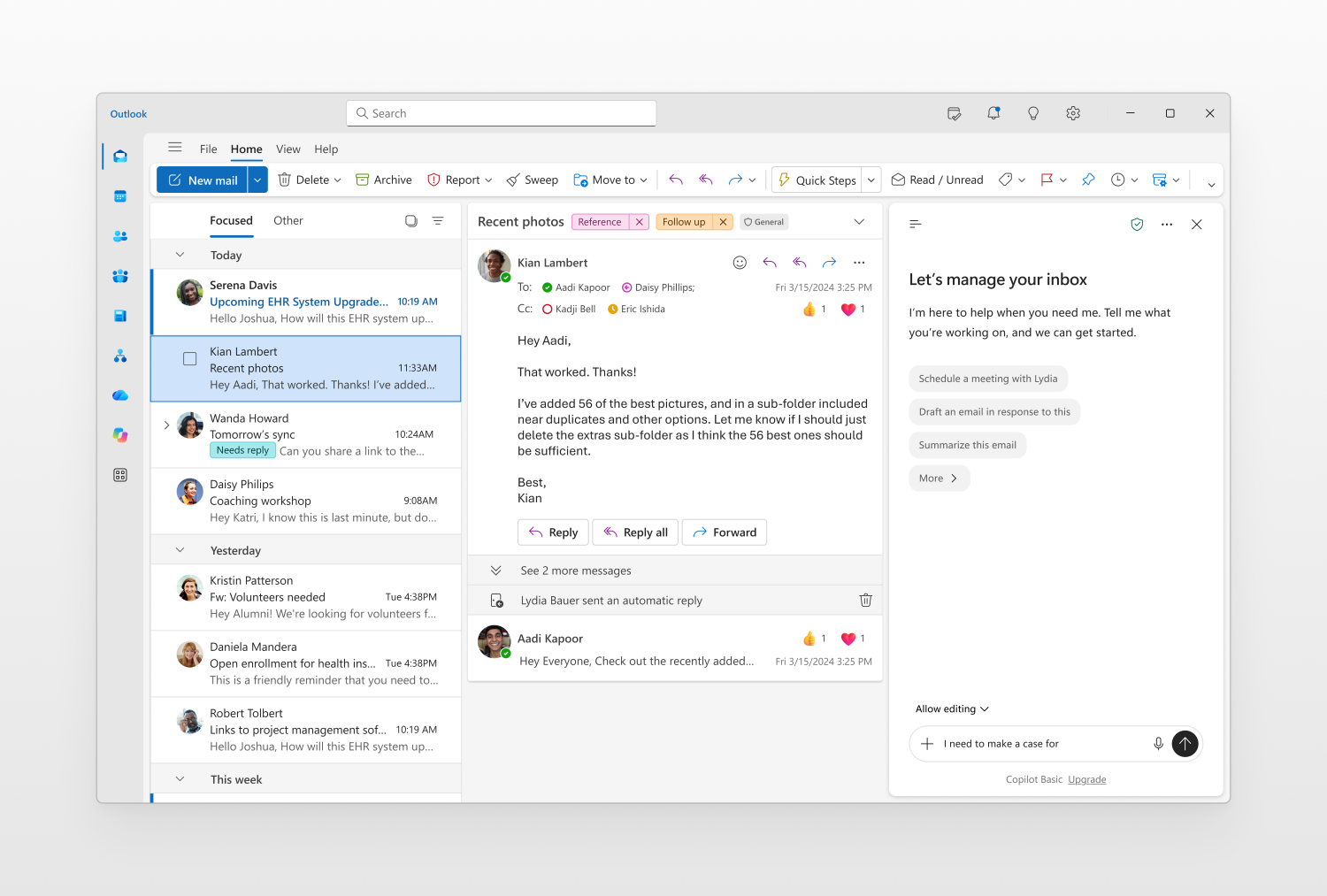
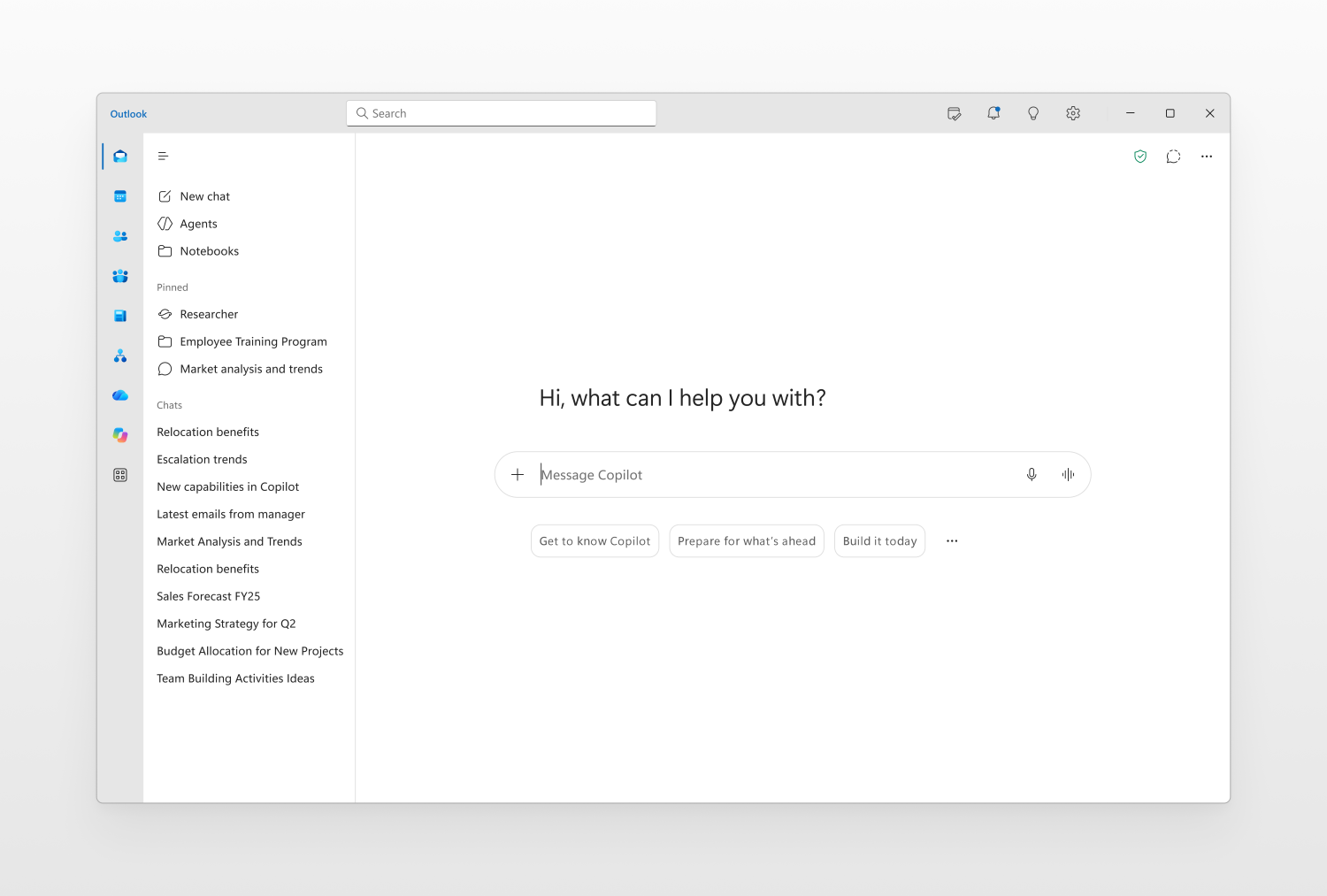
[What and Why:] Continuing our efforts to streamline the user experience in the Copilot app as shared in MC1325422, we are introducing updates to the Copilot experiences in Microsoft Outlook that deliver a similar, chat-centered experience. These updates simplify navigation, improve the chat experience, and provide new ways for users to organize work—helping them stay focused, maintain context, and move work forward efficiently. The refreshed design will be available in both the full-page Copilot experience in Outlook and the Copilot side pane experience throughout Outlook. The full-screen Copilot experience will closely mirror the recent updates in the Copilot app, while the side pane experience will receive a refreshed design optimized for contextual Copilot interactions within Outlook. [Rollout Schedule:] Generally available: September 2026. [Impact on your organization:] Users will see a refreshed Copilot experience in Microsoft Outlook that aligns with the updated, chat-centered experience available in the Copilot app. The update applies to both the full-page Copilot experience in Outlook and the Copilot side pane experience. The refreshed experience includes simplified navigation, an updated chat layout, improved agent discovery and interaction, and the introduction of Work IQ controls. Users of the full-screen Copilot experience in Outlook will also see the new Tasks view, which provides visibility into long-running Copilot activities such as agent activity and scheduled chats. The side pane experience will receive the updated design and chat experience but will not include the Tasks view. This change is enabled by default as part of the service update and does not require user or administrator action. There are no changes to licensing, permissions, or existing compliance controls.
[Action Required / Recommendations:] No action is required to enable this change. To prepare for the rollout, administrators should:
This update will be enabled automatically and will not require configuration changes by administrators. |
| Machine Translation |
[何となぜ:] MC1325422で共有したCopilotアプリのユーザー体験の効率化を継続し、Microsoft OutlookのCopilot体験にも同様のチャット中心のアップデートを導入します。これらのアップデートはナビゲーションを簡素化し、チャット体験を向上させ、ユーザーが作業を整理する新たな方法を提供し、集中力を維持し、コンテキストを維持し、効率的に作業を進めるのに役立ちます。刷新されたデザインは、Outlookの全ページのCopilot体験とOutlook全体のCopilotサイドペインの両方で利用可能になります。フルスクリーンのCopilot体験はCopilotアプリの最近のアップデートとほぼ一致し、サイドペイン体験はOutlook内の文脈的なCopilot操作に最適化されたリフレッシュデザインを受けます。 [展開スケジュール:] 一般公開:2026年9月。 [組織への影響:] ユーザーはMicrosoft Outlookで、Copilotアプリで提供されているチャット中心のアップデートされた体験と整合したリフレッシュされたCopilot体験を目にします。このアップデートはOutlookの全ページのCopilot体験と、Copilotのサイドペインの両方に適用されます。 刷新された体験には、簡素化されたナビゲーション、更新されたチャットレイアウト、エージェントの発見とインタラクションの改善、そしてWork IQコントロールの導入が含まれます。Outlookの全画面Copilot体験のユーザーは、エージェントの活動やスケジュールされたチャットなど、長期間続いているCopilotの活動を閲覧できる新しいタスクビューも確認できます。サイドペインの体験には更新されたデザインとチャット体験が提供されますが、タスクビューは含まれません。 この変更はサービスアップデートの一環としてデフォルトで有効化されており、ユーザーや管理者の操作は必要ありません。ライセンス、権限、既存のコンプライアンス管理に変更はありません。
[行動が必要/推奨事項:] この変更を可能にするためには何の行動も必要ありません。 導入に備えるため、管理者は以下のことをすべきです:
このアップデートは自動的に有効化され、管理者による設定変更は必要ありません。 |