| MC552782 | (Updated) Microsoft Teams: Default Meeting Layout Controls for Teams Rooms on Android |
|---|
| Classification | stayInformed |
|---|---|
| Last Updated | 06/24/2023 07:16:36 |
| Start Time | 05/10/2023 00:00:38 |
| End Time | 09/04/2023 07:00:00 |
| Message Content |
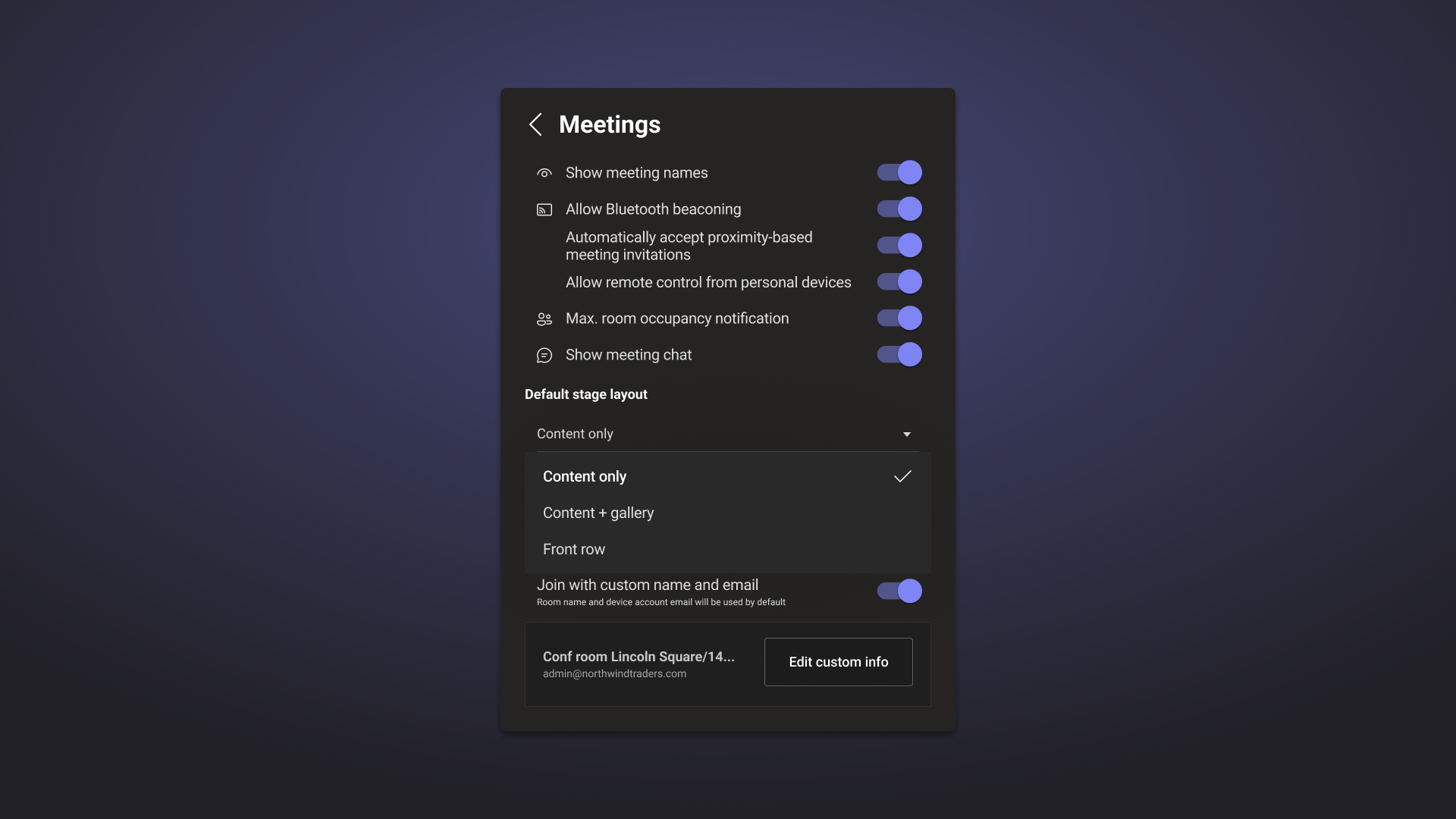
Updated June 7, 2023: We have updated the rollout timeline below. Thank you for your patience. Microsoft Teams Rooms on Android IT admins can choose the default meeting layout. When a meeting begins, room users will see the default meeting layout. They can switch to other views using the view switcher during a meeting. This message is associated with Microsoft 365 Roadmap ID 121663 [When this will happen:] We will begin rolling out in late-June (previously mid-June) and expect to complete by late-July (previously mid-July). Note: There can be a delay between when features are released by Microsoft and when they become available on a device make and model. If an update isn’t available on your device, check with your device manufacturer for information on the availability timeline. [How this will affect your organization:] IT admins can choose the default meeting layout by selecting Content only and Content + Gallery when content sharing begins. Standard, Premium, and Pro customers can also choose Front Row as the default layout.
[What you need to do to prepare:]
Please plan on updating all Microsoft Teams Rooms on Android in your tenant to the latest version through the Teams Admin Center. Once devices are updated, you can control new functionalities through the device settings and notify your users about these new capabilities and update your training and documentation as appropriate.
|
| Machine Translation |
2023 年 6 月 7 日更新: 以下のロールアウトのタイムラインを更新しました。お待ちいただきありがとうございます。 Android の Microsoft Teams ルーム IT 管理者は、既定の会議レイアウトを選択できます。ミーティングが開始されると、ルーム ユーザーにはデフォルトのミーティング レイアウトが表示されます。ミーティング中にビュースイッチャーを使用して他のビューに切り替えることができます。 このメッセージは、Microsoft 365 ロードマップ ID に関連付けられています121663 [これが起こるとき:] ロールアウトは 6 月下旬 (以前は 6 月中旬) に開始され、7 月下旬 (以前は 7 月中旬) までに完了する予定です。 注: Microsoft によって機能がリリースされてから、デバイスの製造元とモデルで利用可能になるまでの間に遅延が生じる場合があります。デバイスで更新プログラムが利用できない場合は、デバイスの製造元に問い合わせて、提供タイムラインを確認してください。 [これが組織に与える影響:] IT 管理者は、コンテンツ共有の開始時に [コンテンツ のみ ] と [コンテンツ + ギャラリー ] を選択することで、既定の会議レイアウトを選択できます。標準、プレミアム、および Pro のお客様は、既定のレイアウトとして フロント ロウ を選択することもできます。
[準備するために必要なこと:]
Teams 管理センターを使用して、テナント内の Android 上のすべてのMicrosoft Teamsルームを最新バージョンに更新することを計画してください。デバイスが更新されたら、デバイス設定を使用して新しい機能を制御し、これらの新機能についてユーザーに通知し、必要に応じてトレーニングとドキュメントを更新できます。
|