| MC540242 | (Updated) Video Messaging in Outlook Mobile |
|---|
| Classification | stayInformed |
|---|---|
| Last Updated | 06/30/2023 15:38:11 |
| Start Time | 04/11/2023 23:28:06 |
| End Time | 08/07/2023 07:00:00 |
| Message Content |
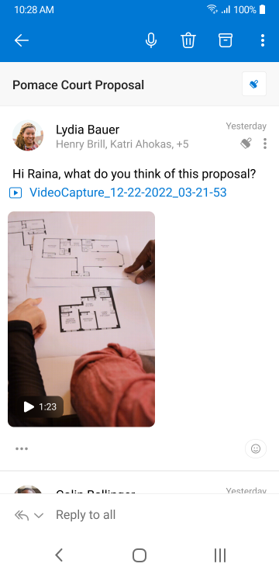
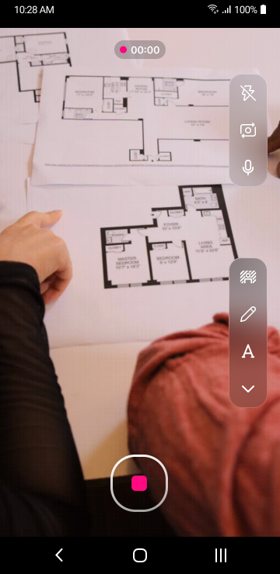
Updated June 30, 2023: We have updated the rollout timeline below. Thank you for your patience. Video Unfurl and Playback will unfurl video links into a delightful thumbnail when reading an email that contains a video. Upon tapping the thumbnail, the user will be able to view the video in their full mobile screen with full screen playback. Video Unfurl and Playback will be available on both iOS and Android soon. We’re also introducing Video Capture and Upload on Android: this will allow users to capture a video on their phone within the Outlook Mobile app and seamlessly upload the video to the email being composed. Upload will leverage OneDrive for Business, allowing the user to share videos of large size and length with OneDrive.
This message is associated with Microsoft 365 Roadmap ID 117588 and 117586 [When this will happen:] This rollout is underway and expected to complete by early July (previously late June). [How this will affect your organization:] Admin/tenant controls will be available for Video Capture/Upload. Video Unfurl and Playback Video Capture and Upload on Android
[What you need to do to prepare:]
You may consider updating your training and documentation as appropriate.
|
| Machine Translation |
2023 年 6 月 30 日更新: 以下のロールアウトのタイムラインを更新しました。お待ちいただきありがとうございます。 ビデオの展開と再生は、ビデオリンクを楽しいサムネイルに展開しますか?ビデオを含む電子メールを読むとき。サムネイルをタップすると、ユーザーはフルスクリーン再生でフルモバイルスクリーンでビデオを見ることができます。ビデオの展開と再生は、iOSとAndroidの両方でまもなく利用できるようになります。 また、Android での ビデオ キャプチャと アップロードも導入されています: これにより、ユーザーは Outlook Mobile アプリ内で携帯電話でビデオをキャプチャし、作成中の電子メールにビデオをシームレスにアップロードできます。アップロードでは OneDrive for Business が活用され、ユーザーは大きなサイズと長さのビデオを OneDrive と共有できます。
このメッセージは、Microsoft 365 ロードマップ ID 117588 と117586に関連付けられています。 [これが起こるとき:] このロールアウトは進行中であり、7 月上旬 (以前は 6 月下旬) までに完了する予定です。 [これが組織に与える影響:] 管理者/テナント コントロールは、ビデオ キャプチャ/アップロードで使用できます。 ビデオの展開と再生 Androidでのビデオキャプチャとアップロード
[準備するために必要なこと:]
必要に応じて、トレーニングとドキュメントを更新することを検討してください。
|