| MC609888 | (Updated) Removal of access to Sections view in Outlook Mobile Feed |
|---|
| Classification | planForChange |
|---|---|
| Last Updated | 07/07/2023 20:09:59 |
| Start Time | 06/27/2023 00:00:13 |
| End Time | 09/25/2023 07:00:00 |
| Message Content |
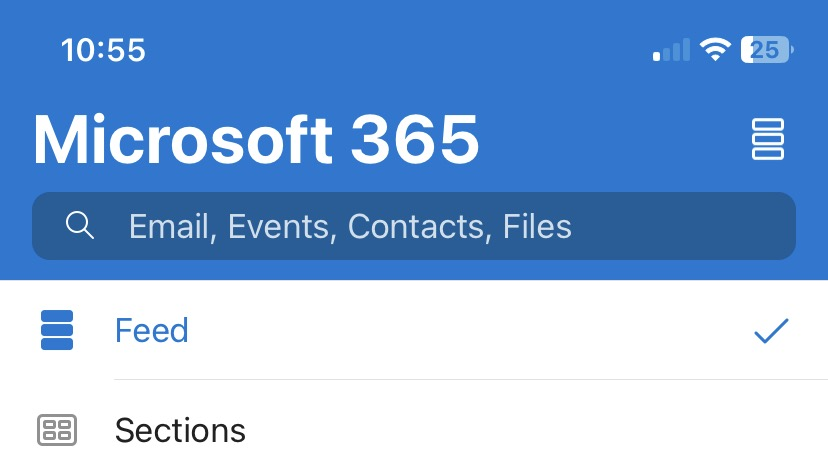
Updated July 7, 2023: We have updated the rollout timeline below. Thank you for your patience. We will be removing the toggle that switches between the Feed and the sections view in the Outlook Mobile Feed.
[When this will happen:] This change is planned to begin rolling out mid-July (previously late June) and be complete by mid-August (previously late July). [How this affects your organization:]
For users: The Feed in Outlook Mobile is a view of the Microsoft 365 ecosystem that aims to consolidate information from different Microsoft products and services into one organized destination for the user. Currently, users have the option to access the old Sections view using the toggle in the upper right-hand corner of the Search page. This change effectively removes this toggle and users will only see the Feed view. The content that was in the sections can be found elsewhere in the Outlook Mobile App. The People section is accessible from the Feed tab, the Upcoming section has been integrated into the Feed as Meeting insights. The Received and Sent Files section and the To Do section can be accessed through the Files and To Do apps in the Apps vertical in Outlook Mobile. Much of the content from these sections has also been incorporated into the Feed. For admins: Admins can turn on and off the Microsoft Feed feature through the existing Discover feature in MDM. This means they can deploy app settings to the devices in the tenant. More details and instructions can be found in the documentation Deploying Outlook for iOS and Android app configuration settings in Exchange Online. When users have turned off the Discover feature through MDM, the Feed will be replaced by the old Sections view with no toggle to turn on the Feed view. [What you need to do to prepare:] To prepare for this update, please read the updated Outlook Mobile Support Documentation. Admins may want to notify your users about this change and update your training and documentation as appropriate.
|
| Machine Translation |
2023 年 7 月 7 日更新: 以下のロールアウトのタイムラインを更新しました。お待ちいただきありがとうございます。 Outlookモバイルフィードのフィードビューとセクションビューを切り替えるトグルを削除します。
[これが起こるとき:] この変更は、7月中旬(以前は6月下旬)にロールアウトを開始し、8月中旬(以前は7月下旬)までに完了する予定です。 [これが組織に与える影響:]
ユーザーの場合: Outlook Mobile のフィードは、さまざまなマイクロソフト製品およびサービスからの情報をユーザー向けの 1 つの整理された宛先 に統合することを目的とした Microsoft 365 エコシステムのビューです。 現在、ユーザーは [検索] ページの右上隅にあるトグルを使用して、古いセクション ビューにアクセスできます。この変更により、このトグルは事実上削除され、ユーザーにはフィードビューのみが表示されます。 セクションにあったコンテンツは、Outlook モバイル アプリの他の場所にあります。[ユーザー] セクションには [フィード] タブからアクセスでき、[今後の予定] セクションは [会議の分析情報としてフィード] に統合されました。[送受信されたファイル] セクションと [To Do] セクションには、Outlook Mobile の [アプリ] バーティカルにある [ファイル] アプリと [To Do] アプリからアクセスできます。これらのセクションのコンテンツの多くは、フィードにも組み込まれています。 管理者向け: 管理者は、MDM の既存の検出機能を使用して、Microsoft フィード機能のオンとオフを切り替えることができます。 つまり、テナント内のデバイスにアプリ設定を展開できます。詳細と手順については、ドキュメント 「Exchange Online での iOS および Android アプリの構成設定の展開」を参照してください。 ユーザーがMDMを介して検出機能をオフにした場合、フィードは古いセクションビューに置き換えられ、フィードビューをオンにするトグルはありません。 [準備するために必要なこと:] この更新プログラムを準備するには、更新された Outlook モバイル サポート ドキュメントをお読みください。管理者は、この変更についてユーザーに通知し、必要に応じてトレーニングとドキュメントを更新することができます。
|