| MC565166 | (Updated) Handwriting Beautification and Ink Straightening for Microsoft Whiteboard |
|---|
| Classification | stayInformed |
|---|---|
| Last Updated | 07/13/2023 23:23:54 |
| Start Time | 05/31/2023 23:09:22 |
| End Time | 09/04/2023 07:00:00 |
| Message Content |
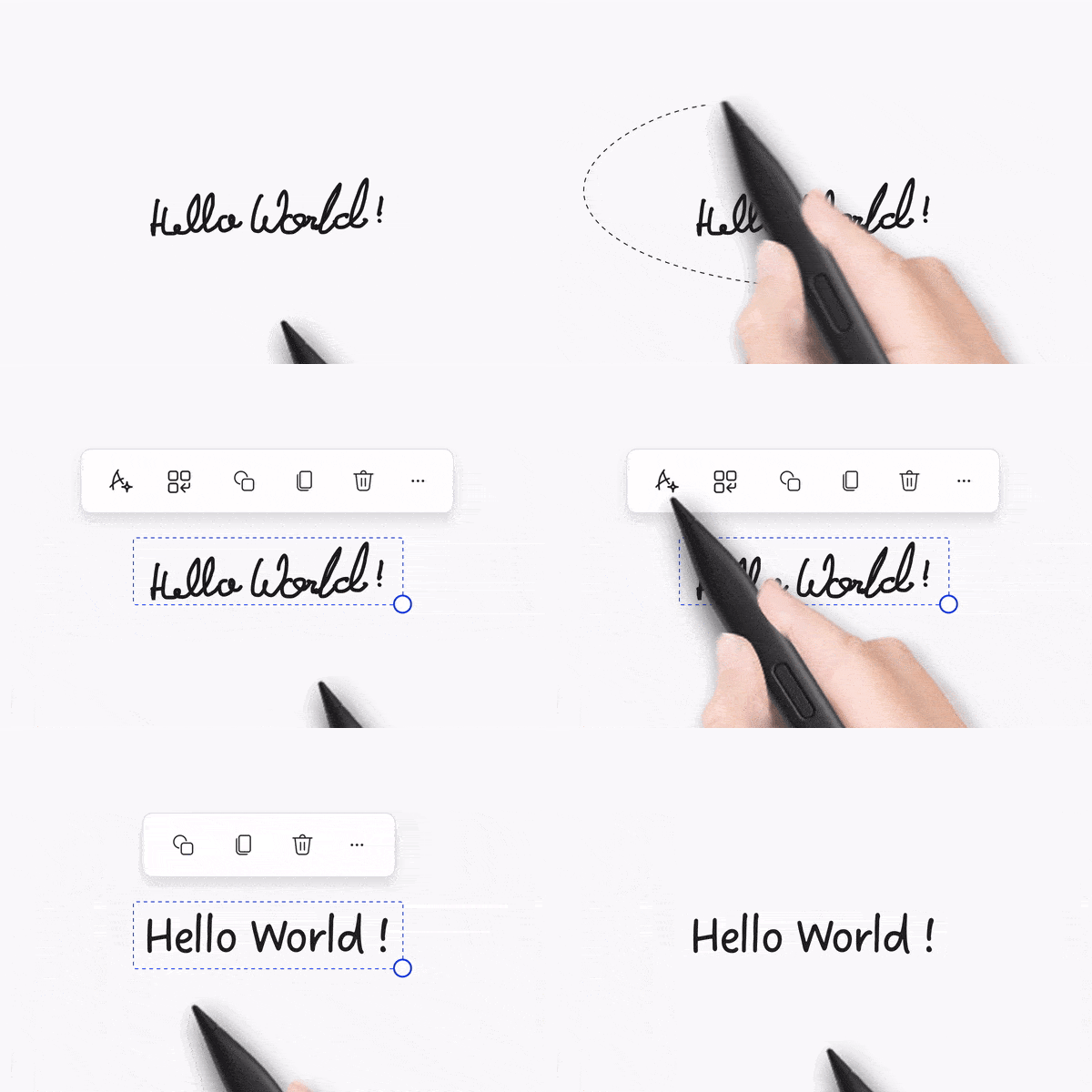
Updated July 13, 2023: We have updated the rollout timeline below. Thank you for your patience. The ability to make handwriting more legible & readable is coming to Whiteboard for the web, Microsoft Teams, Windows app and Surface Hubs/MTR experiences as well as Annotations in Teams meetings. The new capability will enable smoother collaboration while using ink.
This message is associated with Microsoft 365 Roadmap ID 124897 [When this will happen:] Rollout will begin in late June (previously early June) and is expected to be complete by late July (previously early July). [How this will affect your organization:] This service can be controlled by the optional connected experiences policy, which controls whether users have access to the functionality. Today this policy applies to the ability to see a link in Whiteboard where users can provide feedback using Microsoft’s Feedback portal, ability to add images via Bing Search and insert hyperlinks and embed videos in whiteboards with an unfurled preview.
[What you need to do to prepare:]
No change is necessary, unless you wish to disable the Handwriting Beautification & Ink Straightening functionalities (and other optional connected experiences) in Whiteboard. To do this, you can use the Office cloud policy service in the Microsoft 365 Apps admin center.
|
| Machine Translation |
2023 年 7 月 13 日更新: 以下のロ`ルアウトのタイムラインを更新しました。お待ちいただきありがとうございます。 手颏瑜暾iみやすくiみやすくするC能は、Web、Microsoft Teams、Windowsアプリ、Surface Hubs/MTRエクスペリエンスのホワイトボ`ド、およびTeams会hの注に登訾筏蓼埂¥长涡C能により、インクの使用中によりスム`ズなコラボレ`ションが可能になります。
このメッセ`ジは、Microsoft 365 ロ`ドマップ ID にvB付けられています124897 [これが起こるとき:] ロ`ルアウトは 6 月下旬 (以前は 6 月上旬) に_始され、7 月下旬 (以前は 7 月上旬) までに完了する予定です。 [これがMに与える影:] このサ`ビスは、ユ`ザ`がC能にアクセスできるかどうかを制御するオプションのコネクテッドエクスペリエンスポリシ`によって制御できます。F在、このポリシ`は、ユ`ザ`がMicrosoftのフィ`ドバックポ`タルを使用してフィ`ドバックを提供できるホワイトボ`ドのリンクを表示するC能、Bing仕鳏蚪椁筏苹瘠蜃芳婴筏匹膝ぅ雪`リンクを啡毪贰⒄归_されたプレビュ`でホワイトボ`ドにビデオを埋めzむC能にm用されます。
[浃工毪郡幛吮匾胜长:]
ホワイトボ`ドの手阑去ぅ螗C正C能(およびその他のオプションの接Aエクスペリエンス)をo郡摔筏郡龊悉虺涓媳匾辘蓼护蟆¥长欷蛐肖Δ摔稀Microsoft 365 アプリ管理センタ`で Office クラウド ポリシ` サ`ビス を使用できます。
|