| MC649938 | Browse files by Meetings in OneDrive |
|---|
| Classification | stayInformed |
|---|---|
| Last Updated | 07/19/2023 23:34:14 |
| Start Time | 07/19/2023 23:34:00 |
| End Time | 12/31/2023 08:00:00 |
| Message Content |
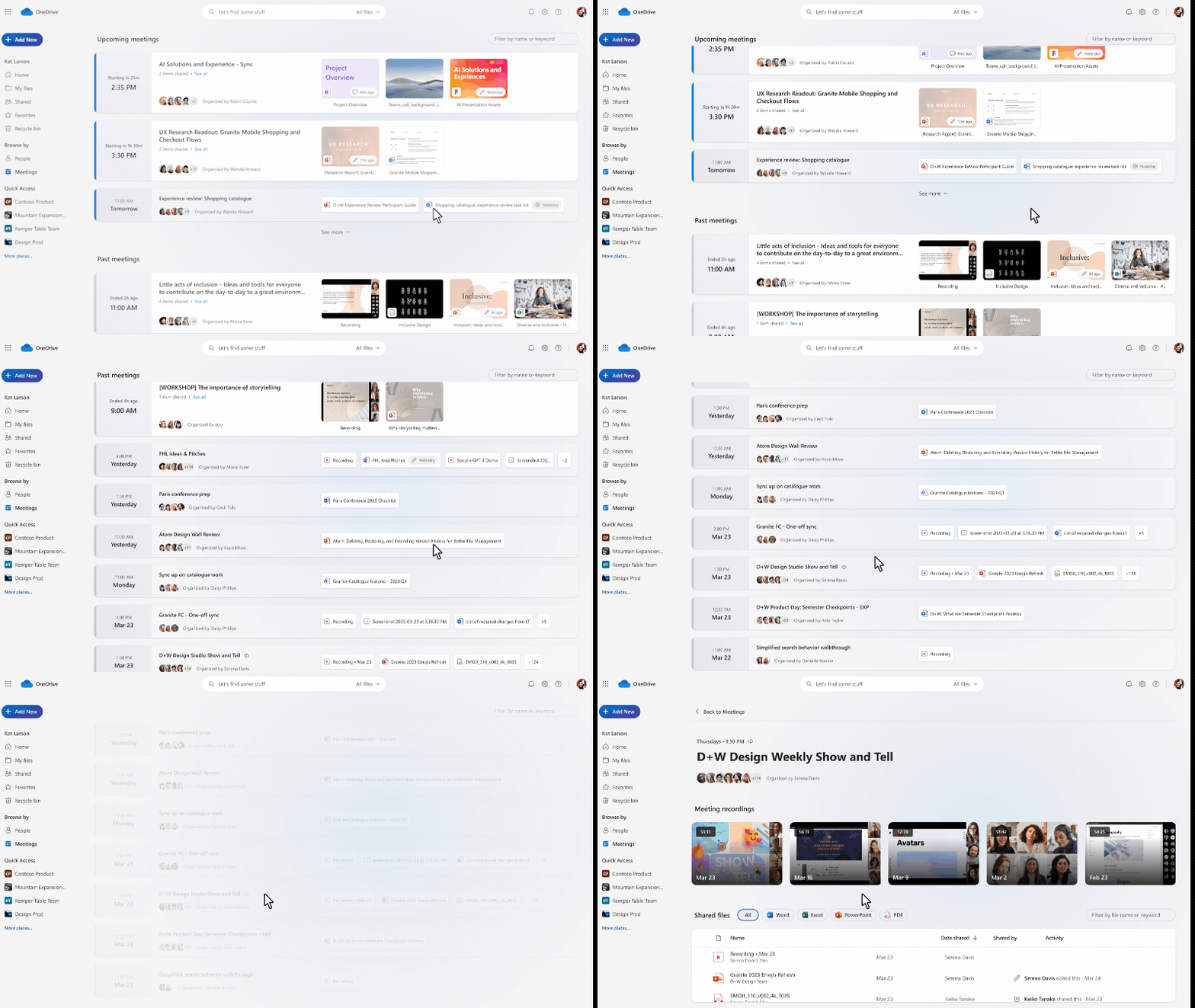
So much of our collaboration happens in the context of meetings, yet how many times have you found yourself trying to scroll back and find a meeting recording from a month ago? Or spent time digging through email to find pre-reading material for an upcoming meeting so you can be prepared going in? With this new meetings view in OneDrive, you’ll be able to get back to all of your meeting content with just a few clicks! When you come to meetings view, you’ll first see any meetings in the next week that you might need to prepare for, followed by a list of meetings that have already occurred. This view brings together all content shared both in meeting invites, meeting chat, and meeting recordings all into one place for easy access! Here you’ll see a recurring meeting with multiple meeting recordings, all laid out sequentially so you can catch up on whatever you missed. Users can get to latest file associated with recurring meetings by searching for the ‘meeting title’. In this version we have the start time of the first instance of a recurring meeting and are working on getting the start time of each instance so that users can see them in the right chronological order instead of only seeing the time of the first instance.
This message is associated with Microsoft 365 Roadmap ID 124885
[When this will happen:] Preview: We will begin rolling out late July and expect to complete by late August. Standard Release: We will begin rolling out late August and expect to complete by early October. [How this will affect your organization:] Users in your organization will be able to see a new view called Meetings under the ‘Browse files by’ section in the left nav in their OneDrive. Users can get to latest file associated with recurring meetings by searching for the ‘meeting title’. In this version we have the start time of the first instance of a recurring meeting and are working on getting the start time of each instance so that users can see them in the right chronological order instead of only seeing the time of the first instance.
[What you need to do to prepare:]
You may consider updating your training and documentation as appropriate. |
| Machine Translation |
私たちのコラボレーションの多くは会議のコンテキストで行われますが、スクロールして1か月前の会議の記録を見つけようとしていることに何回気づきましたか?または、メールを掘り下げて、今後の会議の事前資料を見つけて、準備を整えるのに時間を費やしましたか? OneDrive のこの新しい会議ビューを使用すると、数回クリックするだけですべての会議コンテンツに戻ることができます。会議ビューが表示されると、最初に準備が必要な翌週の会議が表示され、その後に既に行われた会議の一覧が表示されます。 このビューでは、会議の招待状、会議のチャット、会議の記録の両方で共有されているすべてのコンテンツがすべて 1 か所にまとめられ、簡単にアクセスできます。ここでは、複数の会議の記録を含む定期的な会議が表示され、すべてが順番にレイアウトされているため、見逃したものに追いつくことができます。 ユーザーは、「会議のタイトル」を検索することで、定期的な会議に関連付けられている最新のファイルにアクセスできます。このバージョンでは、定期的な会議の最初のインスタンスの開始時刻があり、ユーザーが最初のインスタンスの時刻のみを表示するのではなく、正しい時系列で表示できるように、各インスタンスの開始時刻の取得に取り組んでいます。
このメッセージは、Microsoft 365 ロードマップ ID に関連付けられています124885
[これが起こるとき:] プレビュー: 7 月下旬にロールアウトを開始し、8 月下旬までに完了する予定です。 標準リリース: 8 月下旬にロールアウトを開始し、10 月上旬までに完了する予定です。 [これが組織に与える影響:] 組織内のユーザーは、OneDrive の左側のナビゲーションの [ファイルの参照方法] セクションの下に [会議] という新しいビューを表示できます。 ユーザーは、「会議のタイトル」を検索することで、定期的な会議に関連付けられている最新のファイルにアクセスできます。このバージョンでは、定期的な会議の最初のインスタンスの開始時刻があり、ユーザーが最初のインスタンスの時刻のみを表示するのではなく、正しい時系列で表示できるように、各インスタンスの開始時刻の取得に取り組んでいます。
[準備するために必要なこと:]
必要に応じて、トレーニングとドキュメントを更新することを検討してください。 |