| MC660073 | SharePoint Platform: Visual Refresh |
|---|
| Classification | stayInformed |
|---|---|
| Last Updated | 07/24/2023 22:32:33 |
| Start Time | 07/24/2023 22:32:08 |
| End Time | 09/07/2023 07:00:00 |
| Message Content |
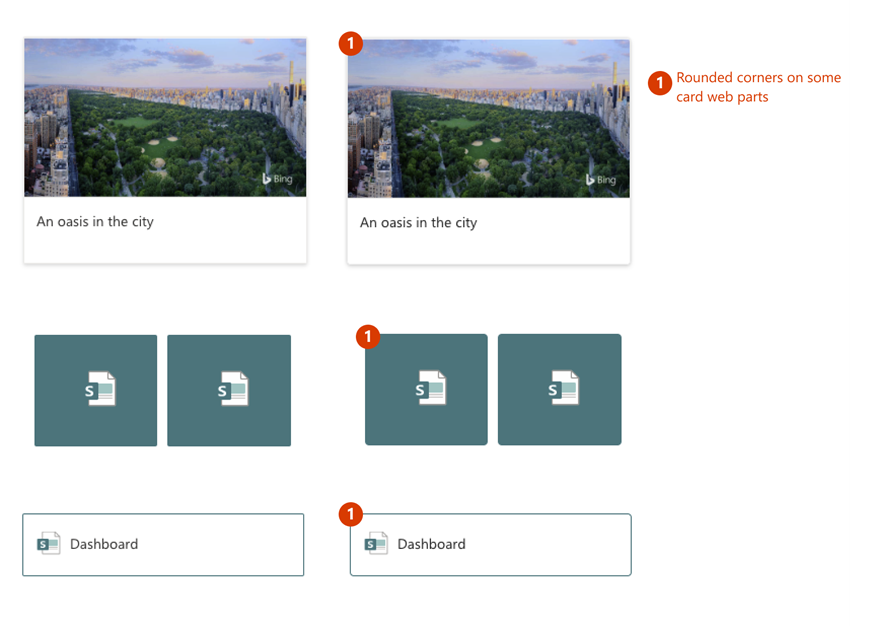
We are introducing updates to the Microsoft Fluent Visual styling of the SharePoint platform that will improve the experience across the SharePoint Authoring Experience and Microsoft Syntex. Aligning with the latest Microsoft Fluent design system principles includes updated icons with softer edges, a cooler grey palette, and more rounded corners on various UI controls. Visual Refresh Details This visual refresh will provide alignment to the latest Microsoft Fluent design framework. These changes are small visual changes that will improve the experience and provide consistency across the Microsoft platform. Below you will find examples of the updates you can expect to see in the different areas. SharePoint: Updates to the Quick Links and Image web parts:
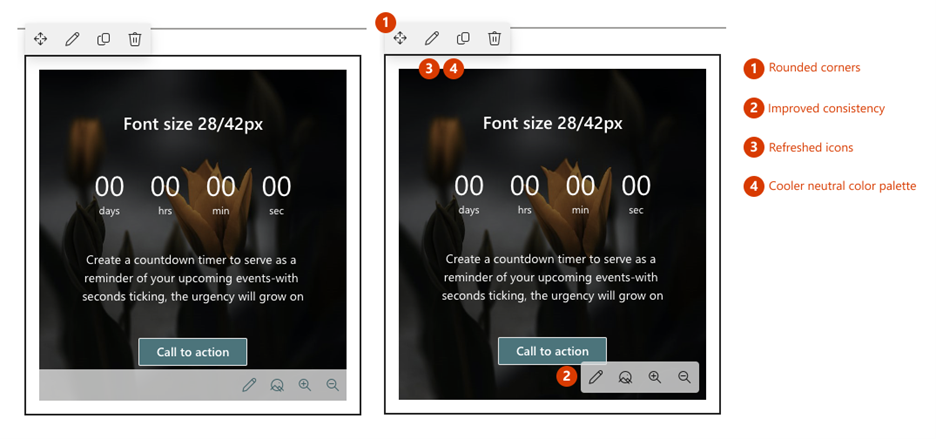
Updates to the web part toolbars:
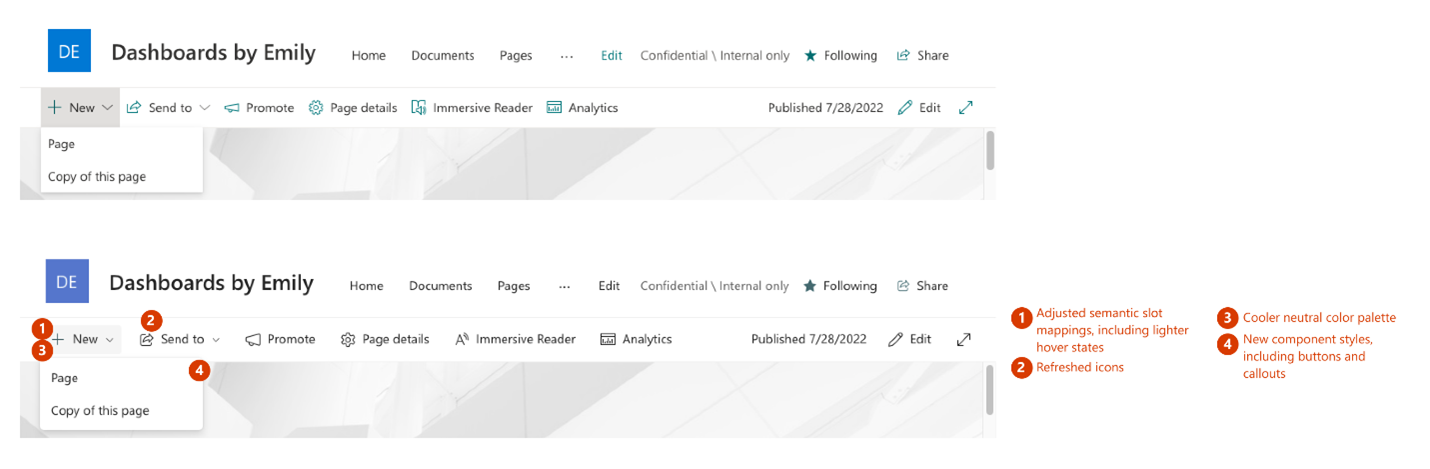
Updates to the Command Bar:
Learn more about Fluent design: Microsoft Design – What’s new This message is associated with Microsoft 365 Roadmap ID 148368 [When this will happen:] Standard Release: We will begin rolling out late July and expect to complete rollout by early August. [How this will affect your organization:] No action is required from you to implement this update. However, there are some visual differences that you and your organization might notice as detailed below. [What you need to do to prepare:] There is no action needed to prepare for this change. |
| Machine Translation |
SharePoint プラットフォームの Microsoft Fluent Visual スタイルに更新プログラムを導入し、SharePoint オーサリング エクスペリエンスと Microsoft Syntex 全体のエクスペリエンスを向上させます。 最新の Microsoft Fluent デザイン システムの原則に合わせて、エッジが柔らかくなった更新されたアイコン、よりクールな灰色のパレット、さまざまな UI コントロールの角の丸みを帯びたアイコンが含まれます。 ビジュアル更新の詳細 この視覚的な更新により、最新の Microsoft Fluent デザイン フレームワークに合わせて調整されます。これらの変更は、エクスペリエンスを向上させ、Microsoft プラットフォーム全体で一貫性を提供する小さな視覚的な変更です。 以下に、さまざまな分野で期待できるアップデートの例を示します。 シェアポイント: クイック リンクとイメージ Web パーツの更新:
Web パーツのツール バーの更新:
コマンド バーの更新:
Fluent デザインの詳細については、「 マイクロソフト デザイン – 新機能」を参照してください。 このメッセージは、Microsoft 365 ロードマップ ID に関連付けられています148368 [これが起こるとき:] 標準リリース: 7 月下旬にロールアウトを開始し、8 月上旬までにロールアウトを完了する予定です。 [これが組織に与える影響:] この更新プログラムを実装するために、ユーザーによる操作は必要ありません。ただし、以下で詳しく説明するように、あなたとあなたの組織が気付くかもしれないいくつかの視覚的な違いがあります。 [準備するために必要なこと:] この変更に備えるために必要なアクションはありません。 |