| MC538385 | (Updated) Collaborative Meeting Notes |
|---|
| Classification | planForChange |
|---|---|
| Last Updated | 08/09/2023 23:06:58 |
| Start Time | 04/06/2023 23:48:39 |
| End Time | 09/18/2023 07:00:00 |
| Message Content |
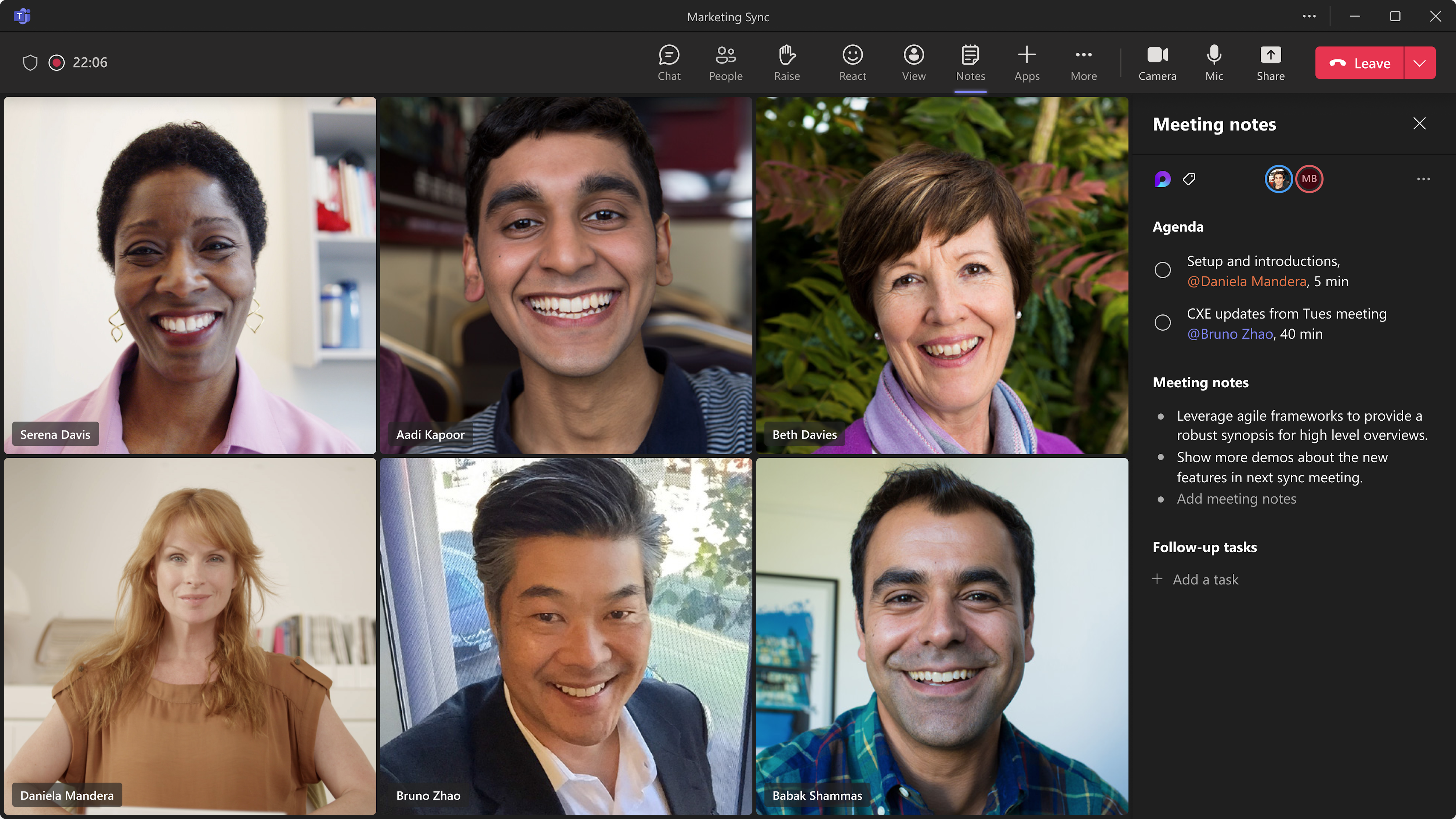
Updated August 9, 2023: We have updated the content below with additional information. Thank you for your patience. We will not be rolling this feature to customers in GCC at this time. We will communicate via Message center when we are ready to proceed. Thank you for your patience. Teams across Microsoft are coming together to provide tools that help make meetings more effective. More specifically, we’re improving how you track what you want to discuss (Agenda), what you discussed/decided (Notes) and what you need to follow up on (Follow-up Tasks). These capabilities are now integrated into the end-to-end meeting experience in Teams, Loop, Planner, To Do, Office.com and OneDrive for Business. This message is associated with Microsoft 365 Roadmap ID 101509 [When this will happen:] Preview Release: We will begin rolling out late May (previously late April) and expect to complete by early June (previously mid-May). Standard Release: We will begin rolling out mid-June (previously late May) and expect to complete by early August 2023 (previously mid-July). [How this will affect your organization:] Users within your tenant will see a Notes button during meetings that invokes these new capabilities. The meeting notes will be shown on the right pane of the meeting window with the ability to open them in the browser for more room or on a second monitor. Participants can collaborate in real time, create an agenda, take notes and add tasks. When participants are assigned a task in the meeting, they will also receive an email notification and it will be synced with the Planner and To Do apps. Meeting organizers will also see an ability to add Collaborative notes before meetings, to prepare by adding agendas or other materials in one place. After the meeting, Collaborative notes will remain accessible for all participants on the Teams calendar meeting details page. The experience is a Loop component, so they can be copied easily out of the meeting and into chats, group chats, emails and other documents. This makes prepping and follow-up even more seamless. [What you need to do to prepare:] Nothing is required to prepare. This capability will be enabled by default when it rolls out. Important Notes:
You can manage this feature via SharePoint PowerShell with: Set-SPOTenant -IsCollabMeetingNotesFluidEnabled (boolean) You can read more about admin controls here: Manage Loop experiences (Loop app and Loop components) in SharePoint.
|
| Machine Translation |
2023年8月9日更新:以下の内容を追加情報で更新しました。お待ちいただきありがとうございます。 現時点では、この機能を GCC のお客様には展開しません。続行する準備ができたら、メッセージセンターを介して連絡します。お待ちいただきありがとうございます。 Microsoft 全体のチームが協力して、会議をより効果的にするのに役立つツールを提供しています。具体的には、話し合いたいこと(議題)、議論/決定したこと(メモ)、フォローアップする必要があること(フォローアップタスク)を追跡する方法を改善しています。これらの機能は、Teams、Loop、Planner、To Do、Office.com、OneDrive for Business のエンドツーエンドの会議エクスペリエンスに統合されました。 このメッセージは、Microsoft 365 ロードマップ ID に関連付けられています101509 [これが起こるとき:] プレビュー リリース: 5 月下旬 (以前は 4 月下旬) にロールアウトを開始し、6 月上旬 (以前は 5 月中旬) までに完了する予定です。 標準リリース: 6 月中旬 (以前は 5 月下旬) にロールアウトを開始し、2023 年 8 月上旬 (以前は 7 月中旬) までに完了する予定です。 [これが組織に与える影響:] テナント内のユーザーには、会議中にこれらの新機能を呼び出す [メモ] ボタンが表示されます。会議メモは会議ウィンドウの右側のペインに表示され、ブラウザで開いてスペースを広げたり、2台目のモニターで開いたりすることができます。参加者は、リアルタイムで共同作業したり、議題を作成したり、メモを取ったり、タスクを追加したりできます。参加者に会議のタスクが割り当てられると、電子メール通知も受信され、プランナーおよびTo Doアプリと同期されます。 会議の主催者には、会議の前に共同メモを追加して、議題やその他の資料を1か所に追加して準備することもできます。 会議後、Teams 予定表の会議の詳細ページで、すべての参加者が共同作業メモに引き続きアクセスできます。エクスペリエンスはループコンポーネントであるため、会議からチャット、グループチャット、電子メール、その他のドキュメントに簡単にコピーできます。これにより、準備とフォローアップがさらにシームレスになります。 [準備するために必要なこと:] 準備には何の必要もありません。この機能は、ロールアウト時に既定で有効になります。 重要な注意事項:
この機能は、次の方法で SharePoint PowerShell を介して管理できます。 Set-SPOTenant -IsCollabMeetingNotesFluidEnabled (boolean) 管理者コントロールの詳細については、「 SharePoint でループ エクスペリエンス (ループ アプリとループ コンポーネント) を管理する」を参照してください。
|