| MC638133 | (Updated) Introducing the Reminders Window in the New Outlook for Windows Preview |
|---|
| Classification | stayInformed |
|---|---|
| Last Updated | 08/12/2023 21:48:17 |
| Start Time | 07/12/2023 00:18:09 |
| End Time | 09/30/2023 07:00:00 |
| Message Content |
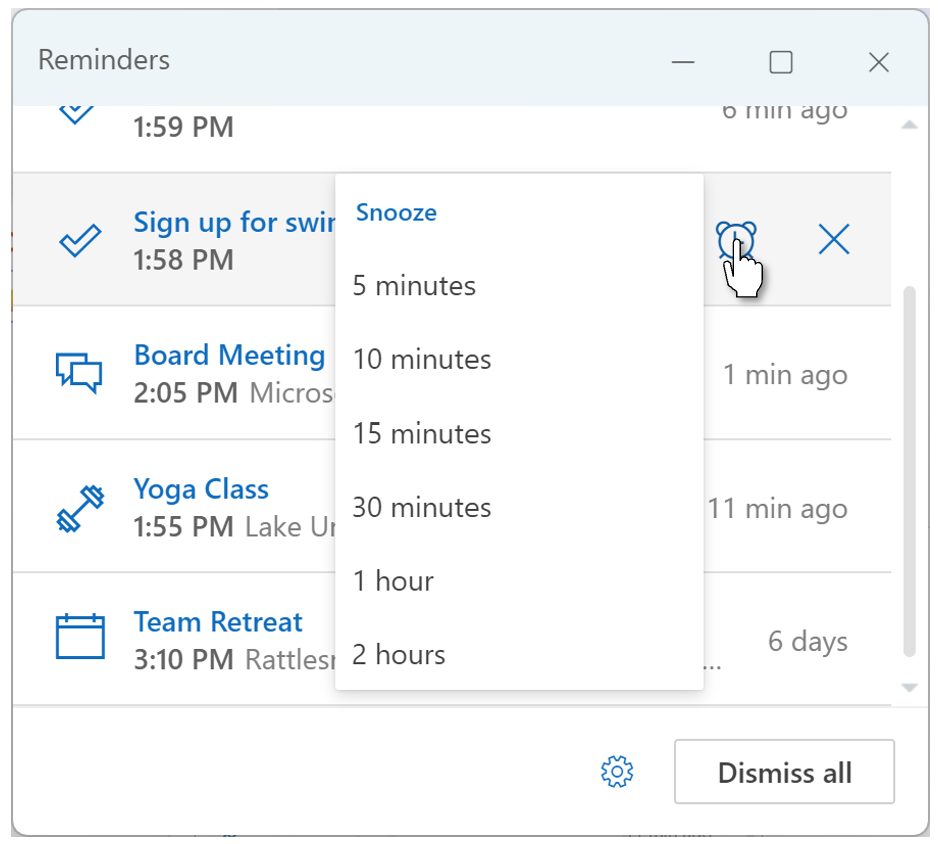
Updated August 12, 2023: We have updated the content to show as intended. Thank you for your patience. Introducing the reminders window. This reminders window is a new notification style for the New Outlook for Windows preview. It is a pop-out window that organizes your meeting/event reminders and task reminders in one place. You can also snooze reminders, dismiss reminders, or join Teams meetings directly from the window. Here is how users can enable this reminder window:
This change is associated with Microsoft 365 Roadmap ID: 144731 [When this will happen:] Rollout has begun and expect to complete by mid-August. [How this will affect your organization:] There is no expected impact to your organization. This is a new feature that will be defaulted to OFF in the user’s settings, unless their migrated settings (from their previous Outlook client that they toggled in from) indicates otherwise, in which case they will be defaulted to ON.
[What you need to do to prepare:]
Nothing is required of you to prepare for this change, unless you have internal support documentation that needs to be updated to accommodate this new feature/notification option. Microsoft support documentation is being updated to reflect this new feature available in Settings. |
| Machine Translation |
2023 年 8 月 12 日更新: 意図したとおりに表示されるようにコンテンツを更新しました。お待ちいただきありがとうございます。 リマインダーウィンドウの紹介。このアラーム ウィンドウは、Windows 用新しい Outlook プレビューの新しい通知スタイルです。これは、会議/イベントのリマインダーとタスクのリマインダーを1か所に整理するポップアウトウィンドウです。また、ウィンドウから直接、リマインダーをスヌーズしたり、リマインダーを閉じたり、Teams 会議に参加したりすることもできます。 ユーザーがこのリマインダーウィンドウを有効にする方法は次のとおりです。
この変更は、Microsoft 365 ロードマップ ID に関連付けられています: 144731 [これが起こるとき:] ロールアウトが開始されており、8月中旬までに完了する予定です。 [これが組織に与える影響:] 組織への影響は予想されません。これは、ユーザーの設定で既定で [オフ] に設定される新機能であり、移行された設定 (切り替え元の以前の Outlook クライアントから) で特に指定されていない限り、その場合は既定で [オン] になります。
[準備するために必要なこと:]
この新機能/通知オプションに対応するために更新する必要がある内部サポート ドキュメントがない限り、この変更に備える必要はありません。Microsoft サポート ドキュメントは、[設定] で利用できるこの新機能を反映するように更新されています。 |