| MC670896 | Accessibility Improvements to Page Authoring |
|---|
| Classification | stayInformed |
|---|---|
| Last Updated | 08/25/2023 22:57:23 |
| Start Time | 08/25/2023 22:56:42 |
| End Time | 10/31/2023 07:00:00 |
| Message Content |
To support accessibility best practices, we’ve made some improvements to the Page authoring experience in SharePoint. The first improvement will provide the functionality to mark images as decorative. The second improvement has changed the heading level 1 to be reserved for the page title in the title area. This message is associated with Microsoft 365 Roadmap ID 146063 [When this will happen:] Targeted Release: Rollout has begun and is expected to be complete by late August 2023. Standard Release: Rollout will begin in early September 2023 and is expected to be complete by late September. [How this will affect your organization:] Users will now have more options to help them make their Pages more accessible. Decorative images will be ignored by assistive technology, including screen readers. This addition has been made to the following: background image of the Title Region, images added inline with the Text Web Part, Image Web Part, Image Gallery, Hero, Call to Action, and Quick Links.
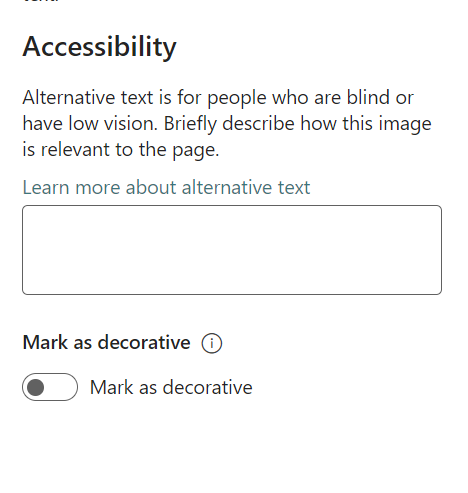
To mark an image as decorative, open the property pane details of the web part and scroll to the Accessibility section. Under the alternative text box, a new toggle is available for you to select if the image should be marked as decorative.
You can still add headings to a page at levels 2-4 using the web parts. This makes it easier for users of screen readers to understand how your page is structured.
To communicate the heading level of the text correctly to screen reader users, choose a heading style from the text style dropdown menu, instead of just using visual styling such as increasing the font size and applying bold formatting to the text.
[What you need to do to prepare:] There is nothing you need to do to prepare. You may want to notify users of these updates. |
| Machine Translation |
アクセシビリティのベスト プラクティスをサポートするために、SharePoint のページ作成エクスペリエンスにいくつかの改善が加えられました。 最初の改善は、画像を装飾としてマークする機能を提供します。2 つ目の改善では、見出しレベル 1 がタイトル領域のページ タイトル用に予約されるように変更されました。 このメッセージは、Microsoft 365 ロードマップ ID に関連付けられています146063 [これが起こるとき:] ターゲット リリース: ロールアウトが開始されており、2023 年 8 月下旬までに完了する予定です。 標準リリース: ロールアウトは 2023 年 9 月初旬に開始され、9 月下旬までに完了する予定です。 [これが組織に与える影響:] ユーザーは、ページのアクセシビリティを高めるためのオプションを追加できるようになります。 装飾的な画像は、スクリーンリーダーなどの支援技術では無視されます。この追加は、タイトル領域の背景画像、テキスト Web パーツと共にインラインで追加された画像、画像 Web パーツ、画像ギャラリー、ヒーロー、行動喚起、クイック リンクに対して行われました。
画像を装飾としてマークするには、Web パーツのプロパティ ウィンドウの詳細を開き、[アクセシビリティ] セクションまでスクロールします。代替テキスト ボックスの下に、画像を装飾としてマークするかどうかを選択するための新しいトグルを使用できます。
Web パーツを使用して、レベル 2 から 4 のページに見出しを追加することもできます。これにより、スクリーンリーダーのユーザーはページの構造を理解しやすくなります。
テキストの見出しレベルをスクリーンリーダーのユーザーに正しく伝えるには、フォントサイズを大きくしたり、テキストに太字の書式を適用したりするなどの視覚的なスタイルを使用するのではなく、テキストスタイルのドロップダウンメニューから見出しスタイルを選択します。
[準備するために必要なこと:] 準備するためにあなたがする必要があるものは何もありません。これらの更新プログラムをユーザーに通知できます。 |