| MC668258 | (Updated) Microsoft Default for Tag Management to include Team Members |
|---|
| Classification | planForChange |
|---|---|
| Last Updated | 09/06/2023 19:38:44 |
| Start Time | 08/16/2023 23:06:41 |
| End Time | 10/23/2023 07:00:00 |
| Message Content |
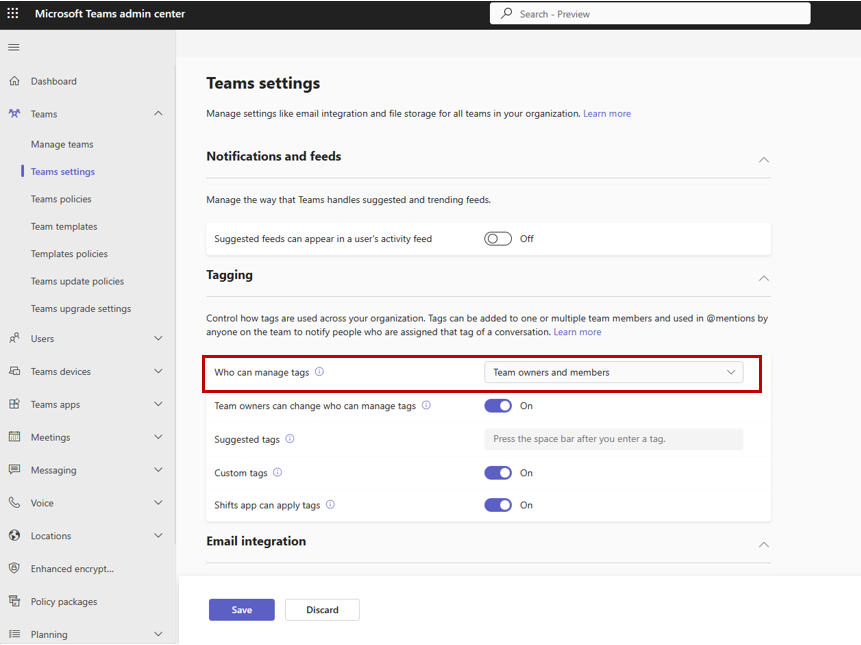
Updated September 6, 2023: We have updated the rollout timeline below. Thank you for your patience. We are updating Microsoft Default setting to Team Owners and Members for Teams Tag Management settings in Teams Admin Center. If you have already explicitly made a selection to your Tag Management settings your tenant will not be affected by this change. If you have not made changes to Tag Management settings, Microsoft Default settings will apply for your tenant. Microsoft Default settings currently map to “Team Owners” value but this update will change it to “Team Owners and Members”. As Admin, please set tag management settings to reflect tenant-level preference. Select “Team Owners” to keep tag management limited to Team Owners, or select “Team owners and members” to allow all team members to create and edit tags. In Teams client, users will still see the same options as they do today: “Team Owners” and “Team owners and members”. This message is associated with Microsoft 365 Roadmap ID 88318
[When this will happen:]
[How this will affect your organization:]
If you are an EDU tenant, non-owner students cannot manage tags as long as the Tenant level settings is Team Owners or Microsoft Default. We will continue to respect explicit and preferred tenant settings over Microsoft Default settings. Select your preferred tag management setting for your tenant to ensure you are not impacted by future changes. [What you need to do to prepare:] As tenant Admin, please change your tag management settings to your preferred setting. Here are some steps you can take:
|