| MC675503 | Meeting Protection Support and Improved View Switcher for Teams Rooms on Android |
|---|
| Classification | stayInformed |
|---|---|
| Last Updated | 09/16/2023 00:29:40 |
| Start Time | 09/16/2023 00:29:25 |
| End Time | 01/31/2024 08:00:00 |
| Message Content |
The latest version of Teams Rooms on Android Update 3 (2023) includes new in-meeting experiences including:
[When this will happen:] We will begin rolling out in late November 2023 and expect to complete rollout by late December 2023. [How this will affect your organization:] The updated interface for the Teams Rooms on Android View Switcher menu provides users with more control of the front of room display(s) during a meeting and enables customizations including visibility of the meeting chat and selected meeting components displayed on the left and right panel for Front Row. IT admins can configure the default number of panels and default components on panel(s) using the local device setting.
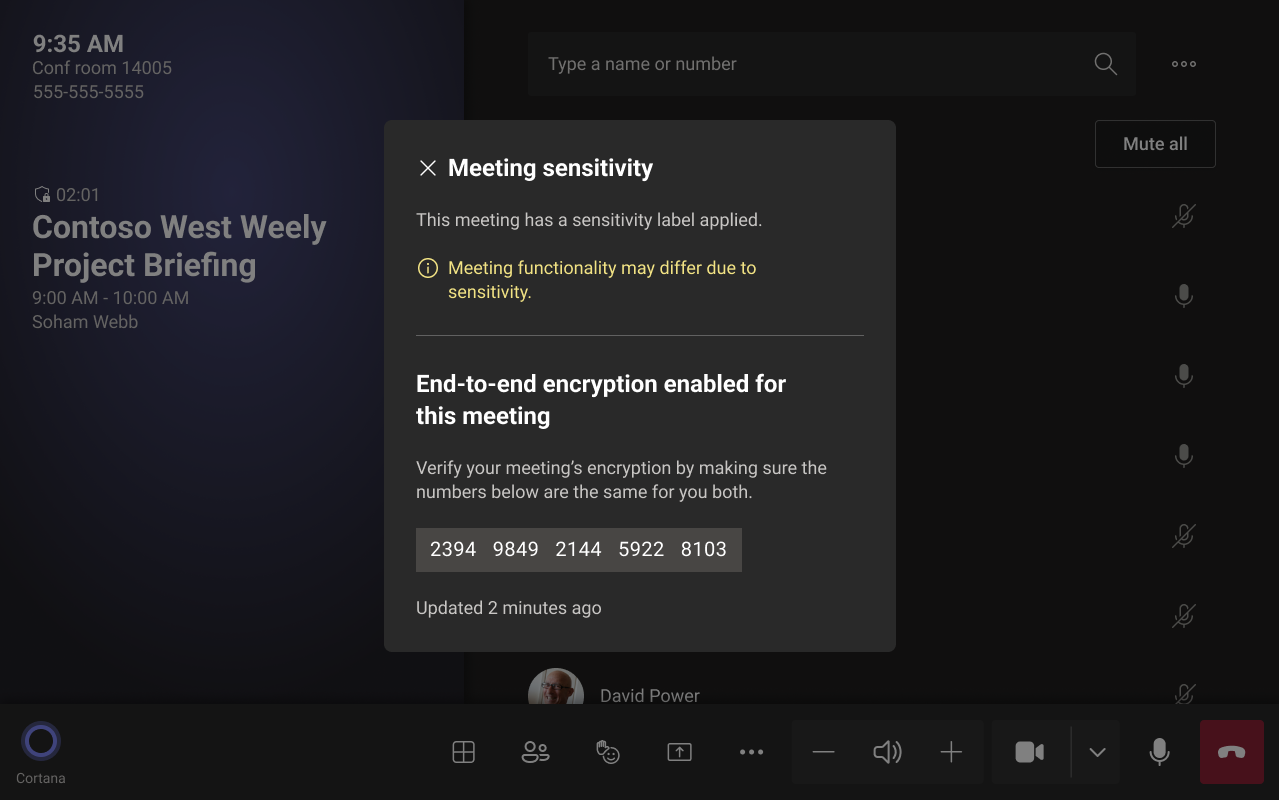
Teams Rooms on Android devices applies the Teams Premium meeting security features including end-to-end encryption and sensitivity labels if the meeting organizer has them turned ON. Note: Features need to be activated through the Meeting options in Teams Calendar or Outlook on desktop or mobile devices. To enable the features a Teams premium license may be required. If End-to-end Encryption is enabled, the Teams Rooms on Android will display a shield with a lock icon next to the view switcher. This icon includes a 20-digit group key that can be verified with other meeting participants. Note: Together mode and Large Gallery are not available during End-to-end Encrypted Meetings, but meeting chat is permitted. If a Teams meeting is set with a Sensitivity Label, room users will be informed that the label has been applied when clicking the shield with a lock icon.
[What you need to do to prepare:] Please notify your users about this new experience and update your training and documentation as appropriate. |
| Machine Translation |
Android 更新プログラム 3 (2023) の Teams Rooms の最新バージョンには、次のような新しい会議内エクスペリエンスが含まれています。
[これが起こるとき:] ロールアウトは 2023 年 11 月下旬に開始され、2023 年 12 月下旬までにロールアウトが完了する予定です。 [これが組織に与える影響:] Android ビュー スイッチャー メニューの Teams Rooms の更新されたインターフェイスにより、ユーザーは会議中に会議室の前面表示をより細かく制御でき、会議チャットの表示や、Front Row の左右のパネルに表示される選択した会議コンポーネントの表示などのカスタマイズが可能になります。IT 管理者は、ローカル デバイス設定を使用して、パネルの既定の数とパネル上の既定のコンポーネントを構成できます。
Android デバイス上の Teams Rooms は、会議の開催者がオンにしている場合、エンドツーエンドの暗号化や秘密度ラベルなどの Teams Premium 会議セキュリティ機能を適用します。 手記: 機能は、デスクトップまたはモバイル デバイスの Teams 予定表または Outlook の 会議オプション を使用してアクティブ化する必要があります。この機能を有効にするには、Teams プレミアム ライセンスが必要になる場合があります。 エンドツーエンド暗号化が有効になっている場合、Android の Teams ルームには、ビュー スイッチャーの横にロック アイコンが付いたシールドが表示されます。このアイコンには、他の会議参加者と確認できる 20 桁のグループ キーが含まれています。 手記: Together モードとラージギャラリーは、エンドツーエンドの暗号化されたミーティング中は使用できませんが、ミーティングチャットは許可されます。Teams 会議に秘密度ラベルが設定されている場合、ロック アイコンの付いたシールドをクリックすると、ラベルが適用されたことが会議室ユーザーに通知されます。
[準備するために必要なこと:] この新しいエクスペリエンスについてユーザーに通知し、必要に応じてトレーニングとドキュメントを更新してください。 |