| MC672523 | (Updated) eDiscovery (Premium) C Data sources usability enhancements |
|---|
| Classification | stayInformed |
|---|---|
| Last Updated | 09/19/2023 21:21:44 |
| Start Time | 08/31/2023 23:26:34 |
| End Time | 12/29/2023 08:00:00 |
| Message Content |
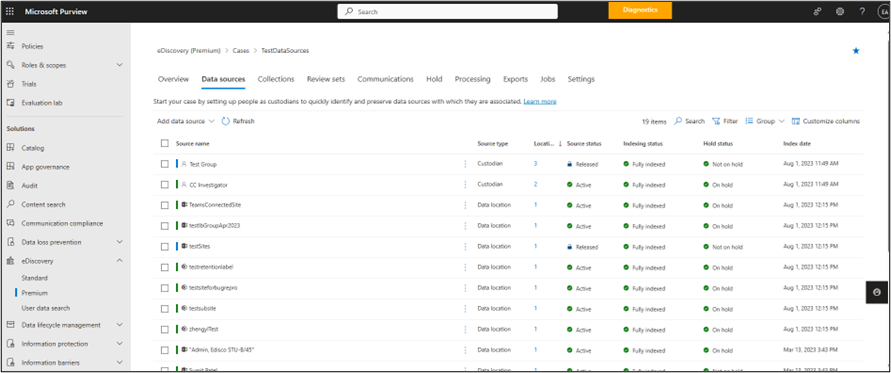
Updated September 19, 2023: We have updated the rollout timeline below. Thank you for your patience. Several usability improvements in the Data Sources page will be introduced in eDiscovery (Premium) service including list view updates, improvements to hold status and error messaging, error reports and quick hold retry.
This message is associated with Microsoft 365 Roadmap ID 164895
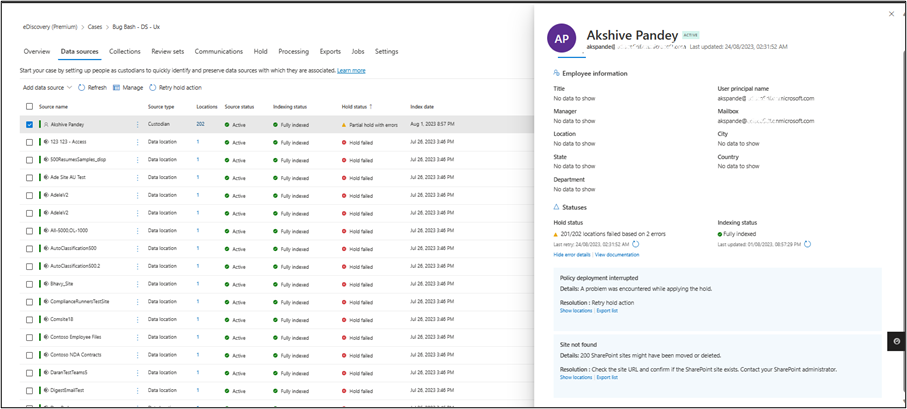
[When this will happen:] Standard Release: We will begin rolling out in late September 2023 (previously mid-September) and expect to complete by mid-October 2023 (previously late-September). [How this will affect your organization:] The Data Sources list page will show the count of locations added to a custodial data location. Updated hold statuses include – applying hold, releasing hold, on hold, not on hold, partial hold with errors, partial hold released, hold failed, and release failed.
Location flyout will show details of locations where hold action failed, suggest remediation actions, provide ability to download the error report for custodial locations and retry hold action for failed data sources.
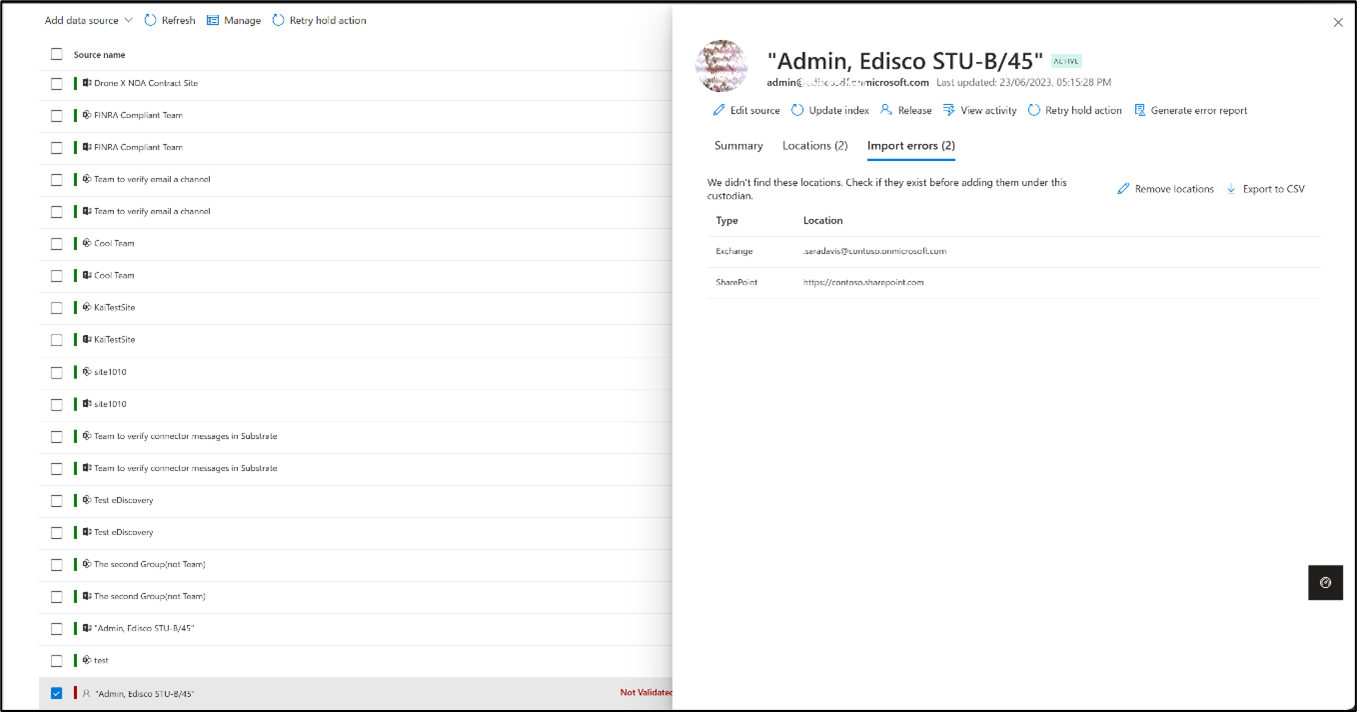
List of custodial locations will show in a separate page within the flyout and can be searched.
Validation errors that occur during Import custodians will show in a separate page within the custodian location flyout.
Note C The detailed hold error messaging is only available when new sources are placed on hold or when hold action is retried for existing sources. For older sources where hold failed, a generic error message will be shown. User can retrieve the detailed error message by performing ‘Retry hold action’ for the failed sources. To learn more about upcoming user experience and usability changes to eDiscovery (Premium), see Microsoft 365 Roadmap | Microsoft 365
[What you need to do to prepare:]
If your training and documentation contain screenshots of the current views, you might want to update the contents with the updated views. Then notify your users about these usability experience changes. Learn more about Microsoft Purview eDiscovery solutions – Microsoft Purview (compliance) | Microsoft Docs. |
| Machine Translation |
2023 年 9 月 19 日更新: 以下のロ`ルアウト タイムラインを更新しました。お待ちいただきありがとうございます。 子情箝_示 (Premium) サ`ビスでは、リスト ビュ`の更新、保留状Bとエラ` メッセ`ジングの改善、エラ` レポ`ト、クイック ホ`ルド再行など、[デ`タ ソ`ス] ペ`ジの使いやすさの向上がいくつか毪丹欷蓼埂
このメッセ`ジは、Microsoft 365 ロ`ドマップ ID にvB付けられています164895
[これが起こるとき:] 圣辚戛`ス: 2023 年 9 月下旬 (以前は 9 月中旬) にロ`ルアウトを_始し、2023 年 10 月中旬 (以前は 9 月下旬) までに完了する予定です。 [これがMに与える影:] [デ`タ ソ`ス] リスト ペ`ジには、保管デ`タの鏊俗芳婴丹欷鏊问硎兢丹欷蓼埂8陇丹欷勘A糇Bには、保留のm用、保留の解除、保留中、保留中ではない、エラ`のある部分的な保留、部分的な保留の解放、保留の失 ⒔夥扭问・蓼欷蓼埂
鏊荪氓抓氓驻摔稀⒈A籁伐绁螭・筏鏊卧が表示され、修アクションが提案され、保管鏊违ē椹` レポ`トをダウンロ`ドするC能が提供され、失・筏骏签`タ ソ`スの保留アクションが再行されます。
保管鏊我挥Eは、ポップアップ内のeのペ`ジに表示され、仕鳏扦蓼埂
保管担当者のインポ`ト中にk生した试^エラ`は、保管担当者の鏊荪氓抓氓啄冥eのペ`ジに表示されます。
注 – な保留エラ` メッセ`ジは、新しいソ`スが保留になっている龊稀蓼郡霞却妞违僵`スにして保留アクションが再行された龊悉摔韦呤褂盲扦蓼埂1A簸耸・筏抗扭ぅ僵`スの龊稀⒁话愕膜圣ē椹`メッセ`ジが表示されます。ユ`ザ`は、失・筏骏僵`スにして「再行保留アクション」をg行することで、なエラ`メッセ`ジを取得できます。 子情箝_示 (Premium) の今後のユ`ザ` エクスペリエンスと使いやすさの涓卧については、「 Microsoft 365 ロ`ドマップ |マイクロソフト365
[浃工毪郡幛吮匾胜长:]
トレ`ニングとドキュメントにF在のビュ`のスクリ`ンショットが含まれている龊悉稀⒏陇丹欷骏鹰濠`でコンテンツを更新できます。次に、これらのユ`ザビリティ エクスペリエンスの涓摔膜い匹姗`ザ`に通知します。 マイクロソフト パ`ビュ` 子情箝_示ソリュ`ションの – マイクロソフト パ`ビュ` (コンプライアンス) |マイクロソフトドキュメント。 |