| MC679312 | Dictation Support Coming to the New Outlook |
|---|
| Classification | stayInformed |
|---|---|
| Last Updated | 10/04/2023 23:37:14 |
| Start Time | 10/04/2023 23:36:43 |
| End Time | 01/11/2024 08:00:00 |
| Message Content |
Dictation lets you use speech-to-text to author messages in Outlook with a microphone and reliable internet connection. It’s a quick and easy way to draft emails, send replies, and capture the tone you’re going for.
This message is associated with Microsoft 365 Roadmap ID 171199
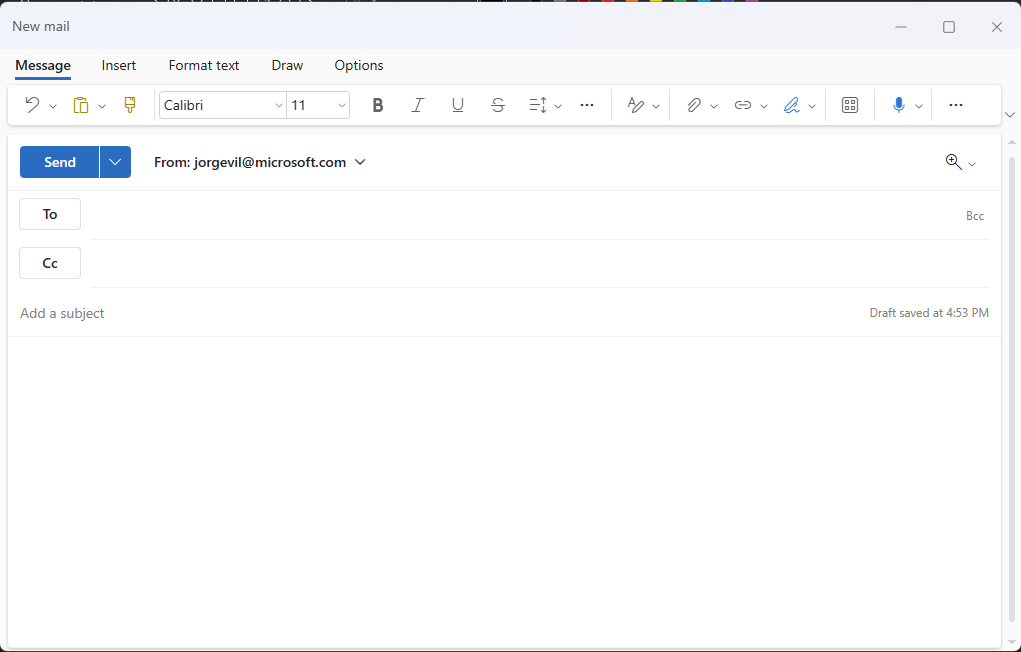
[When this will happen:] Standard Release: We will begin rolling out to Production in mid-November and will complete by early December. [How this will affect your organization:] The mail compose ribbon will now include a dictation button (a blue microphone) that can be clicked to initiate dictation.
Once clicked, it changes state, and the user can dictate the contents of the message using the microphone in their device.
[What you need to do to prepare:]
There is nothing you need to do to prepare. You may want to notify your users of this update. |
| Machine Translation |
ディクテーションを使用すると、音声テキスト変換を使用して、マイクと信頼性の高いインターネット接続を備えた Outlook でメッセージを作成できます。これは、メールの下書き、返信の送信、目的のトーンのキャプチャをすばやく簡単に行う方法です。
このメッセージは、Microsoft 365 ロードマップ ID に関連付けられています171199
[これが起こるとき:] 標準リリース: 11 月中旬に製品版へのロールアウトを開始し、12 月初旬までに完了する予定です。 [これが組織に与える影響:] メール作成リボンに、ディクテーションを開始するためにクリックできるディクテーションボタン(青いマイク)が含まれるようになりました。
クリックすると状態が変わり、ユーザーはデバイスのマイクを使用してメッセージの内容を口述できます。
[準備するために必要なこと:]
準備するためにあなたがする必要があるものは何もありません。この更新プログラムをユーザーに通知できます。 |