| Message Content |
Soon you’ll be able to further customize the Connections experience by applying the themes available in SharePoint to reflect organizational brand colors across desktop, tablet, and mobile.
If you can edit the Connections experience, you have two ways to use this new feature:
- Current process: Editors can change the color theme by using the ‘Change the look’ panel under site settings for their home site. The same color theme will also apply to their Viva Connections experience on Teams desktop, tablet, and mobile.
- New process: Editors can go to the top right corner of the Connections desktop app and open the overflow menu. There, they will find a new option called ‘Change the look’. This option lets them choose a color theme that will impact both the Connections theme and the home site theme.
Note: This feature will be released along with or after the tenant has received the refreshed landing experience for Viva Connections desktop.
This message is associated with Microsoft 365 Roadmap ID 180793
[When this will happen:]
We will begin rolling out this feature to targeted release customers by mid-November 2023.
This is expected to become generally available to all customers by the end of February 2024.
[How this will affect your organization:]
Once the feature is released to your tenant, you will notice the following changes to your Viva Connections experience:
- The home site color theme will reflect automatically in the Connections desktop, tablet & mobile experiences, with a few exceptions noted below.
- If you have never selected a theme for your home site, the default SharePoint theme will still reflect across the home site and the Connections experience.
- If you are using a Connections experience without a home site, there will be no visual difference, however after the release of this feature you will have the option to change the color theme.
- If you have been using an accent color under app customization feature in the Teams admin center for theming for the Connections mobile experience, once the feature is rolled out, the accent color won’t apply to the Connections experience, however it will continue applying to the Teams chrome surrounding the Connections experience, e.g. the app icon outline color on the Teams chrome will be sourced from the accent color setting.
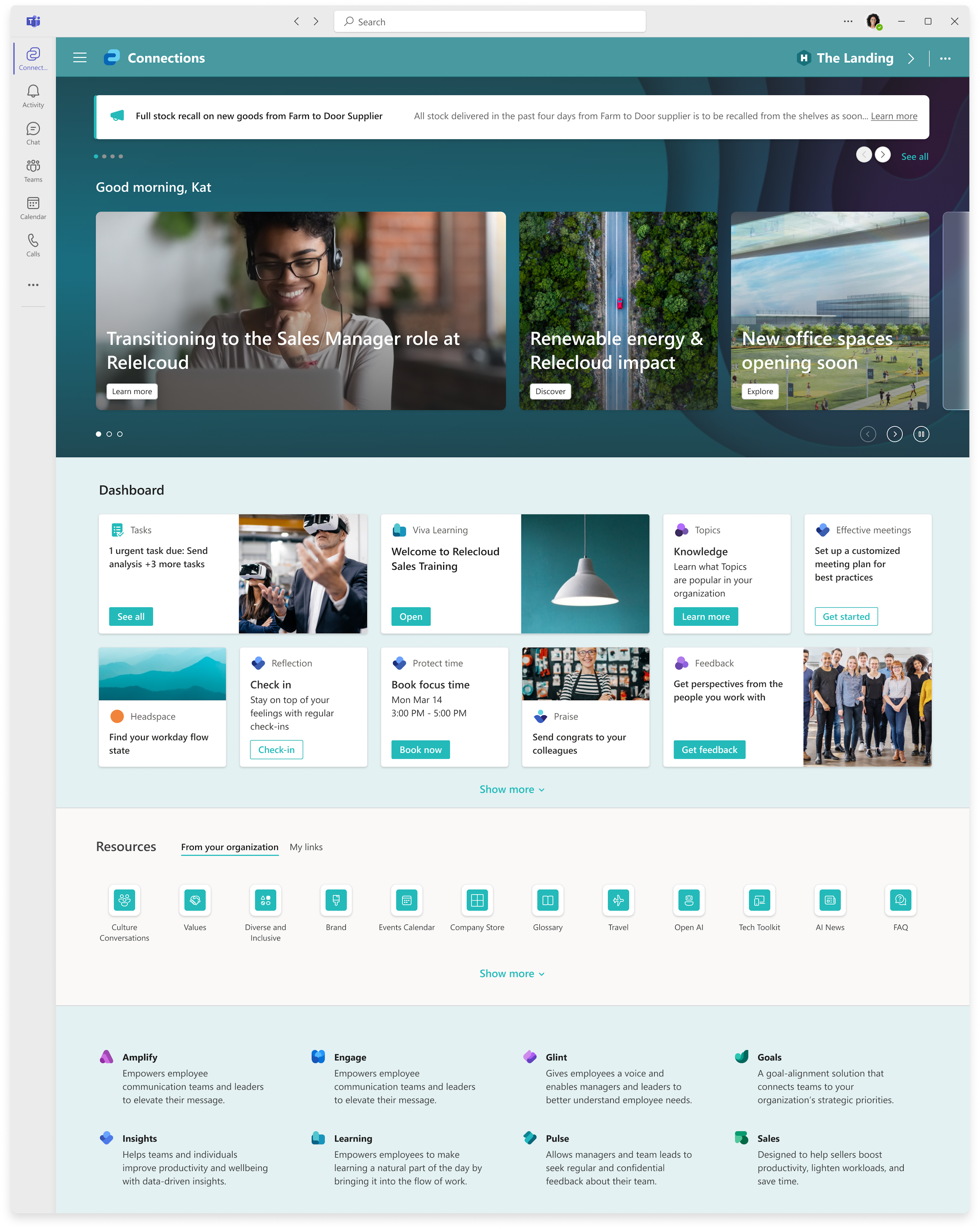
There are a few exceptions where the selected theme will not apply:
- If an end user has selected dark mode on their mobile or tablet device, the theme colors won’t be applied to their Connections experience. The dashboard and other Connections components will render in dark mode with the default color.
- Dark themes (has the property isInverted=True), won’t be applied to the mobile experience. If the dark theme is selected, mobile will continue showing Connections with the user’s selected mode (light or dark) and the default colors.
We are continuously listening to your feedback and will send a separate communication once these exceptions are removed.
[What you need to do to prepare:]
It’s recommended that you share information regarding this upcoming feature and the following steps with your team managing home site and Connections experiences.
|
| Machine Translation |
まもなく、SharePoint で利用可能なテーマを適用して、デスクトップ、タブレット、モバイル全体で組織のブランド カラーを反映することで、接続エクスペリエンスをさらにカスタマイズできるようになります。
接続エクスペリエンスを編集できる場合、この新機能を使用する方法は 2 つあります。
- 現在のプロセス: 編集者は、ホーム サイトのサイト設定の下にある [外観の変更] パネルを使用して、配色テーマを変更できます。同じ色のテーマは、Teams デスクトップ、タブレット、モバイルでのViva コネクション エクスペリエンスにも適用されます。
- 新しいプロセス: 編集者は、Connections デスクトップ・アプリケーションの右上隅に移動して、オーバーフロー・メニューを開くことができます。そこに、「外観を変更する」という新しいオプションがあります。このオプションを使用すると、Connections テーマとホーム サイト テーマの両方に影響する配色テーマを選択できます。
手記: この機能は、テナントが Viva コネクション デスクトップの更新されたランディング エクスペリエンスを受け取った後、またはその後にリリースされます。
このメッセージは、Microsoft 365 ロードマップ ID に関連付けられています180793
[これが起こるとき:]
この機能は、2023 年 11 月中旬までに対象リリースのお客様へのロールアウトを開始します。
これは、2024 年 2 月末までにすべてのお客様に一般提供される予定です。
[これが組織に与える影響:]
機能がテナントにリリースされると、Viva コネクション エクスペリエンスに次の変更が加えられます。
- ホーム サイトのカラー テーマは、Connections デスクトップ、タブレット、モバイル エクスペリエンスに自動的に反映 されますが、以下に示すいくつかの例外があります。
- ホーム サイトのテーマを選択していない場合でも、既定の SharePoint テーマはホーム サイトと接続エクスペリエンス全体に反映されます。
- ホーム サイトなしで Connections エクスペリエンスを使用している場合、視覚的な違いはありませんが、この機能のリリース後に、配色テーマを変更するオプションがあります。
- Teams 管理センターの アプリのカスタマイズ機能で Connections モバイル エクスペリエンスのテーマ設定にアクセント カラーを使用している場合、機能がロールアウトされると、アクセント カラーは接続エクスペリエンスには適用されませんが、接続エクスペリエンスを囲む Teams クロムには引き続き適用されます (たとえば、Teams クロムのアプリ アイコンのアウトラインの色は アクセント カラー設定から取得されます)。
選択したテーマが適用されない例外がいくつかあります。
- エンド ユーザーがモバイル デバイスまたはタブレット デバイスでダーク モードを選択した場合、テーマの色は Connections エクスペリエンスに適用されません。ダッシュボードおよびその他の Connections コンポーネントは、デフォルトの色でダークモードでレンダリングされます。
- ダーク テーマ (プロパティが isInverted=True) は、モバイル エクスペリエンスには適用されません。ダークテーマが選択されている場合、モバイルはユーザーが選択したモード(明るいまたは暗い)とデフォルトの色で接続を表示し続けます。
私たちはあなたのフィードバックに継続的に耳を傾けており、これらの例外が削除されたら別のコミュニケーションを送信します。
[準備するために必要なこと:]
この今後の機能と次の手順に関する情報を、ホーム サイトと Connections エクスペリエンスを管理するチームと共有することをお勧めします。
|