| Message Content |
The ability to create live Loop components starting with task lists, tables, voting tables, progress trackers & checklists is coming soon to Whiteboard for the web, Whiteboard app in Teams, and Whiteboard for Windows.
This message is associated with Microsoft 365 Roadmap ID 117400
[When this will happen:]
Standard Release: We will begin rolling out late October 2023 and expect to complete by early November 2023.
[How this will affect your organization:]
- Users will be able to create, copy/paste, view and edit live Loop components in Whiteboard. This functionality is controlled by the Create and view Loop files in Microsoft apps that support Loop OCPS policy, which applies to all Microsoft apps that support Loop components. You can use this policy to enable or disable access for individual users.
- On mobile devices, users can view and edit Loop components in Whiteboard, but will neither be able to create them nor copy/paste them. This functionality will be coming in a future update.
- On Surface Hubs & Microsoft Teams Room devices, users will not be able to view, edit, create or copy/paste Loop components in Whiteboard. This functionality will be coming in a future update.
- External & anonymous users when collaborating on whiteboards in Teams meetings, will not be able to view, edit, create or copy/paste Loop components. This functionality will be coming in a future update.
- Environments other than commercial (such as GCC, GCC-H & DoD) will be available when Loop components are supported in additional environments.
(Please note that the below images are illustrative & may differ from actual in-product user experience)
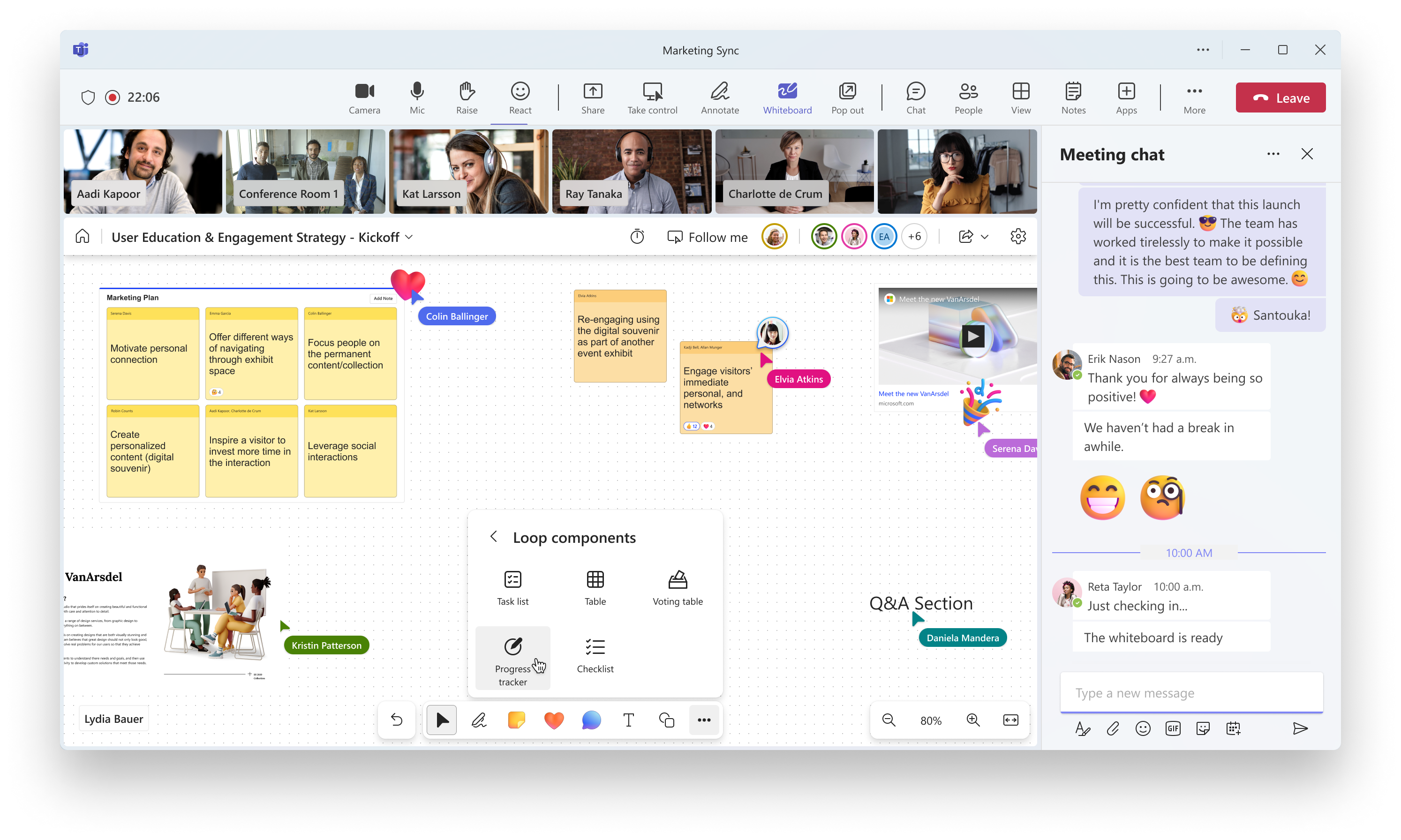
Illustrative list of Loop components supported in Whiteboard for creation.
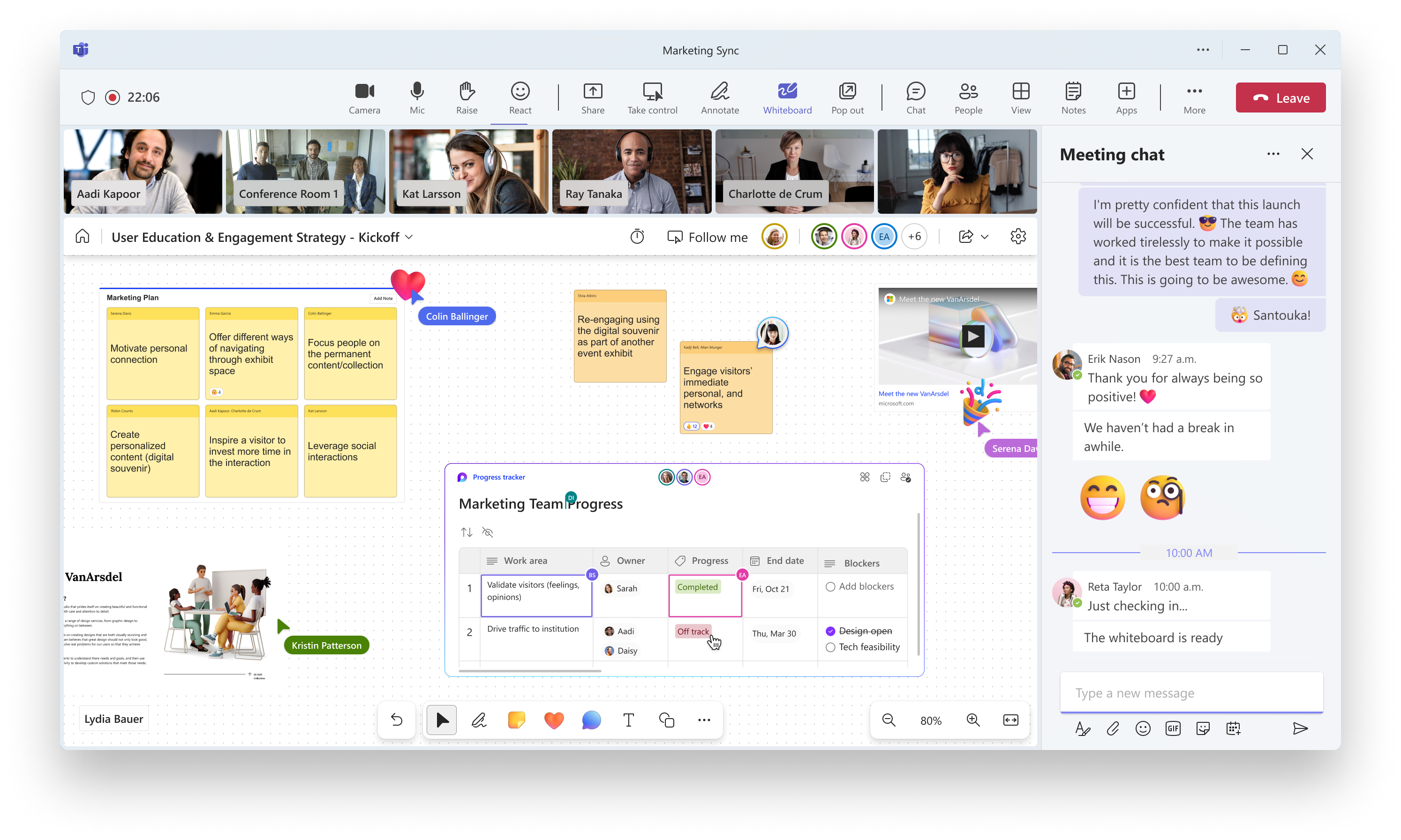
Illustrative image showcasing a Progress tracker Loop component in Whiteboard.
[What you need to do to prepare:]
No change is necessary, unless you wish to disable the Loop functionality in Whiteboard and other MS365 apps. To do this, you can use the Office cloud policy service in the Microsoft 365 Apps admin center.
- Sign in to https://config.office.com/ with your Microsoft 365 admin credentials.
- Select Customization from the left pane.
- Select Policy Management.
- Create a new policy configuration or edit an existing one.
- In Choose the scope, choose the security group for which you want to apply the policy.
- In Configure Settings, choose Create and view Loop files in Microsoft apps that support Loop.
- In configuration setting, choose either C enabled, disabled, or not configured. The implication of each of these options is mentioned below:
- Enabled: Loop functionality is available to users
- Disabled: Loop functionality isn’t available to users
- Not configured: Loop functionality is available to users.
- Save the policy configuration.
- Reassign priority for any security group if required (If two or more policy configurations are applicable to the same set of users, the one with the higher priority is applied).
- In case you create a new policy, configuration or change the configuration for an existing policy, there will be a delay in the change being reflected as mentioned below:
- If there were existing policy configurations prior to the change, then it will take 90 mins for the change to be reflected.
- If there were no policy configurations prior to the change then it will take 24 hours for the change to be reflected.
To learn more about the feature, visit the Microsoft Whiteboard Help Hub page.
|
| Machine Translation |
タスクリスト、テ`ブル、投票テ`ブル、M氓去楗氓`、チェックリストから始まるライブル`プコンポ`ネントを作成するC能は、Whiteboard for the Web、TeamsのWhiteboard アプリ、およびWhiteboard for Windowsにgもなく登訾筏蓼埂
このメッセ`ジは、Microsoft 365 ロ`ドマップ ID 117400 にvB付けられています
[これが起こるとき:]
圣辚戛`ス: 2023 年 10 月下旬にロ`ルアウトを_始し、2023 年 11 月初旬までに完了する予定です。
[これがMに与える影:]
- ユ`ザ`は、ホワイトボ`ドでライブル`プコンポ`ネントを作成、コピ`/Nり付け、表示、扦毪瑜Δ摔胜辘蓼埂¥长C能は、ル`プ コンポ`ネントをサポ`トするすべての Microsoft アプリにm用される [ル`プ OCPS をサポ`トする Microsoft アプリでル`プ ファイルを作成および表示する ] ポリシ`によって制御されます。このポリシ`を使用して、々のユ`ザ`のアクセスを有郡蓼郡o郡摔工毪长趣扦蓼埂
- モバイルデバイスでは、ユ`ザ`はホワイトボ`ドでル`プコンポ`ネントを表示および扦蓼工⒆鞒嗓筏郡辍偿冤`/Nり付けしたりすることはできません。このC能は、今後のアップデ`トで提供される予定です。
- Surface Hubs & Microsoft Teams Room デバイスでは、ユ`ザ`はホワイトボ`ドでル`プ コンポ`ネントを表示、⒆鞒伞蓼郡膝偿冤`/Nり付けすることはできません。このC能は、今後のアップデ`トで提供される予定です。
- 外部および匿名ユ`ザ`は、Teams 会hでホワイトボ`ドで共同作Iする龊稀氅`プ コンポ`ネントを表示、⒆鞒伞蓼郡膝偿冤`/Nり付けすることはできません。このC能は、今後のアップデ`トで提供される予定です。
- 商用以外のh境 (GCC、GCC-H、DoD など) は、Loop コンポ`ネントが追加のh境でサポ`トされる龊悉死每赡埭摔胜辘蓼埂
(以下の画像は 例示であり 、gHのu品内のユ`ザ`エクスペリエンスとはなる龊悉辘蓼工韦扦醋⒁猡坤丹)
作成用にホワイトボ`ドでサポ`トされているル`プコンポ`ネントのg例リスト。
ホワイトボ`ドのM行状rトラッカ`ル`プコンポ`ネントを示すg例画像。
[浃工毪郡幛吮匾胜长:]
ホワイトボ`ドやその他のMS365アプリでル`プC能をo郡摔工龊悉虺涓媳匾辘蓼护蟆¥长欷蛐肖Δ摔稀Microsoft 365 アプリ管理センタ`で Office クラウド ポリシ` サ`ビス を使用できます。
- Microsoft 365 管理者のY格情螭蚴褂盲筏 https://config.office.com/ にサインインします。
- 左趣违讠ぅ螭 [ カスタマイズ ] をxkします。
- [ ポリシ`管理] をxkします。
- 新しいポリシ`成を作成するか、既存のポリシ`成を筏蓼埂
- [ スコ`プのxk] で、ポリシ`をm用するセキュリティグル`プをxkします。
- [ O定の成] で、[ル`プ をサポ`トする Microsoft アプリでル`プ ファイルを作成して表示する] をxkします。
- [成O定] で、[ 有]、[ o]、または [ 未成] のいずれかをxkします。これらの各オプションの意味を以下に示します。
- 有浚 ル`プC能はユ`ザ`が利用できます
- o浚 ル`プC能はユ`ザ`が使用できない
- 未成: ル`プC能はユ`ザ`が利用できます。
- ポリシ`成を保存します。
- 必要にじて、セキュリティ グル`プの先度を再割り当てします (2 つ以上のポリシ`O定が同じユ`ザ` セットにm用できる龊悉稀先度の高い方がm用されます)。
- 新しいポリシ`、成を作成するか、既存のポリシ`の成を涓工龊稀⒁韵陇耸兢工瑜Δ恕涓从长丹欷毪韦诉W延がk生します。
- 涓挨思却妞违荪辚珐`O定があった龊悉稀涓从长丹欷毪蓼扦 90 分かかります。
- 涓挨衰荪辚珐`O定がなかった龊稀涓从长丹欷毪蓼扦 24 rgかかります。
このC能のについては、 Microsoft ホワイトボ`ド ヘルプ ハブのペ`ジを参照してください。
|