| MC602596 | (Updated) Microsoft Teams Panels Update |
|---|
| Classification | stayInformed |
|---|---|
| Last Updated | 10/16/2023 20:04:05 |
| Start Time | 06/22/2023 22:49:11 |
| End Time | 12/25/2023 07:00:00 |
| Message Content |
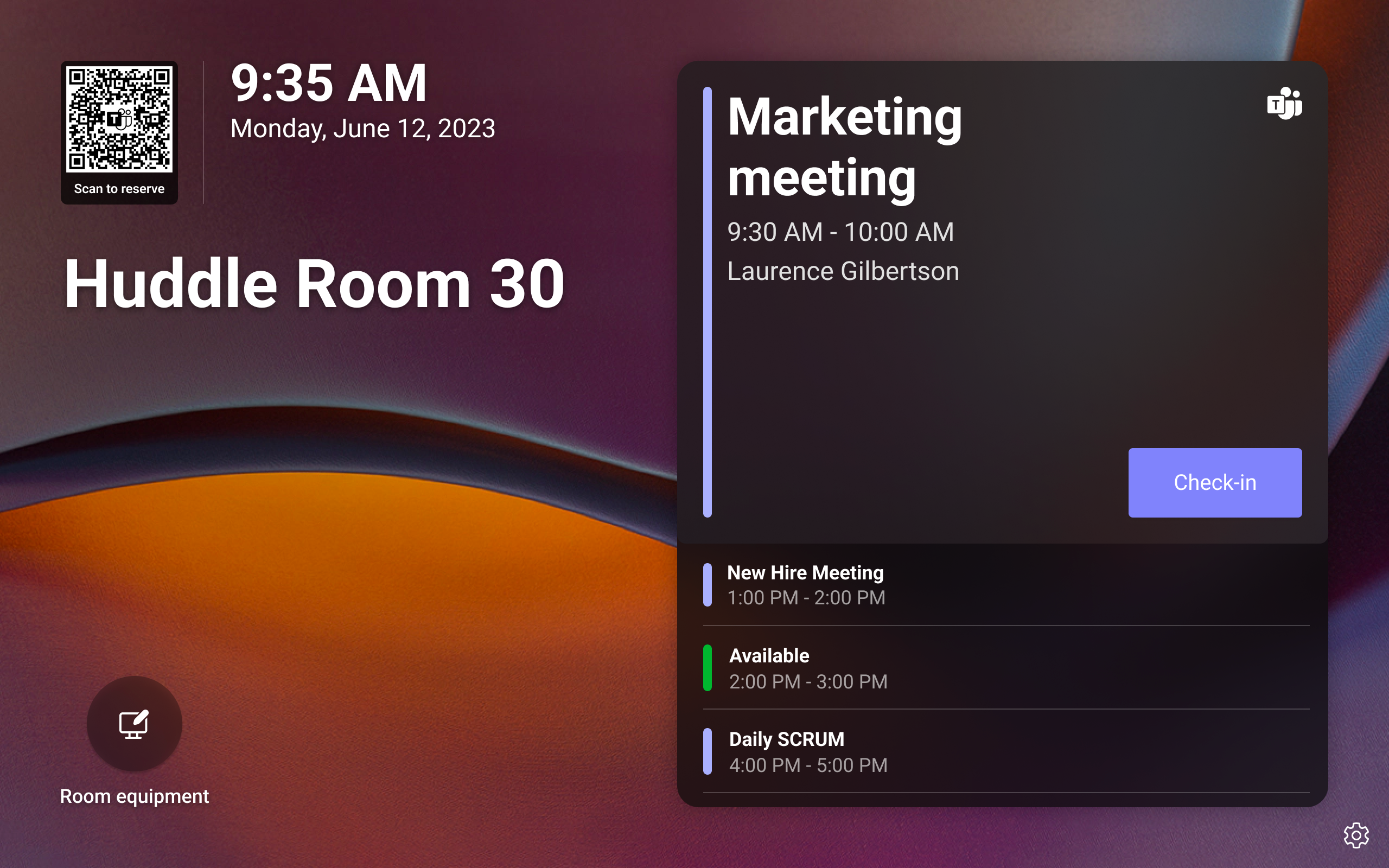
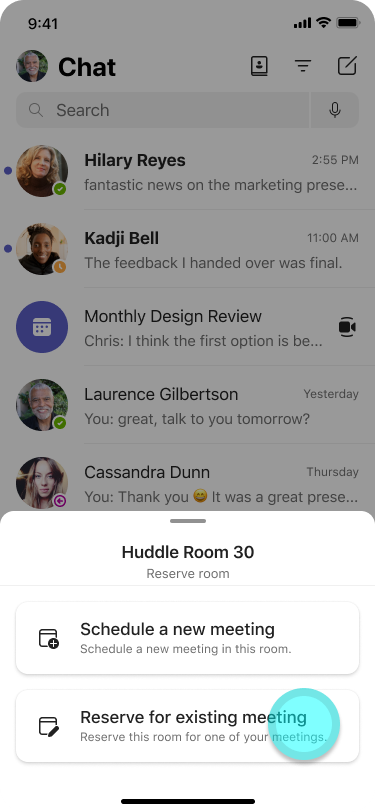
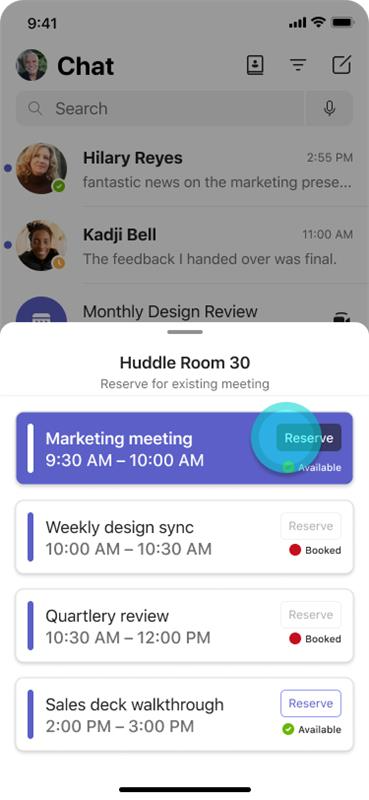
Updated October 16, 2023: We have updated the rollout timeline below. Thank you for your patience. With this update, Teams Panels will support reserving a room using a QR code. This feature lets Microsoft Teams users book a room for meetings now, in the future, or add the room to an existing meeting by scanning a QR code on the scheduling panel and using the Teams app on their Android or iOS mobile phones. All Teams Panels will have a QR code shown in the top left of the home screen. Panels users can either schedule a new meeting with the room pre-populated for them or easily see the room’s availability for their meetings and book the room with one click. This message is associated with Microsoft 365 Roadmap ID 129366 [When this will happen:] Rollout is expected to begin in late August 2023 (previously early August) and is expected to be complete by mid-November 2023 (previously late October). [How this will affect your organization:] In order to access this feature, be sure to have the most up-to-date release of Teams Panels from Teams Admin Center, a Teams Rooms Pro or Teams Shared Devices license assigned to the account on the Panel, and check that your users have access to the latest version of the Teams app on their mobile phones. Please note the following:
You can disable this feature on Teams Panels under Settings > Device settings > Teams Admin Settings > Meetings. To reserve the room:
[What you need to do to prepare:]
To prepare for this incoming feature, we strongly recommend communicating this new feature to your users and share instructions if needed. A recommended scanner for this feature is the mobile system/OS scanner on mobile phones. However, for Android, the scanning may not work if your users have both work and personal profiles on their Android phones. In this case, users will need to add mobile system/OS scanner in the work profile. To do that, follow the steps below:
In order to use this feature, make sure Teams Panels is on 1449/1.0.97.2023080401. iOS mobile phones will need to be on 5.15.0 or higher, and Android mobile phones will need to be on 1416/1.0.0.2023153001 or higher. For more information, please see: What’s new in Microsoft Teams devices – Microsoft Support |
| Machine Translation |
2023 年 10 月 16 日更新: 以下のロールアウト タイムラインを更新しました。お待ちいただきありがとうございます。 この更新プログラムでは、Teams パネルで QR コードを使用した会議室の予約がサポートされます。この機能を使用すると、Microsoft Teamsユーザーは、現在、将来の会議用に会議室を予約したり、スケジュール パネルで QR コードをスキャンして Android または iOS 携帯電話で Teams アプリを使用して既存の会議に会議室を追加したりできます。 すべてのチームパネルには、ホーム画面の左上にQRコードが表示されます。パネル ユーザーは、会議室が事前に入力された状態で新しい会議をスケジュールすることも、会議の会議室の空き状況を簡単に確認して、ワンクリックで会議室を予約することもできます。 このメッセージは、Microsoft 365 ロードマップ ID に関連付け られています129366 [これが起こるとき:] ロールアウトは 2023 年 8 月下旬 (以前は 8 月上旬) に開始され、2023 年 11 月中旬 (以前は 10 月下旬) までに完了する予定です。 [これが組織に与える影響:] この機能にアクセスするには、Teams 管理センターからの Teams パネルの最新リリース、パネルのアカウントに割り当てられている Teams Rooms Pro または Teams 共有デバイス ライセンスを用意し、ユーザーが携帯電話で最新バージョンの Teams アプリにアクセスできることを確認してください。 以下の点にご注意ください。
この機能は、[Teams パネル] の [設定] > [デバイスの設定] > [Teams 管理者設定] > 会議で無効にできます。 部屋を予約するには:
[準備するために必要なこと:]
この新機能に備えるために、この新機能をユーザーに伝え、必要に応じて手順を共有することを強くお勧めします。 この機能に推奨されるスキャナーは、携帯電話のモバイル システム/OS スキャナーです。ただし、Android の場合、ユーザーが Android スマートフォンに仕事用プロファイルと個人用プロファイルの両方を持っている場合、スキャンが機能しないことがあります。この場合、ユーザーは仕事用プロファイルにモバイル システム/OS スキャナーを追加する必要があります。これを行うには、以下の手順に従います。
この機能を使用するには、Teams パネルが 1449/1.0.97.2023080401 にあることを確認してください。iOS携帯電話は5.15.0以降、Android携帯電話は1416 / 1.0.0.2023153001以降である必要があります。 詳細については、「Microsoft Teams デバイスの新機能 – Microsoft サポート」を参照してください。 |