| MC684525 | Microsoft Purview compliance portal: Identify, add and preserve Teams channels as data locations in eDiscovery (Premium) |
|---|
| Classification | stayInformed |
|---|---|
| Last Updated | 10/26/2023 22:39:06 |
| Start Time | 10/26/2023 22:38:28 |
| End Time | 02/15/2024 08:00:00 |
| Message Content |
We are rolling out the capability to pick relevant Teams channels (Standard, Private, and Shared) as non-custodial data locations. This will intelligently identify associated custodian/group mailboxes and SharePoint sites related to the channel.
This message is associated with Microsoft 365 Roadmap ID 88815
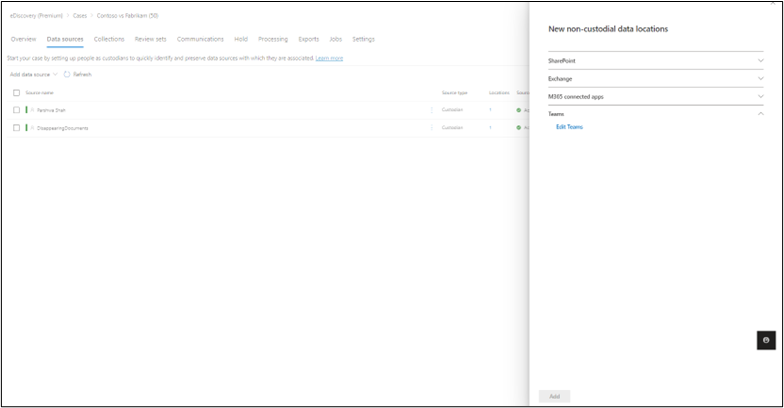
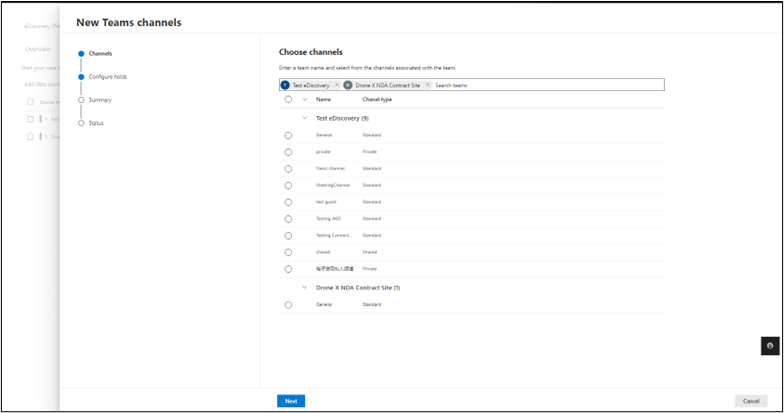
[When this will happen:] This is in Public Preview and the General Availability rollout will start in the last week of October and is expected to be complete by mid-November. [How this will affect your organization:] The ability to search for Teams and for select Teams channels to be added as non-custodial data sources will be available under the Data Sources > Add data locations >Teams option. You can search for and add up to 10 Teams at a time. You can select the Standard, Shared and Private channels under each Team to add as a data source. You can also select which associated locations you want to place on Hold.
eDiscovery users with the permission to add locations in the Data sources page will be able to add mailboxes and sites associated with Teams channel (including Standard, Shared and Private channels) as non-custodial data sources and preserve them.
[What you need to do to prepare:]
Assess if the changes will change your organization’s eDiscovery workflow. If so, update internal documentation. Provide training to all eDiscovery users in your organization and update relevant documentation if needed. |
| Machine Translation |
関連する Teams チャネル (標準、プライベート、共有) を非保管データの場所として選択する機能を展開しています。これにより、チャネルに関連する関連付けられた保管担当者/グループ メールボックスと SharePoint サイトがインテリジェントに識別されます。
このメッセージは、Microsoft 365 ロードマップ ID 88815 に関連付けられています
[これが起こるとき:] これはパブリック プレビュー段階であり、一般提供のロールアウトは 10 月の最終週に開始され、11 月中旬までに完了する予定です。 [これが組織に与える影響:] Teams を検索する機能と、非管理データ ソースとして追加する選択した Teams チャネルを検索する機能は、[データ ソース] > [データの場所の追加 >Teams ] オプションで使用できます。 一度に最大 10 個のチームを検索して追加できます。各チームの下にある標準、共有、およびプライベートチャネルを選択して、データソースとして追加できます。保留にする関連地域を選択することもできます。
[データ ソース] ページで場所を追加するアクセス許可を持つ電子情報開示ユーザーは、Teams チャネル (標準、共有、プライベート チャネルを含む) に関連付けられているメールボックスとサイトを非保管データ ソースとして追加し、保持できます。
[準備するために必要なこと:]
変更によって組織の電子情報開示ワークフローが変更されるかどうかを評価します。その場合は、内部ドキュメントを更新します。組織内のすべての電子情報開示ユーザーにトレーニングを提供し、必要に応じて関連ドキュメントを更新します。
|