| MC664866 | (Updated) Clipchamp Video Editor Launching to Microsoft 365 Commercial Accounts |
|---|
| Classification | stayInformed |
|---|---|
| Last Updated | 11/02/2023 21:11:29 |
| Start Time | 08/03/2023 22:09:01 |
| End Time | 12/18/2023 08:00:00 |
| Message Content |
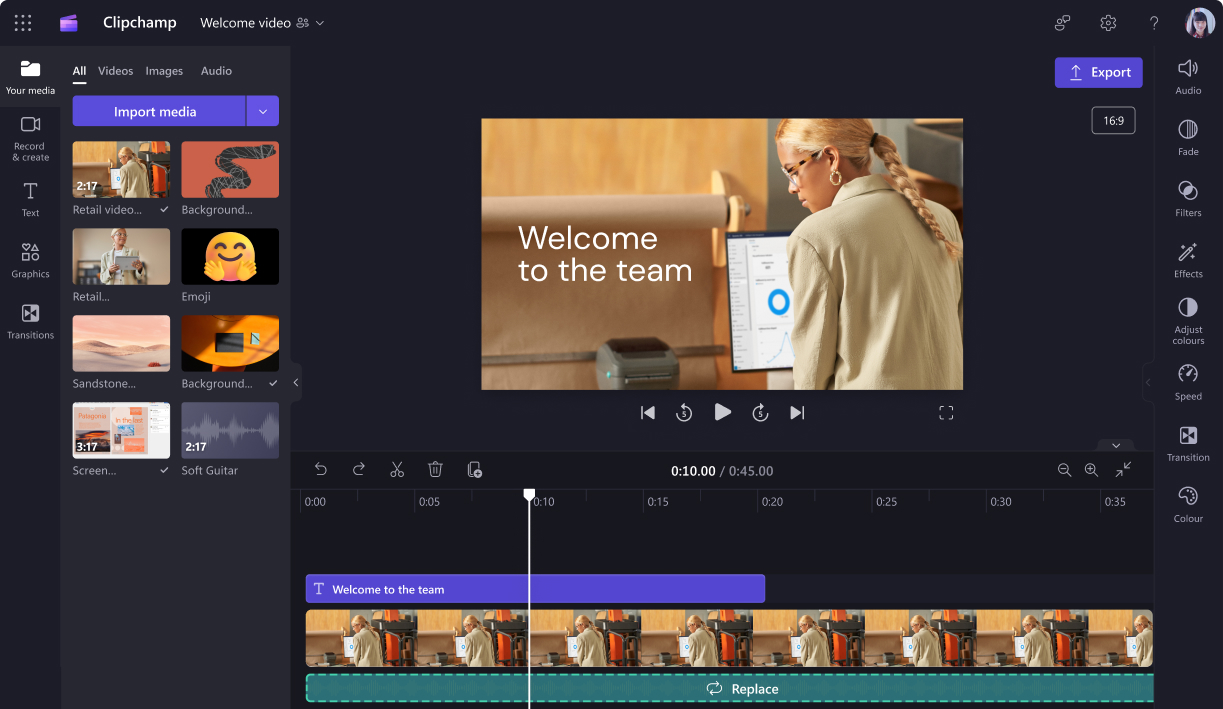
Updated November 2, 2023: We have updated the content with additional details. Thank you for your patience. Microsoft Clipchamp is launching for Microsoft 365 commercial accounts. You are receiving this message because users in your organization have Microsoft 365 licenses which enable access to Microsoft Clipchamp capabilities. This update will not impact any other parts of Microsoft 365 licenses or Microsoft 365 admin center. Clipchamp runs in the Edge or Chrome browser and is accessible via OneDrive or SharePoint on the web by creating a new Clipchamp video or editing an existing video. This message is associated with Microsoft 365 Roadmap ID 124826 [When this will happen:]
We will begin rolling out in late August 2023, and expect to be complete by mid-November 2023 (previously mid-October). [How this will affect your organization:]
Users with these licenses will have access to Clipchamp: Microsoft 365 E3, Microsoft 365 E5, Microsoft 365 Business Standard and Microsoft 365 Business Premium.
Clipchamp for work will be available from the following locations:
Clipchamp enables capabilities such as trimming or joining video recordings saved on OneDrive or SharePoint, adding text overlays, recording screen or webcam and more. All videos are stored securely on OneDrive or SharePoint for sharing. Watch the product overview or review the FAQs for more information. As part of rolling out Clipchamp to Microsoft 365 organizations, which we expect to complete by mid November 2023, the app is being progressively enabled for users with corresponding licenses. This secondary process is happening automatically and will continue until the end of December 2023. You have the option to enable Clipchamp for your users earlier than it would happen in the automatic enablement process as follows: In your Microsoft admin console, “Microsoft Clipchamp” has been added to the list of services available to your organization. You can manually enable the service for individual users or groups of users there. [What you need to do to prepare:] When this change takes effect, please make note of the new service plan names for your administrative records and ensure that you update any relevant provisioning documentation, as needed. Also, be aware that a Clipchamp application for Windows is included in new builds and updates of Windows 10 and 11. This Windows application currently is only available to personal Microsoft accounts. Until direct login support for work accounts arrives soon, work users will see a link to the Clipchamp in-browser experience when they launch the Clipchamp Windows application and are logged into Windows with their AAD account. |
| Machine Translation |
2023 年 11 月 2 日更新: コンテンツを更新し、詳細を追加しました。何卒ご理解のほどよろしくお願いいたします。 Microsoft Clipchamp は、Microsoft 365 商用アカウント向けにリリースされます。このメッセージが表示されるのは、組織内のユーザーが Microsoft Clipchamp 機能へのアクセスを可能にする Microsoft 365 ライセンスを持っているためです。この更新プログラムは、Microsoft 365 ライセンスまたは Microsoft 365 管理センターの他の部分には影響しません。 ClipchampはEdgeまたはChromeブラウザーで実行され、新しいClipchampビデオを作成するか、既存のビデオを編集することで、Web上のOneDriveまたはSharePointからアクセスできます。 このメッセージは、Microsoft 365 ロードマップ ID 124826に関連付けられています [これがいつ起こるか:]
2023 年 8 月下旬にロールアウトを開始し、2023 年 11 月中旬 (以前は 10 月中旬) までに完了する予定です。 [これが組織に及ぼす影響:]
これらのライセンスを持つユーザーは、Clipchamp(Microsoft 365 E3、Microsoft 365 E5、Microsoft 365 Business Standard、Microsoft 365 Business Premium)にアクセスできます。
Clipchamp for workは、以下の場所から入手できます。
Clipchampは、OneDriveやSharePointに保存されたビデオ録画のトリミングや結合、テキストオーバーレイの追加、画面やWebカメラの録画などの機能を可能にします。すべてのビデオは、共有のためにOneDriveまたはSharePointに安全に保存されます。詳細については、製品の概要をご覧いただくか、FAQをご覧ください。 2023年11月中旬までに完了する予定のMicrosoft 365組織へのClipchampのロールアウトの一環として、アプリは対応するライセンスを持つユーザーに対して段階的に有効になります。この 2 番目のプロセスは自動的に行われ、2023 年 12 月末まで継続されます。次のように、自動有効化プロセスよりも早くユーザーに対してClipchampを有効にするオプションがあります。 Microsoft管理コンソールで、組織で利用可能なサービスのリストに「Microsoft Clipchamp」が追加されています。そこで、個々のユーザーまたはユーザーのグループに対してサービスを手動で有効にすることができます。 [準備に必要なこと:] この変更が有効になったら、管理レコードの新しいサービス プラン名をメモし、必要に応じて関連するプロビジョニング ドキュメントを更新してください。 また、Windows 10 および 11 の新しいビルドと更新プログラムには、Windows 用の Clipchamp アプリケーションが含まれていることに注意してください。この Windows アプリケーションは、現在、個人の Microsoft アカウントでのみ使用できます。仕事用アカウントの直接ログインサポートが間もなく登場するまで、仕事用ユーザーがClipchamp Windowsアプリケーションを起動し、AADアカウントでWindowsにログインすると、Clipchampのブラウザ内エクスペリエンスへのリンクが表示されます。 |