| MC689499 | Data Loss Prevention – Admin Units support for DLP alerts in Microsoft 365 Defender portal |
|---|
| Classification | stayInformed |
|---|---|
| Last Updated | 11/14/2023 01:32:20 |
| Start Time | 11/14/2023 01:30:53 |
| End Time | 01/31/2024 08:00:00 |
| Message Content |
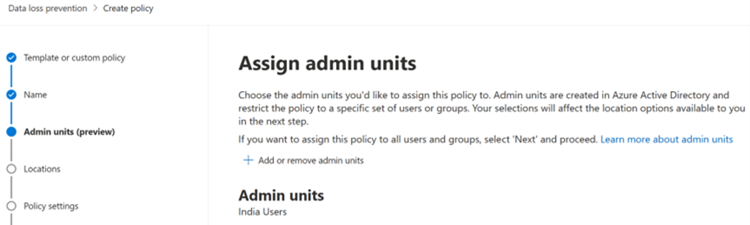
We’re recently released a new GA capability that enables admins to delegate management and remediation authority for different people in different regions or organization units with role-based access control (RBAC) via Azure Active Directory Administrative Units. For example, German Admin Unit investigators would be able to investigate alerts and audit events for only German users. With the GA rollout of this new feature, we are extending the Admin Units capability currently available in Microsoft Purview Information Protection and Data Loss Prevention (DLP) to DLP alerts in the Microsoft 365 Defender portal.
This message is associated with Microsoft 365 Roadmap ID 162292
[When this will happen:] Rollout will begin in mid-November and is expected to be complete by end of November. [How this will affect your organization:] If you choose to not use this Admin Units feature, there is no impact to your organization. If your organization requires delegations of tasks based on users in specific regions or organization units, please follow the steps to set up this capability: 1. Set up Administrative Units (AU) in Azure Portal 2. Ring-fence Purview Admin Permissions to Administrative Unit scopes 3. Create and manage Admin Unit scoped MIP/DLP policies 4. Investigate user scoped DLP Alerts, Incidents, and Logs in Purview and/or M365 Defender 5. Investigate user scoped Activities and events in Activity Explorer in Purview and/or Advanced Hunting in M365 Defender
[What you need to do to prepare:]
Get started with Information Protection and Data Loss Prevention in the Microsoft Purview compliance portal and Investigate data loss alerts with Microsoft 365 Defender | Microsoft Learn Learn more: Permissions in the Microsoft Purview compliance portal |
| Machine Translation |
最近、Azure Active Directory 管理単位を介してロールベースのアクセス制御 (RBAC) を使用して、管理者がさまざまなリージョンまたは組織単位のさまざまなユーザーに管理と修復の権限を委任できる新しい GA 機能がリリースされました。たとえば、ドイツの管理ユニットの調査担当者は、ドイツのユーザーのみのアラートと監査イベントを調査できます。 この新機能の GA ロールアウトにより、Microsoft Purview Information Protection とデータ損失防止 (DLP) で現在使用できる管理ユニット機能を、Microsoft 365 Defender ポータルの DLP アラートに拡張しています。
このメッセージは、Microsoft 365 ロードマップ ID 162292に関連付けられています
[これがいつ起こるか:] ロールアウトは11月中旬に開始され、11月末までに完了する予定です。 [これが組織に及ぼす影響:] この管理ユニット機能を使用しないことを選択した場合でも、組織への影響はありません。組織で特定の地域または組織部門のユーザーに基づいてタスクの委任が必要な場合は、手順に従ってこの機能を設定してください。 1. Azure Portal で管理単位 (AU) を設定する 2. 管理単位スコープに対する Purview 管理者のアクセス許可をリングフェンスする 3. 管理ユニット スコープの MIP/DLP ポリシーの作成と管理 4. Purview や M365 Defender でユーザー スコープの DLP アラート、インシデント、ログを調査する 5. Purview のアクティビティ エクスプローラーや M365 Defender の高度なハンティングで、ユーザー スコープのアクティビティとイベントを調査する
[準備に必要なこと:]
Microsoft Purview コンプライアンス ポータル で Information Protection と Data Loss Prevention の概要 と Microsoft 365 Defenderを使用してデータ損失アラートを調査する |Microsoft Learn (英語) 詳細情報: Microsoft Purview コンプライアンス ポータルのアクセス許可 |