| MC689500 | (Updated) OneDrive Open in App availablility |
|---|
| Classification | stayInformed |
|---|---|
| Last Updated | 11/17/2023 23:16:31 |
| Start Time | 11/14/2023 01:32:44 |
| End Time | 03/04/2024 08:00:00 |
| Message Content |
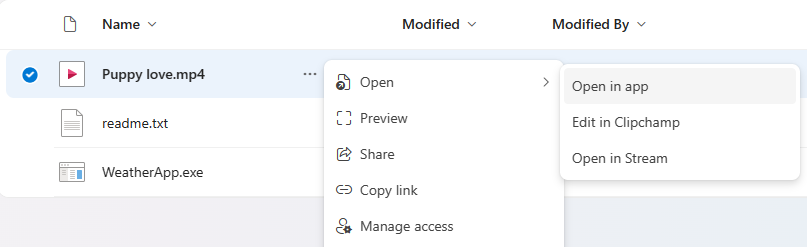
Updated November 17, 2023: We have updated the content below with additional information. In the same way that you can open a Word, PowerPoint, or Excel file in their respective desktop apps, you can now open any file in its desktop app, edit it, and the changes will sync to OneDrive. From OneDrive’s My Files or Sharepoint’s Documents, users can now select Open In App to open a file in its native app. Note: this feature is powered by OneDrive’s Sync Client C it requires having it installed on the user’s machine. In case it’s not running it will start it. This message is associated with Microsoft 365 Roadmap ID 124813 [When this will happen:] Targeted Release: We will begin rolling out in mid-November 2023. Standard Release: We will begin rolling out in early December 2023 and expect to complete by late January 2024. [How this will affect your organization:] Users can open any file in its desktop app, edit it, and the changes will sync to OneDrive. Note: You may encounter unexpected behavior when opening a file that depends on other files. We recommend syncing the containing folder using Add shortcut and trying again.
[What you need to do to prepare:]
You may consider updating your training and documentation as appropriate. |
| Machine Translation |
2023 年 11 月 17 日更新: 以下のコンテンツを更新し、追加情螭蜃芳婴筏蓼筏俊 Word、PowerPoint、または Excel ファイルをそれぞれのデスクトップ アプリで_くことができるのと同じ方法で、デスクトップ アプリで任意のファイルを_いて贰涓 OneDrive に同期されるようになりました。OneDrive の [マイ ファイル] または SharePoint の [ドキュメント] から、ユ`ザ`は [アプリで_く] をxkして、ネイティブ アプリでファイルを_くことができるようになりました。 注: このC能はOneDriveの同期クライアントを利用しており、ユ`ザ`のマシンにインスト`ルする必要があります。g行されていない龊悉稀⑵婴筏蓼埂 このメッセ`ジは、Microsoft 365 ロ`ドマップ ID 124813にvB付けられています [これがいつ起こるか:] 象リリ`ス: 2023 年 11 月中旬にロ`ルアウトを_始します。 圣辚戛`ス: 2023 年 12 月上旬にロ`ルアウトを_始し、2024 年 1 月下旬までに完了する予定です。 [これがMに及ぼす影:] ユ`ザ`はデスクトップ アプリで任意のファイルを_いて扦涓谌荬 OneDrive に同期されます。 注: 他のファイルに依存するファイルを_くと、予期しない幼鳏k生することがあります。 [ショ`トカットの追加] を使用して含まれているフォルダ`を同期し、もう一度すことをお幛幛筏蓼埂
[浃吮匾胜长:]
必要にじて、トレ`ニングとドキュメントの更新を视してください。 |