SHD / MC Checker

MC550081 | (Updated) Microsoft Teams: New Channels Experience


MC550081 | (Updated) Microsoft Teams: New Channels Experience

Classification planForChange
Last Updated 11/30/2023 19:16:00
Start Time 05/03/2023 21:10:04
End Time 03/18/2024 07:00:00
Message Content

Updated November 30, 2023: We have updated the rollout timeline below. Thank you for your patience.

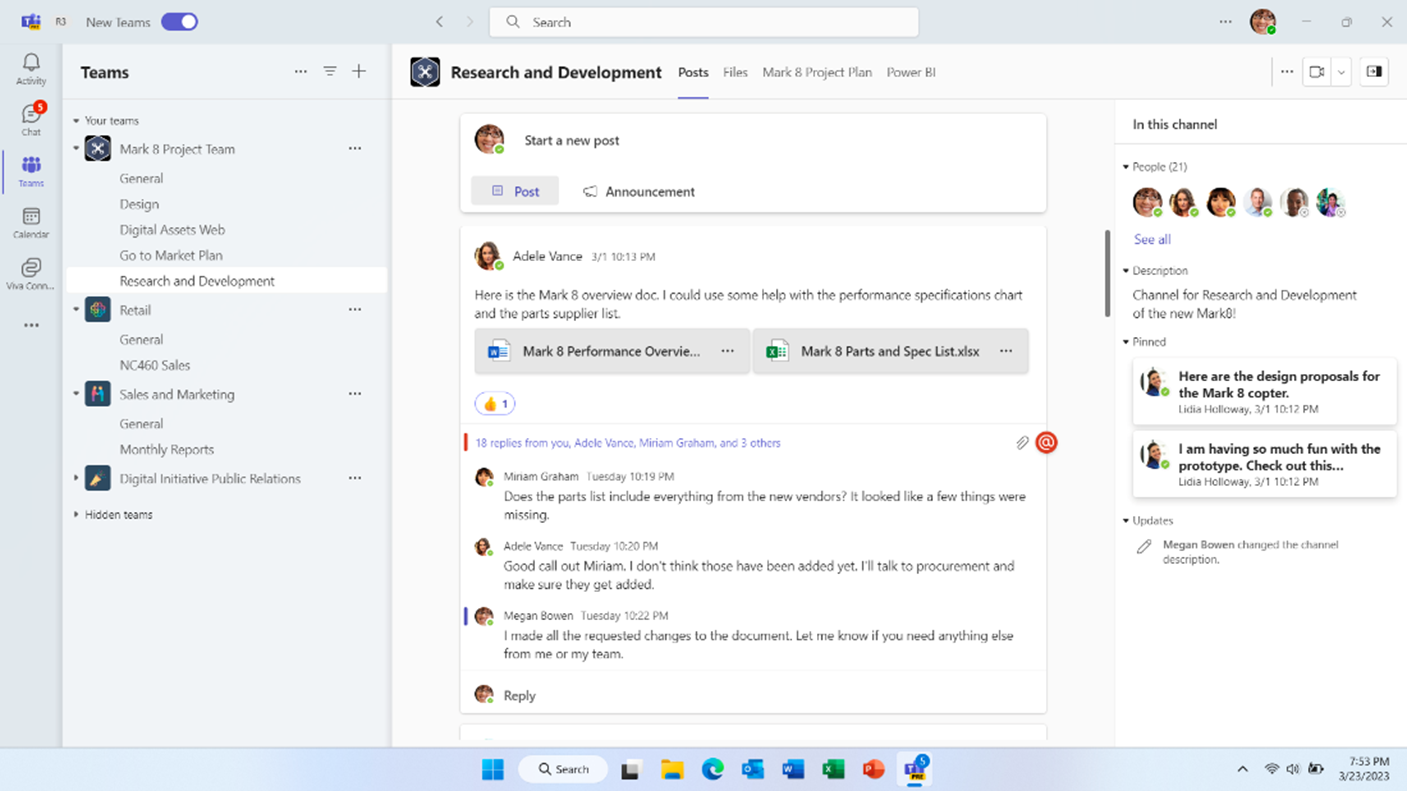
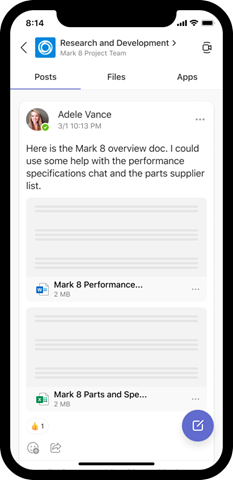
A new channels experience in Microsoft Teams has been built with an intuitive design that allows teams to focus and stay on tasks, bring everyone up to speed, and actively engage in real-time. The following features will be rolling out:  

  • The compose box and recent posts will appear at the bottom (previously top) of the channel by default. Users can configure channels to show new posts at the top via the more options … menu the top of the channel. It’ll now be much easier to start a new post, keep up with the latest conversations and participate – giving users the confidence that they’ve not missed anything. 
  • Every post is now a true conversation that users can focus on. Users can navigate to a conversation view that makes the discussion more engaging and synchronous, just like a chat. Users can also pop out the post, keep an eye on the discussion, while continuing to work on other topics. 
  • A streamlined information pane will include all the important contextual information like channel’s members and pinned posts so new team members can quickly on-board and for all members to find the information they need, right in the channel.
  • Pin posts to make it easy for everyone to know what’s important in the channel and quickly reference it. 
  • Simplified badging is making it easier for users to understand when there are new unread activities in teams. In addition, the simplified design helps users focus on the specific channels which requires the most attention, like channels in which the user was @mentioned. 

This message is associated with Microsoft 365 Roadmap ID 91683

[When this will happen:]

Targeted Release: Started rolling out in May and is expected to complete in late August 2023 (previously early July). Complete

Standard: We will begin rollout in early October 2023 (previously mid-September) and expect to complete rollout by late October 2023 (previously mid-August). Complete

GCC, GCC High, and DoD: We will begin rollout in mid-December 2023 and complete in early February 2024.

[How this will affect your organization:]

Users in your organization will not need to make any changes and will get the new channels experience by default.


[What you need to do to prepare:]

Admins will not need to make any changes. 

Machine Translation

2023 年 11 月 30 日更新: 以下のロールアウト タイムラインを更新しました。何卒ご理解のほどよろしくお願いいたします。

Microsoft Teams の新しいチャネル エクスペリエンスは、チームがタスクに集中して継続し、全員がスピードを上げ、リアルタイムで積極的に関与できる直感的なデザインで構築されています。次の機能がローリングされます。  

  • 作成ボックスと最近の投稿は、デフォルトでチャンネルの下部(以前は上部)に表示されます。ユーザーは、その他のオプションを使用して、新しい投稿を上部に表示するようにチャネルを構成できます…メニュー チャンネルの上部。新しい投稿を開始したり、最新の会話を把握したり、参加したりするのがはるかに簡単になり、ユーザーは何も見逃していないという自信を得ることができます。 
  • すべての投稿は、ユーザーが集中できる真の会話になりました。ユーザーは、チャットと同じように、ディスカッションをより魅力的で同期的にする会話ビューに移動できます。ユーザーは、他のトピックの作業を続けながら、投稿をポップアウトしてディスカッションを監視することもできます。 
  • 合理化された情報ウィンドウには、チャネルのメンバーやピン留めされた投稿など、すべての重要なコンテキスト情報が含まれるため、新しいチーム メンバーはすばやくオンボーディングでき、すべてのメンバーはチャネル内で必要な情報を見つけることができます。
  • 投稿をピン留めすると、チャンネル内の重要な内容を全員が簡単に把握し、すばやく参照できます。 
  • 簡略化されたバッジにより、Teams に新しい未読のアクティビティがある場合にユーザーが理解しやすくなります。さらに、簡素化された設計により、ユーザーは、ユーザーが@mentionedしたチャネルなど、最も注意が必要な特定のチャネルに集中できます。 

このメッセージは、Microsoft 365 ロードマップ ID 91683 に関連付けられています

[これがいつ起こるか:]

対象指定リリース: 5 月にロールアウトを開始し、2023 年 8 月下旬 (以前は 7 月上旬) に完了する予定です。完成

標準: 2023 年 10 月上旬 (以前は 9 月中旬) にロールアウトを開始し、2023 年 10 月下旬 (以前は 8 月中旬) までにロールアウトを完了する予定です。完成

GCC、GCC High、DoD: 2023 年 12 月中旬にロールアウトを開始し、2024 年 2 月上旬に完了する予定です。

[これが組織に及ぼす影響:]

組織内のユーザーは変更を加える必要はなく、既定で新しいチャネル エクスペリエンスを取得します。


[準備に必要なこと:]

管理者は変更を加える必要はありません。