| MC694647 | User experience improvements and persistent views in Threat Explorer by Microsoft Defender for Office 365 |
|---|
| Classification | stayInformed |
|---|---|
| Last Updated | 12/01/2023 00:57:04 |
| Start Time | 12/01/2023 00:56:47 |
| End Time | 02/26/2024 08:00:00 |
| Message Content |
As part of our user experience enhancements, we will be rolling out the following improvements to the user experience of Threat Explorer by Microsoft Defender for Office 365:
[When this will happen:] Preview: We will begin the private preview by early December 2023 and will finish the rollout by mid-December 2023. Standard Release: We will begin the worldwide rollout by late December 2023 and will finish the rollout by mid-January 2024. [How this will affect your organization:] 1. Persistent views: Explorer allows users to select the columns they want to see on the data grid and the columns they want to export as per their need and supporting data that they are looking for to investigate their cases and hunt for threats. We have enhanced this experience to allow users to save these preferences, and the saved preferences will be used in consecutive actions.
2. Navigation between URL Clicks and All email tab: The recently added URL clicks tab allow users to see end user clicks on URLs across emails, Teams messages, and documents shared across SPO/OD. Users will be able to navigate between the URL clicks tab and the All email tab of Explorer, allowing users to be more effective and efficient while hunting via clicks on malicious URLs.
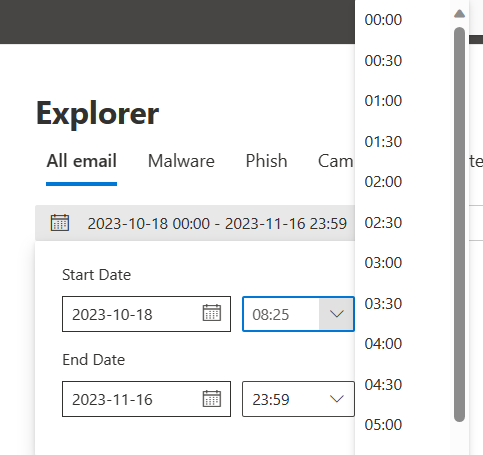
3. Custom inputs for timestamp filter: The timestamp filter in Explorer will now allow users to input time ranges along with the current filter where users can select the time range from the dropdown options. Since the current dropdown allows users to select a time range in increments of 30 minutes only, this enhancement will allow users to manually enter more granular time ranges to narrow down the searches per their requirements.
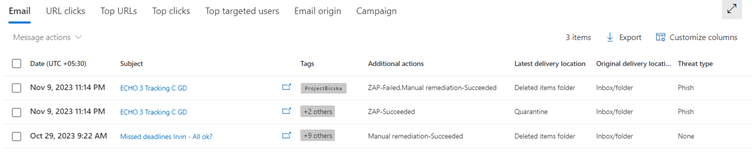
4. Remediation action results in Explorer: SOC teams have direct and in-line visibility into manual remediation, quarantine release, and system post-delivery actions like ZAP and reprocessed messages (for FP recovery) in Threat Explorer’s result set. The result of the action will be appended to the action name for respective actions in the Additional Actions column of Threat Explorer.
[What you need to do to prepare:] You do not have to do anything to prepare.
|