| MC695492 | SharePoint Tables: New Accessibility Labels |
|---|
| Classification | stayInformed |
|---|---|
| Last Updated | 12/04/2023 23:43:51 |
| Start Time | 12/04/2023 23:43:33 |
| End Time | 03/04/2024 08:00:00 |
| Message Content |
Accessibility improvements to SharePoint tables within the text webpart allow users to specify row and column layouts, as well as provide alternative text labels for screen readers. This message is associated with Microsoft 365 Roadmap ID 184511
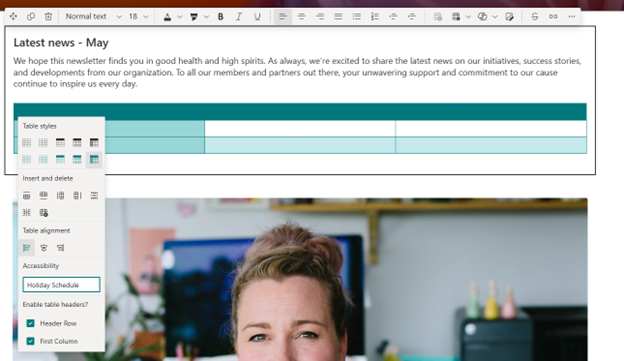
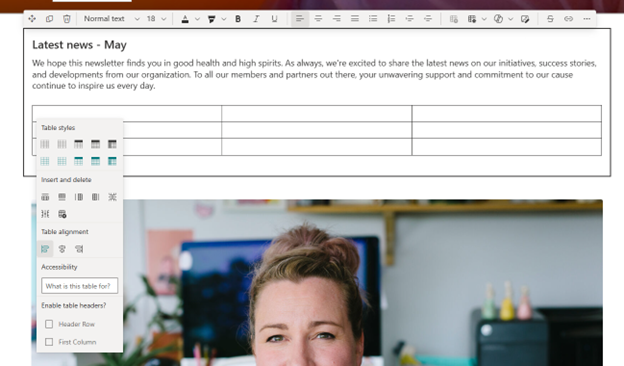
[When this will happen:] This update will begin rolling out in early January 2024 and should complete for all customers by the end of January 2024. [How this will affect your organization:] Authors of SharePoint pages can now make their tables accessible by providing custom labels and indicating heading rows. To access the table accessibility menu, right click into any cell. Here, you can input an accessibility title, and specify which rows or columns function as headers. This is useful to screen reader users because it allows them to know how your data is categorized. You can see this menu in Figure 1 below.
When you apply a style to your table, the rows and columns that function as headers in that style are marked accordingly automatically. You can give your table an accessibility label to communicate context of your table. This label will only surface when read aloud by the screen reader. Both features can be seen implemented in figure 2 below.
[What you need to do to prepare:] You do not need to do anything to prepare for this update, but you may want to let your users know about this improvement. |
| Machine Translation |
テキスト Web パーツ内の SharePoint テーブルに対するアクセシビリティの向上により、ユーザーは行と列のレイアウトを指定したり、スクリーン リーダーに代替テキスト ラベルを提供したりできます。 このメッセージは、Microsoft 365 ロードマップ ID 184511に関連付けられています
[これがいつ起こるか:] この更新プログラムは 2024 年 1 月上旬にロールアウトを開始し、2024 年 1 月末までにすべてのお客様に対して完了する予定です。 [これが組織に及ぼす影響:] SharePoint ページの作成者は、カスタム ラベルを提供し、見出し行を示すことで、テーブルにアクセスできるようにできるようになりました。 表のアクセシビリティ メニューにアクセスするには、任意のセルを右クリックします。ここでは、アクセシビリティのタイトルを入力し、ヘッダーとして機能する行または列を指定できます。これは、データがどのように分類されているかを知ることができるため、スクリーンリーダーのユーザーにとって便利です。このメニューは、下の図 1 に示されています。
表にスタイルを適用すると、そのスタイルのヘッダーとして機能する行と列が自動的にマークされます。テーブルにアクセシビリティ ラベルを付けて、テーブルのコンテキストを伝えることができます。このラベルは、スクリーンリーダーで読み上げられた場合にのみ表示されます。両方の機能が実装されているのを以下の図2に示します。
[準備に必要なこと:] この更新プログラムの準備のために何もする必要はありませんが、この改善についてユーザーに知らせることをお勧めします。 |