| MC678068 | (Updated) Introducing Left Navigation Customization on Microsoft365.com |
|---|
| Classification | stayInformed |
|---|---|
| Last Updated | 01/09/2024 18:59:08 |
| Start Time | 09/28/2023 22:23:16 |
| End Time | 04/29/2024 08:00:00 |
| Message Content |
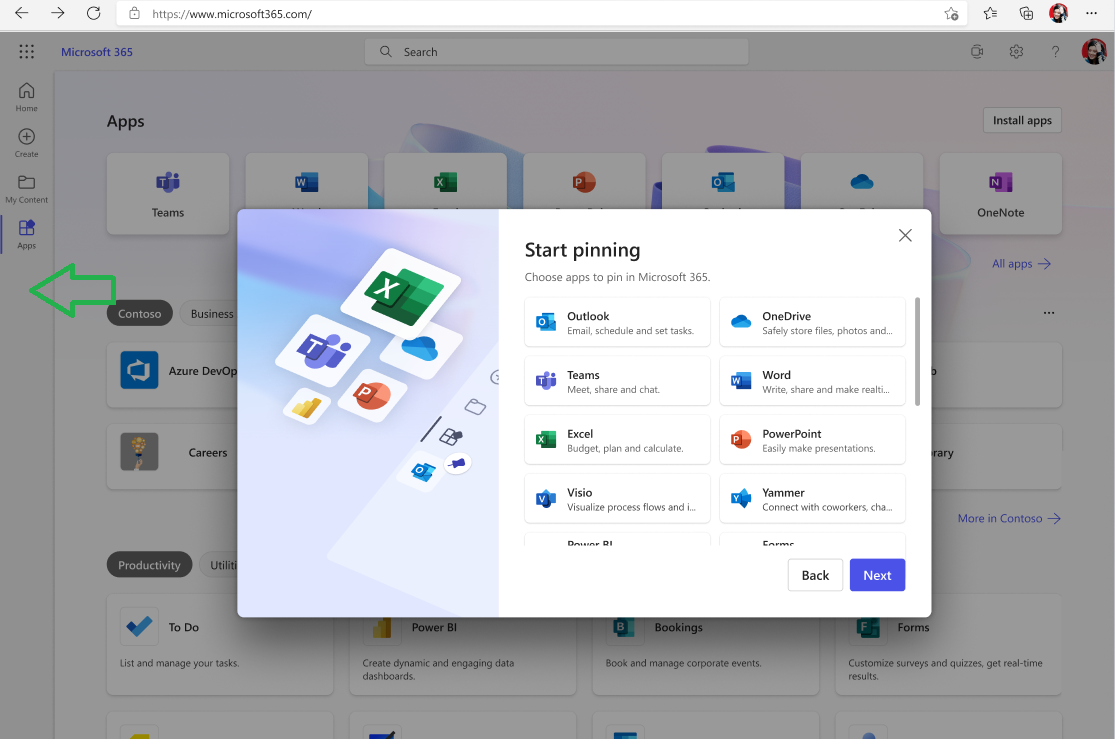
Updated January 9, 2024: We have updated the rollout timeline below. Thank you for your patience. We are excited to announce a new feature that will allow individuals to customize the apps on the left navigation on microsoft365.com. This feature will give individuals more control and flexibility over the apps they use and access frequently. [When this will happen:] We will begin rolling this feature out in early October 2023 and will complete by late March 2024 (previously late January). [How this will affect your organization:] As part of this feature, the current set of default apps on the app bar will be removed and users will be presented with an experience allowing them to pin the specific apps they want. Users will be able to add and remove apps to the left navigation from the Apps page at Microsoft365.com/apps. Admins will not be able to manage or override the user’s app choices.
[What you need to do to prepare:] No required preparation for this change. Training and documentation may need to be updated as appropriate. |
| Machine Translation |
2024 年 1 月 9 日更新: 以下のロールアウト タイムラインを更新しました。何卒ご理解のほどよろしくお願いいたします。 個人が microsoft365.com の左側のナビゲーションでアプリをカスタマイズできる新機能を発表できることを嬉しく思います。この機能により、個人は頻繁に使用およびアクセスするアプリをより詳細に制御し、柔軟に操作できるようになります。 [これがいつ起こるか:] この機能は 2023 年 10 月上旬にロールアウトを開始し、2024 年 3 月下旬 (以前は 1 月下旬) までに完了する予定です。 [これが組織に及ぼす影響:] この機能の一環として、アプリ バーの既定のアプリの現在のセットが削除され、ユーザーには、必要な特定のアプリをピン留めできるエクスペリエンスが表示されます。ユーザーは、Microsoft365.com/apps の [アプリ] ページから左側のナビゲーションにアプリを追加および削除できます。管理者は、ユーザーのアプリの選択を管理または上書きすることはできません。
[準備に必要なこと:] この変更の準備は必要ありません。トレーニングとドキュメントは、必要に応じて更新する必要がある場合があります。 |