| MC515530 | New Sensitivity Labeling Bar in Microsoft 365 Apps for Enterprise |
|---|
| Classification | stayInformed |
|---|---|
| Last Updated | 2/15/2023 3:43:28 AM |
| Start Time | 2/15/2023 3:43:12 AM |
| End Time | 4/30/2023 7:00:00 AM |
| Message Content |
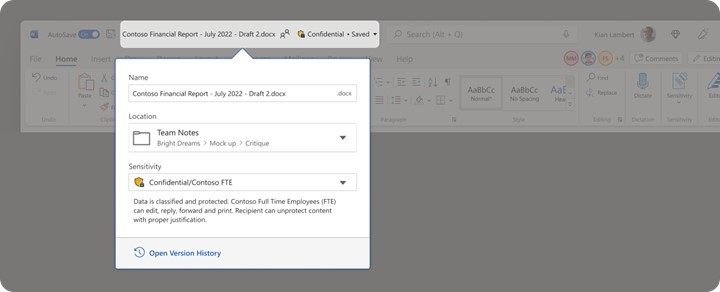
For organizations who rely on sensitivity labels from Microsoft Purview to protect their documents, a new feature is rolling out that makes it easier for end users to see or change sensitivity labels for files and emails in Word, Excel, PowerPoint, and Outlook on PC. The new sensitivity bar is conveniently located in your document?s name or your email?s subject line, making it easier to stay aware of your content?s sensitivity. This bar provides an at-a-glance, familiar, and actionable indicator of the content?s sensitivity label. This message is associated with Microsoft 365 Roadmap ID 88517 [When this will happen:] Preview (Word, Excel, PowerPoint): Already available in Current Channel Preview. Preview (Outlook): We will begin rolling out in mid-February. Standard Release (Word, Excel, PowerPoint, Outlook): We will begin rolling out in mid-March and expect to complete rollout by late March. [How this will affect your organization:] End users will see the new sensitivity bar added in their apps, using the same sensitivity labels and policies already defined for the user. If sensitivity labels are configured with a label color, this will be shown alongside the label name.
[What you need to do to prepare:]
The sensitivity bar will be enabled automatically for all users who have sensitivity labels published to them. Admins can configure an advanced label policy setting “HideBarByDefault” to minimize the amount of space used by the sensitivity bar. Please refer to the blog for screenshots and user scenarios.
|
| 機械翻訳 |
ドキュメントを保護するために Microsoft Purview の秘密度ラベルに依存している組織向けに、エンド ユーザーが PC、Word、Excel、PowerPoint、および Outlook でファイルと電子メールの秘密度ラベルを簡単に表示または変更できるようにする新機能が展開されています。 新しい感度バーは、ドキュメントの名前または電子メールの件名に便利に配置されているため、コンテンツの機密性を簡単に把握できます。このバーは、コンテンツの秘密度ラベルのひとめで、使い慣れた、実用的なインジケーターを提供します。 このメッセージは、Microsoft 365 ロードマップ ID 88517 に関連付けられています。 [これが起こるとき:] プレビュー (Word、Excel、PowerPoint): 最新チャネル プレビューで既に利用可能です。 プレビュー (見通し): 2 月中旬にロールアウトを開始します。 標準リリース (Word、Excel、PowerPoint、Outlook): ロールアウトは 3 月中旬に開始され、3 月下旬までにロールアウトを完了する予定です。 [これが組織に与える影響:] エンド ユーザーには、ユーザーに対して既に定義されているのと同じ秘密度ラベルとポリシーを使用して、アプリに追加された新しい秘密度バーが表示されます。秘密度ラベルがラベルの色で構成されている場合は、ラベル名の横に表示されます。
[準備するために必要なこと:]
秘密度バーは、秘密度ラベルが公開されているすべてのユーザーに対して自動的に有効になります。管理者は 、高度なラベルポリシー設定 “HideBarByDefault” を構成して、秘密度バーで使用される領域の量を最小限に抑えることができます。スクリーンショットとユーザー シナリオについては、 ブログ を参照してください。
|