| MC516906 | Take Action on Meeting Category Insights in the Viva Insights app in Teams and on the web |
|---|
| Classification | stayInformed |
|---|---|
| Last Updated | 2/17/2023 1:20:29 AM |
| Start Time | 2/17/2023 1:20:18 AM |
| End Time | 4/30/2023 7:00:00 AM |
| Message Content |
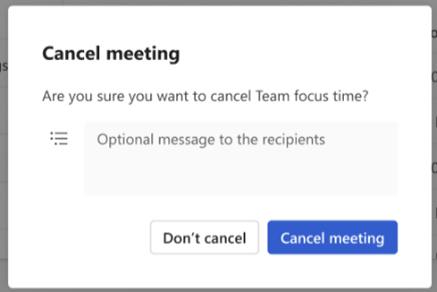
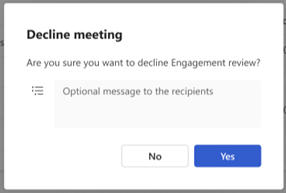
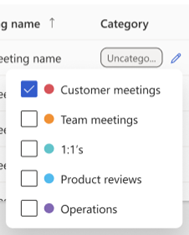
Categories in Outlook and Teams allow users to easily tag and label calendar events. Users can get insights on the time they spend per meeting category in the Viva Insights app in Teams. Using meeting category insights, they can see how their meeting time is distributed (percentage breakdown), how that has changed (meeting trends), and details about each of their meetings contributing to their categories (meeting details). An upcoming update to this feature will allow users to take actions on these meetings to align their time spent in meetings with their goals. These actions include viewing/editing meeting invites, cancelling, declining, and categorizing/recategorizing. This message is associated with Microsoft 365 Roadmap ID 117374 [When will this happen:] We will begin rolling out in early March and expect to complete rollout by late March. [How will this affect your organization:] Users with a Viva Insights subscription are eligible for meeting category insights, including the upcoming release of actions. Users who have not categorized any meetings between the last 3 months and next 4 weeks will not be able to view meeting category insights in the Viva Insights app but will have access to them once they categorize any meetings in this time period. Users without a Viva Insights subscription will not be able to view meeting category insights.
Users will be able to:
[What do you need to do to prepare:] Viva Insights documentation will be updated in sync with this release: Effective meetings in Viva Insights | Microsoft Learn. Review and assess impact for your organization. Consider updating documentation as appropriate. To categorize meetings in Outlook to access these insights, see the following: Assign a color category to a calendar appointment, meeting, or event |
| 機械翻訳 |
Outlook と Teams のカテゴリを使用すると、ユーザーは予定表イベントに簡単にタグを付けてラベルを付けることができます。ユーザーは、Teams のViva インサイト アプリで会議カテゴリごとに費やした時間に関する分析情報を取得できます。会議カテゴリの分析情報を使用して、会議時間がどのように配分されているか (割合の内訳)、それがどのように変化したか (会議の傾向)、およびカテゴリに貢献している各会議の詳細 (会議の詳細) を確認できます。この機能の今後の更新により、ユーザーはこれらの会議に対してアクションを実行して、会議に費やした時間を目標に合わせることができます。これらのアクションには、会議出席依頼の表示/編集、キャンセル、辞退、分類/再分類が含まれます。 このメッセージは、Microsoft 365 ロードマップ ID に関連付けられています117374 [これはいつ起こりますか:] 3 月上旬にロールアウトを開始し、3 月下旬までにロールアウトを完了する予定です。 [これは組織にどのように影響しますか:] Viva インサイト サブスクリプション を持つユーザーは、今後のアクションのリリースを含む、会議カテゴリの分析情報の対象となります。過去 3 か月から今後 4 週間の間に会議を分類していないユーザーは、Viva インサイトアプリで会議カテゴリの分析情報を表示できませんが、この期間に会議を分類すると、それらにアクセスできるようになります。Viva インサイトサブスクリプションのないユーザーは、会議カテゴリの分析情報を表示できません。
ユーザーは次のことができるようになります。
[準備するために何をする必要がありますか:] Viva インサイトのドキュメントは、このリリースと同期して更新されます: Viva インサイトでの効果的な会議 |マイクロソフトは学ぶ。組織への影響を確認および評価します。必要に応じてドキュメントを更新することを検討してください。 Outlook で会議を分類してこれらの分析情報にアクセスするには、以下を参照してください。 予定表の予定、会議、またはイベントに色分類項目を割り当てる |