| MC708499 | (Updated) Microsoft Teams: Allow meeting participants to create Collaborative notes |
|---|
| Classification | stayInformed |
|---|---|
| Last Updated | 02/08/2024 22:35:42 |
| Start Time | 01/20/2024 00:09:51 |
| End Time | 05/06/2024 07:00:00 |
| Message Content |
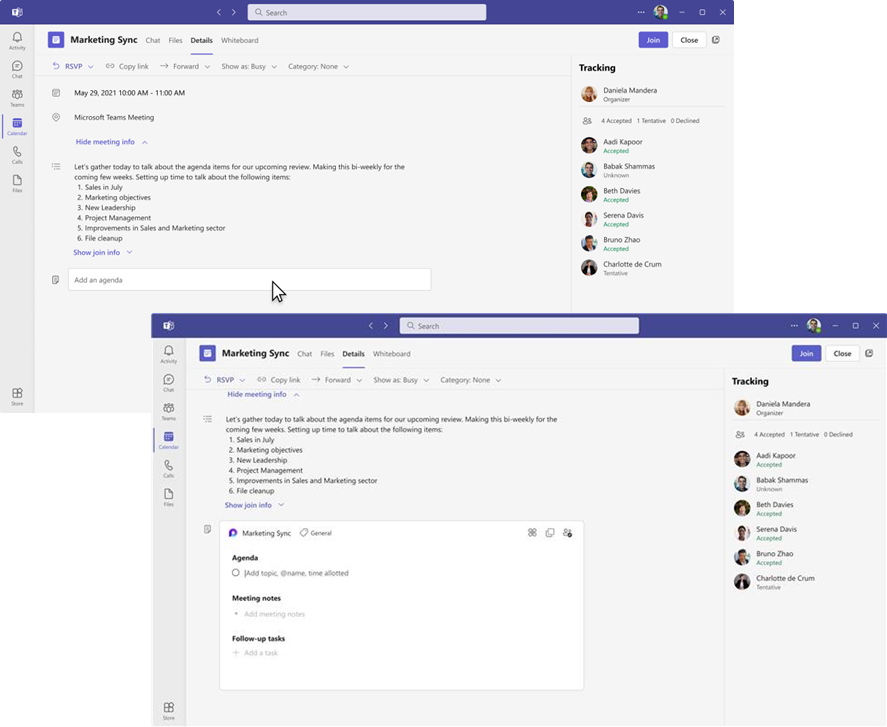
Updated February 8, 2024: We have updated the rollout timeline below. Thank you for your patience. Currently, only Microsoft Teams meeting organizers can create Collaborative notes before and after meetings. We are rolling out enhanced Collaborative notes that allow any meeting invitee to create notes before, during, and after the meeting. This enhancement helps to improve collaboration and efficiency and provides a seamless teamwork experience. This message is associated with Microsoft 365 Roadmap ID 374515. [When this will happen:] Targeted Release: We will begin rolling out early February 2024 and expect to complete by late February 2024 (previously mid-February) Standard Release: We will begin rolling out late February 2024 and expect to complete by mid-March 2024. [How this will affect your organization:] In the Teams app, meeting invitees can add what they want to discuss (Agenda), what they discuss (Meeting notes), and what they need to follow up on (Follow-up tasks) on the Teams calendar meeting details page before, during, and after meetings. However, only meeting organizers can hide the notes once created. The Meeting notes will be shown on the right pane of the meeting window, and they can be opened in the browser or on a second monitor. Participants can continue real-time collaboration in meetings. When participants are assigned a task, they will also receive an email notification, synced with Planner and To Do apps. After the meeting, Collaborative notes will be accessible for all participants on the Teams calendar meeting details page. The Agenda, Meeting notes, and Follow-up tasks are a Loop component, so they can be copied easily into chats, group chats, emails, and other documents.
You can manage this feature via Microsoft SharePoint PowerShell with: Set-SPOTenant -IsCollabMeetingNotesFluidEnabled (boolean) Learn more about admin controls for managing Loop experiences: Manage Loop workspaces in SharePoint Embedded | Microsoft Learn [What you need to do to prepare:] No action is needed to prepare for this change. You may want to notify your users about this change and update any relevant documentation as appropriate. |
| Machine Translation |
2024 年 2 月 8 日更新: 以下のロールアウト タイムラインを更新しました。何卒ご理解のほどよろしくお願いいたします。 現在、Microsoft Teams 会議の開催者のみが、会議の前後に共同作業メモを作成できます。会議の招待者が会議の前、最中、後にメモを作成できるように、強化された 共同作業メモを展開しています。この機能強化により、コラボレーションと効率が向上し、シームレスなチームワーク エクスペリエンスが提供されます。 このメッセージは、Microsoft 365 ロードマップ ID 374515に関連付けられ ています。 [これがいつ起こるか:] 対象リリース: 2024 年 2 月上旬にロールアウトを開始し、2024 年 2 月下旬 (以前は 2 月中旬) までに完了する予定です 標準リリース: 2024 年 2 月下旬にロールアウトを開始し、2024 年 3 月中旬までに完了する予定です。 [これが組織に及ぼす影響:] Teams アプリでは、会議の招待者は、会議の前、最中、後に Teams カレンダーの会議の詳細ページで、話し合いたい内容 (議題)、議論の内容 (会議メモ)、フォローアップする必要がある内容 (フォローアップ タスク) を追加できます。ただし、作成したメモを非表示にできるのは会議の開催者だけです。会議メモは会議ウィンドウの右側のペインに表示され、ブラウザまたはセカンドモニターで開くことができます。参加者は、会議でリアルタイムのコラボレーションを継続できます。参加者にタスクが割り当てられると、Planner および To Do アプリと同期された電子メール通知も受信します。 会議後、Teams 予定表会議の詳細ページですべての参加者が 共同作業メモ にアクセスできるようになります。議題、議事録、フォローアップタスクはループコンポーネントであるため、チャット、グループチャット、メール、その他のドキュメントに簡単にコピーできます。
この機能は、Microsoft SharePoint PowerShell を使用して管理できます。 Set-SPOTenant -IsCollabMeetingNotesFluidEnabled (ブール値) ループ エクスペリエンスを管理するための管理者コントロールの詳細については、「 SharePoint Embedded でループ ワークスペースを管理する |Microsoft Learn (英語) [準備に必要なこと:] この変更に備えるためのアクションは必要ありません。この変更についてユーザーに通知し、必要に応じて関連ドキュメントを更新することをお勧めします。 |