| MC718755 | Microsoft 365: Release of In-Person Events (IPE) including Hybrid RSVPing (HRSVP) |
|---|
| Classification | stayInformed |
|---|---|
| Last Updated | 02/23/2024 23:11:12 |
| Start Time | 02/23/2024 23:09:24 |
| End Time | 05/27/2024 07:00:00 |
| Message Content |
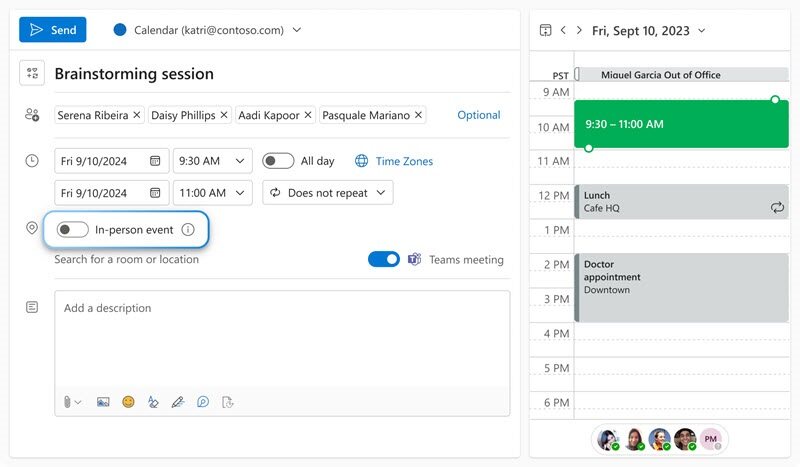
In March 2024, we will release a new feature called In-Person Events (IPE), which includes Hybrid RSVPing (HRSVP). IPE will help users effectively schedule in-person meetings. This message is associated with Microsoft 365 Roadmap ID 322590
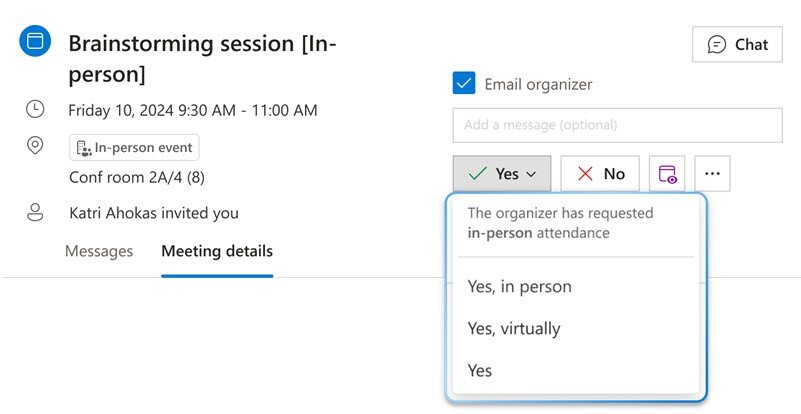
[When this will happen:] Worldwide: We will begin rolling out late March 2024 and expect to complete by mid-April 2024. [How this will affect your organization:] Both meeting organizers and attendees will have new functionalities at their disposal. While scheduling meetings, organizers will be able to request in-person attendance via a new “in-person event” toggle. While responding (RSVP) to in-person meeting invites, attendees will be able to confirm whether they can participate in-person or only participate virtually/online. For not-in-person invites, the RSVP options will continue to be the same. These new functionalities will only be available on Microsoft Outlook on the Web (OWA) and the new Outlook Desktop for Windows.
[What you need to do to prepare:]
There is nothing you need to do to prepare. This feature cannot be turned on/off by tenant admins themselves at this time. |
| Machine Translation |
2024 年 3 月には、ハイブリッド出欠確認 (HRSVP) を含む In-Person Events (IPE) という新機能をリリースします。IPEは、ユーザーが対面式の会議を効果的にスケジュールするのに役立ちます。 このメッセージは、Microsoft 365 ロードマップ ID 322590 に関連付けられています
[これがいつ起こるか:] 全世界: 2024 年 3 月下旬にロールアウトを開始し、2024 年 4 月中旬までに完了する予定です。 [これが組織に及ぼす影響:] 会議の主催者と出席者の両方が、自由に使える新しい機能を利用できます。会議のスケジュールを設定する際、主催者は新しい「対面イベント」トグルを使用して直接出席をリクエストできます。出席者は、対面会議の招待に応答 (RSVP) するときに、対面で参加できるか、仮想/オンラインのみで参加できるかを確認できます。対面以外の招待の場合、出欠確認のオプションは引き続き同じです。これらの新機能は、Microsoft Outlook on the Web (OWA) と新しい Outlook Desktop for Windows でのみ使用できます。
[準備に必要なこと:]
準備する必要はありません。現時点では、この機能をテナント管理者自身がオン/オフにすることはできません。 |