| MC695497 | (Updated) Improved Frontline Workers Availability Preferences |
|---|
| Classification | stayInformed |
|---|---|
| Last Updated | 02/26/2024 02:44:27 |
| Start Time | 12/04/2023 23:49:29 |
| End Time | 04/29/2024 08:00:00 |
| Message Content |
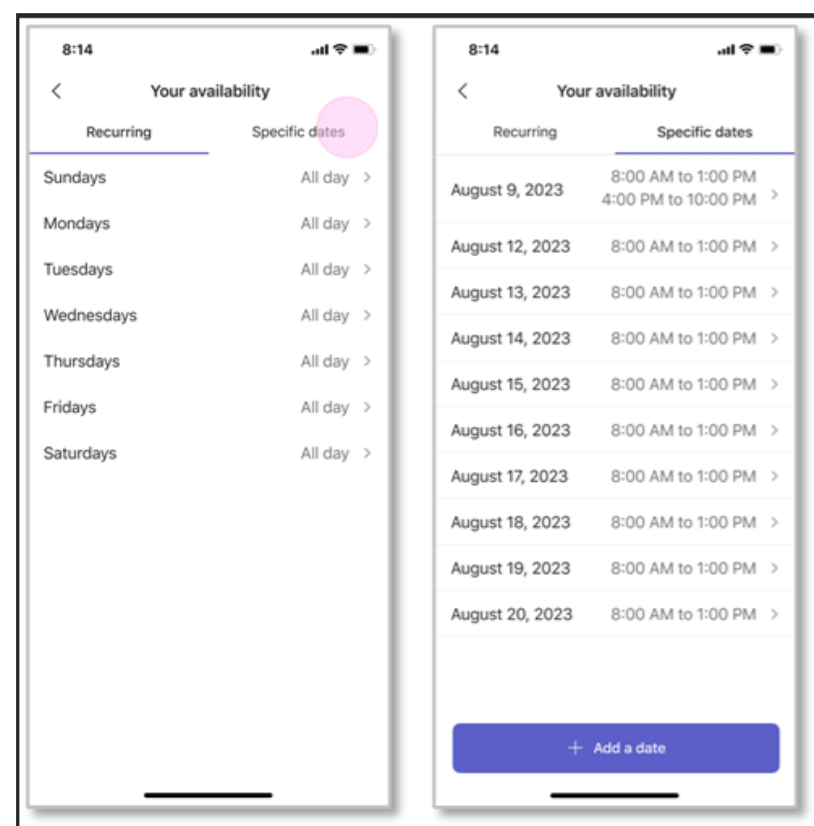
Updated February 25, 2024: We have updated the rollout timeline below. Thank you for your patience. We’re excited to announce significant product upgrades focusing on enhanced FLW Availability Preferences. Frontline workers often balance various personal commitments and specific work-time preferences. Through shifts, FLWs can establish availability preferences for calendar dates alongside recurring days. This feature streamlines shift assignments for frontline managers, who can seamlessly assign shifts by reviewing these availability preferences within the Shifts app. This message is associated with Microsoft 365 Roadmap ID: 156952 [When this will happen:] Worldwide & GCC: We will begin rolling out mid-January 2024 and expect to complete by mid-March 2024 (previously mid-February). [How this will affect your organization:] Frontline Workers can set availability by specific date in addition to recurring days. If specific dates coincide with recurring ones, they can override the recurring schedule. As dates expire, the system automatically removes them. Users also have the option to manually delete dates they no longer need.
[What you need to do to prepare:]
There is nothing you need to do to prepare for these changes unless you choose to notify your frontline workers about these updates. |
| Machine Translation |
2024 年 2 月 25 日更新: 以下のロールアウト タイムラインを更新しました。何卒ご理解のほどよろしくお願いいたします。 FLW の可用性設定の強化に重点を置いた大幅な製品アップグレードを発表できることを嬉しく思います。 現場担当者は、多くの場合、さまざまな個人的なコミットメントと特定の勤務時間の好みのバランスを取ります。シフトを通じて、FLW はカレンダーの日付と繰り返しの日付の可用性設定を確立できます。この機能により、現場担当者のシフト割り当てが合理化され、Shifts アプリ内でこれらの空き時間設定を確認することで、シフトをシームレスに割り当てることができます。 このメッセージは、Microsoft 365 ロードマップ ID: 156952 に関連付けられています [これがいつ起こるか:] 全世界とGCC: 2024 年 1 月中旬にロールアウトを開始し、2024 年 3 月中旬 (以前は 2 月中旬) までに完了する予定です。 [これが組織に及ぼす影響:] 現場担当者は、定期的な日数に加えて、特定の日付で空き時間を設定できます。特定の日付が定期的な日付と一致する場合は、定期的なスケジュールを上書きできます。日付が期限切れになると、システムは自動的に削除します。ユーザーは、不要になった日付を手動で削除することもできます。
[準備に必要なこと:]
これらの更新について現場担当者に通知することを選択しない限り、これらの変更を準備するために行う必要はありません。 |