| MC709985 | (Updated) Microsoft Copilot Dashboard for Viva Insights licensed customers |
|---|
| Classification | stayInformed |
|---|---|
| Last Updated | 02/26/2024 03:14:07 |
| Start Time | 01/25/2024 01:03:17 |
| End Time | 05/27/2024 07:00:00 |
| Message Content |
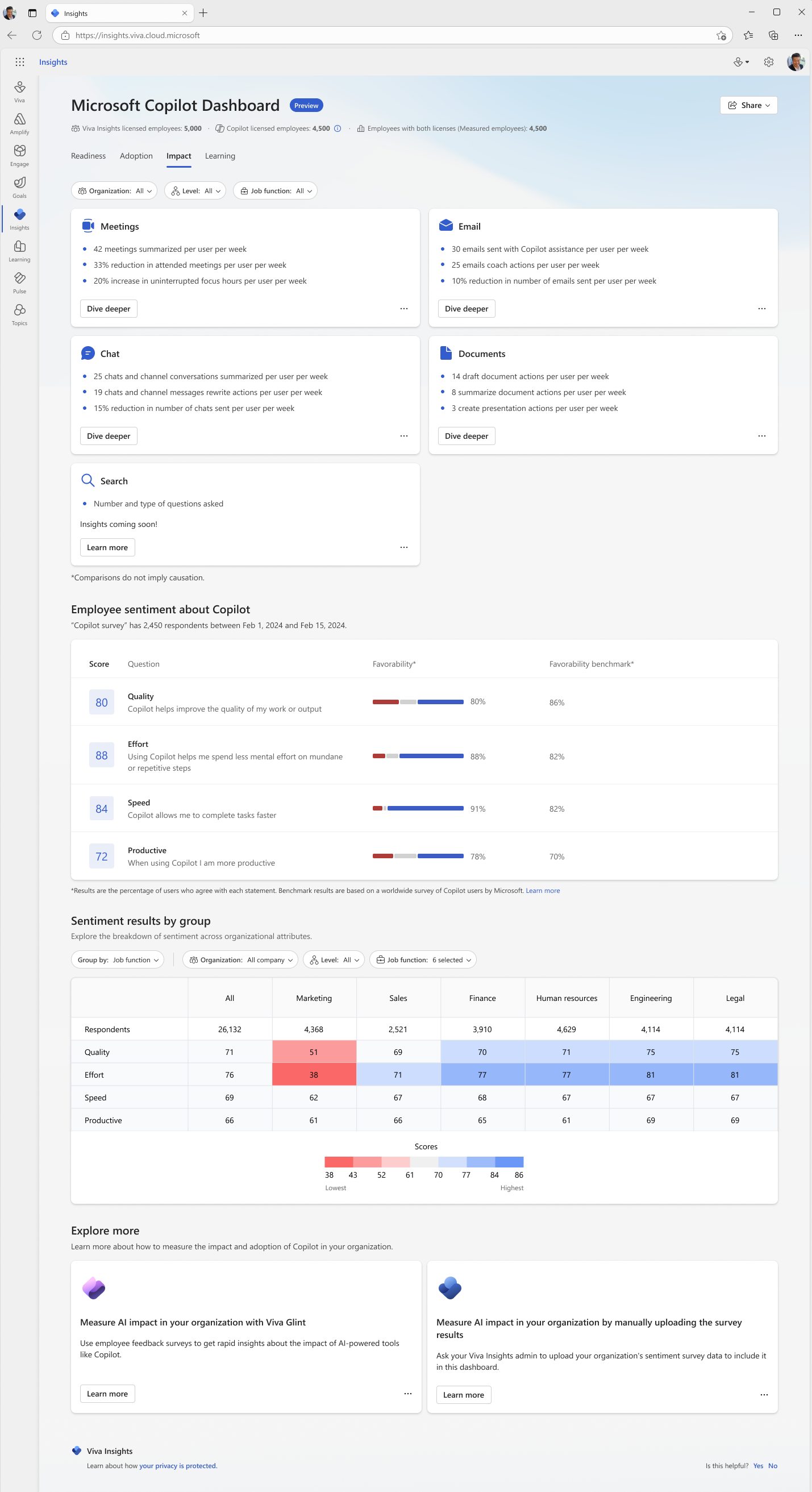
Updated February 25, 2024: To ensure an optimal experience when rolling out this feature, we will communicate a new rollout timeline in the near future. Additional insights that combine Microsoft Copilot usage metrics with collaboration and sentiment data will be available to Viva Insights licensed organizations in the Copilot Dashboard. These additional insights provide more granular views of Copilot adoption, usage patterns, user sentiment, and return on investment across teams, functional roles, and more. Viva Insights analysts can create custom reports based on these metrics as well. [When this will happen:] We will begin rolling out for preview and expand into general availability soon. [How this will affect your organization:] The Microsoft Copilot Dashboard helps organizations maximize the value of Copilot for Microsoft 365. It provides actionable insights to help your organization get ready to deploy AI, drive adoption based on how AI is transforming workplace behavior, and measure the impact of Copilot. The dashboard covers the following categories of metrics: Readiness, adoption, and impact. The dashboard access controls are managed by Global admins. Note: The measured population consists of the people in your company—called measured employees—whose Microsoft 365 collaboration activity you want to analyze. Some organizations choose to analyze the entire population, while others use population subsets for specific analysis scenarios. If you want to get insights that reflect all Copilot users in the company, you will need to assign everyone a Viva Insights license. Here are a few other points regarding roles for these new features:
[What you need to do to prepare:] • Review Connect to the Microsoft Copilot Dashboard (Preview) | Microsoft Learn • Learn how to assign a Viva Insights license to end users. • Learn how to add and remove user access to the Copilot dashboard. • Learn more about Microsoft Copilot Dashboard, including its metrics and how to interpret the data. |
| Machine Translation |
2024 年 2 月 25 日更新: この機能をロールアウトする際のエクスペリエンスを最適化するために、近い将来、新しいロールアウト タイムラインをお知らせします。 Microsoft Copilot の使用状況メトリックとコラボレーションおよびセンチメント データを組み合わせた追加の分析情報は、Copilot ダッシュボードでViva インサイトライセンスを持つ組織で利用できるようになります。これらの追加の分析情報は、Copilot の採用、使用パターン、ユーザーのセンチメント、チーム全体の投資収益率、機能的役割などをより詳細に把握できます。Viva インサイト アナリストは、これらのメトリックに基づいてカスタム レポートを作成することもできます。 [これがいつ起こるか:] プレビュー向けのロールアウトを開始し、まもなく一般提供に拡大します。 [これが組織に及ぼす影響:] Microsoft Copilot ダッシュボードは、組織が Copilot for Microsoft 365 の価値を最大化するのに役立ちます。組織が AI を導入する準備をし、AI が職場の行動をどのように変革しているかに基づいて導入を促進し、Copilot の影響を測定するのに役立つ実用的な分析情報を提供します。 ダッシュボードには、準備状況、導入、影響のメトリックのカテゴリが表示されます。ダッシュボードのアクセス制御は、グローバル管理者によって管理されます。 注: 測定された母集団は、分析する Microsoft 365 コラボレーション アクティビティを持つ、測定された従業員と呼ばれる社内の人々で構成されます。母集団全体を分析することを選択する組織もあれば、特定の分析シナリオに母集団サブセットを使用する組織もあります。社内のすべての Copilot ユーザーを反映した分析情報を取得する場合は、すべてのユーザーにViva インサイト ライセンスを割り当てる必要があります。 これらの新機能の役割に関するその他のポイントを次に示します。
[準備に必要なこと:] . 「Microsoft Copilot ダッシュボードに接続する (プレビュー)」を確認する |Microsoft Learn (英語) . Viva インサイト ライセンスをエンド ユーザーに割り当てる方法について説明します。 . Copilot ダッシュボードへのユーザーアクセスを追加および削除する方法について説明します。 . Microsoft Copilot ダッシュボードの詳細 (メトリックやデータの解釈方法など) について説明します。 |