| MC707657 | (Updated) Microsoft Teams device store |
|---|
| Classification | stayInformed |
|---|---|
| Last Updated | 03/02/2024 00:03:36 |
| Start Time | 01/17/2024 00:34:13 |
| End Time | 06/24/2024 07:00:00 |
| Message Content |
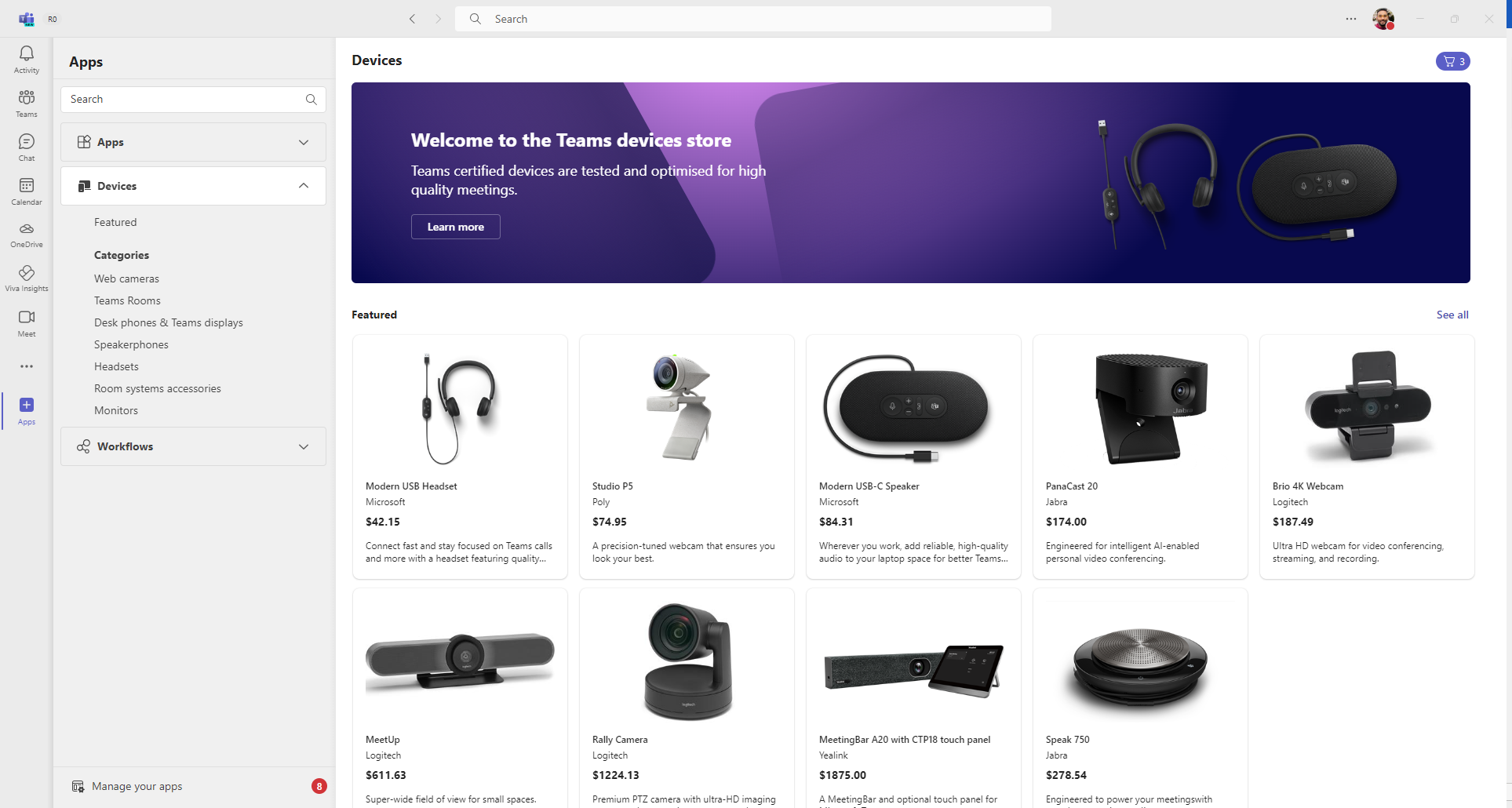
Updated March 1, 2024: We have updated the rollout timeline below. Thank you for your patience. With Teams device store inside Microsoft Teams, customers can easily discover and purchase certified Teams devices for personal or shared use cases – headsets, web cameras, desk phones, Teams Rooms and more. The store features a wide array of Teams certified audio and video devices to accommodate any space be it at home, office, or during transit. Explore devices in categories, use search or filters to find desired device, and purchase all through the familiar Microsoft Teams interface. This release is limited to customers in US and Canada, and with user licenses less than or equal to three hundred.
This message is associated with Microsoft 365 Roadmap ID 169201
[When this will happen:] Targeted Release: We will begin rolling out late January 2024 and expect to complete by early February 2024. Worldwide: We will begin rolling out early April 2024 (previously mid-March) and expect to complete by mid-May 2024 (previously early April). [How this will affect your organization:] For the limited release tenants, users will be able to see the device store in Teams > Apps. They can learn about certified devices from the store and can purchase them. IT administrators can manage the device store settings from Teams Admin Center (TAC) and can disable purchase for all users in the organization if needed.
[What you need to do to prepare:]
On its release, the device store will be available within Teams App by default. Based on organization needs, the ability to purchase can be disabled from TAC, making the store read-only catalog of Teams certified devices. |
| Machine Translation |
2024 年 3 月 1 日更新: 以下のロールアウト タイムラインを更新しました。何卒ご理解のほどよろしくお願いいたします。 Microsoft Teams 内の Teams デバイス ストアを使用すると、顧客は、ヘッドセット、Web カメラ、卓上電話、Teams Rooms など、個人または共有のユース ケース用に認定された Teams デバイスを簡単に見つけて購入できます。この店舗には、自宅、オフィス、輸送中など、あらゆるスペースに対応するために、Teams 認定のオーディオおよびビデオ デバイスが多数用意されています。カテゴリ内のデバイスを探索し、検索またはフィルターを使用して目的のデバイスを見つけ、使い慣れた Microsoft Teams インターフェイスからすべて購入します。このリリースは、米国とカナダのお客様で、ユーザー ライセンスが 300 以下のお客様に限定されています。
このメッセージは、Microsoft 365 ロードマップ ID 169201に関連付けられています
[これがいつ起こるか:] 対象リリース: 2024 年 1 月下旬にロールアウトを開始し、2024 年 2 月上旬までに完了する予定です。 全世界: 2024 年 4 月上旬 (以前は 3 月中旬) にロールアウトを開始し、2024 年 5 月中旬 (以前は 4 月上旬) までに完了する予定です。 [これが組織に及ぼす影響:] 限定リリース テナントの場合、ユーザーはTeams > Appsでデバイス ストアを表示できます。ストアから認定デバイスについて学び、購入することができます。IT 管理者は、Teams 管理センター (TAC) からデバイス ストアの設定を管理でき、必要に応じて組織内のすべてのユーザーの購入を無効にすることができます。
[準備に必要なこと:]
リリース時に、デバイス ストアは既定で Teams アプリ内で利用できるようになります。組織のニーズに基づいて、TAC から購入機能を無効にして、ストアを Teams 認定デバイスの読み取り専用カタログにすることができます。 |