| MC724124 | Microsoft SharePoint Online: New section backgrounds in Pages and News |
|---|
| Classification | stayInformed |
|---|---|
| Last Updated | 03/05/2024 00:56:31 |
| Start Time | 03/05/2024 00:56:19 |
| End Time | 07/26/2024 07:00:00 |
| Message Content |
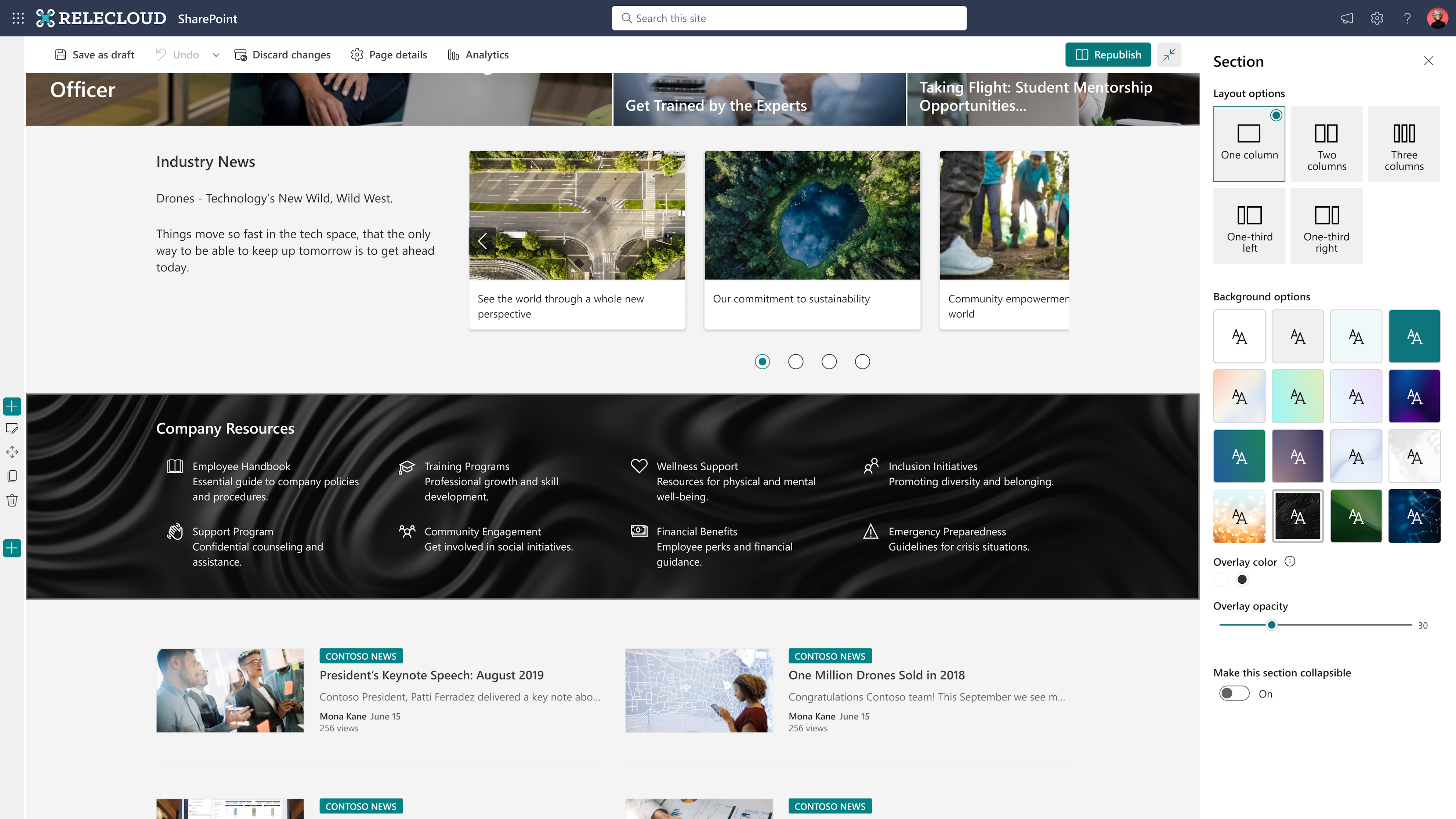
We are rolling out new features for Microsoft SharePoint Online that allow SharePoint Page and News authors to add a curated image background or a gradient color background to page sections. (In a future MC post, we will roll out the ability to use your own images as backgrounds.) We’ve improved the focal point and added more settings like fill mode, overlay, and opacity to help authors follow accessibility best practices and ensure that your customized background is easy to read as well as beautiful. This message is associated with Microsoft 365 Roadmap ID 378647 and Roadmap ID 378648. [When this will happen:] For gradient color and curated image background options:
For customized image and image settings, including focal point:
[How this will affect your organization:] SharePoint Page and News authors: You can access the new features when you edit a Page or News section: in Edit mode, in the Section panel, select Edit section. Choose an image or gradient color from Background options. When you set a background, a see-through overlay will be added automatically to make the text easier to read. Note: When you send a News post as an email, SharePoint theme colors will be used in place of section backgrounds that aren’t supported in email.
[What you need to do to prepare:]
No action is needed from you to prepare for this rollout. You may want to notify your users about this change and update any relevant documentation as appropriate. |
| Machine Translation |
Microsoft SharePoint Online では、SharePoint ページとニュースの作成者が、キュレーションされた画像の背景やグラデーション カラーの背景をページ セクションに追加できる新機能を展開しています。(今後のMC投稿では、独自の画像を背景として使用する機能を展開する予定です。フォーカルポイントを改善し、塗りつぶしモード、オーバーレイ、不透明度などの設定を追加して、作成者がアクセシビリティのベストプラクティスに従い、カスタマイズした背景を読みやすく美しくしました。 このメッセージは、Microsoft 365 ロードマップ ID 378647 とロードマップ ID 378648に関連付けられ ています。 [これがいつ起こるか:] グラデーションカラーとキュレーションされた画像の背景オプションの場合:
カスタマイズされた画像と画像設定(焦点を含む)の場合:
[これが組織に及ぼす影響:] SharePoint ページとニュースの作成者: ページまたはニュース セクションを編集するときに、編集モードの [セクション] パネルで [セクションの編集] を選択すると、新しい機能にアクセスできます。[背景] オプションから画像またはグラデーションの色を選択します。 背景を設定すると、文字が読みやすくなるようにシースルーオーバーレイが自動的に追加されます。 注: ニュース投稿をメールとして送信すると、メールでサポートされていないセクションの背景の代わりに SharePoint テーマの色が使用されます。
[準備に必要なこと:]
このロールアウトの準備のために、お客様による操作は必要ありません。この変更についてユーザーに通知し、必要に応じて関連ドキュメントを更新することをお勧めします。 |