| MC724832 | Microsoft Defender for Office 365: User submission automatic feedback response |
|---|
| Classification | stayInformed |
|---|---|
| Last Updated | 03/05/2024 23:15:14 |
| Start Time | 03/05/2024 23:14:50 |
| End Time | 04/29/2024 07:00:00 |
| Message Content |
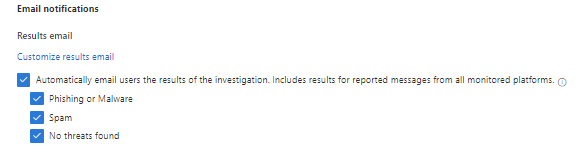
In Microsoft Defender for Office 365 (MDO), the user submission automatic feedback response enables organizations to automatically respond to end user submissions of phish based on the verdict from the automated investigation and response (AIR) investigation. This feature is configurable and allows organizations to dictate which threat scenarios they would like end users to receive feedback emails about. Once enabled, Microsoft Defender for Office 365 will automatically respond to end user submissions based on the investigation verdict and the configured settings. This message is associated with Microsoft 365 Roadmap ID 186575 [When this will happen:] Worldwide, GCC: Rollout completed in late February 2024. [How this will affect your organization:] Customers will have the ability to automatically respond to end user reports of phish based on the verdict of the AIR investigation. The feature may be configured in Settings > Email & collaboration > User reported settings within the Email notifications > Results email section. On this page, the first step to enabling this feature is to check the box to Automatically email users the results of the investigation. Includes results for reported messages from all monitored platforms. Upon making this selection, three additional checkboxes will appear titled Phishing or Malware, and No threats found. These three checkboxes represent the options for the user submission automatic feedback response and allow organizations to dictate which threat scenarios they would like end users to receive feedback emails about. At least one of these options should be selected to enable this feature.
Responses to end users will be sent at the conclusion of the automated investigation based on the verdict, if configured. [What you need to do to prepare:] Customers may further familiarize themselves with the new feature by reviewing the learn document Automatic user notifications for user reported phishing results in AIR | Microsoft Learn that contains additional details. To learn more about automated investigation and response (AIR) in Microsoft Defender for Office 365 visit Automated investigation and response in Microsoft Defender for Office 365 – Office 365 | Microsoft Learn. |
| Machine Translation |
Microsoft Defender for Office 365 (MDO) では、ユーザー送信の自動フィードバック応答により、組織は、自動調査と応答 (AIR) 調査の判定に基づいて、フィッシングのエンド ユーザーの送信に自動的に応答できます。この機能は構成可能であり、組織はエンドユーザーにフィードバックメールを受信させる脅威シナリオを指示できます。有効にすると、Microsoft Defender for Office 365は、調査の判定と構成された設定に基づいて、エンド ユーザーの送信に自動的に応答します。 このメッセージは、Microsoft 365 ロードマップ ID 186575に関連付けられています [これがいつ起こるか:] 全世界、GCC: ロールアウトは2024年2月下旬に完了しました。 [これが組織に及ぼす影響:] お客様は、AIR 調査の判定に基づいて、フィッシングのエンド ユーザー報告に自動的に対応できます。 この機能は、[電子メール通知>結果電子メール] セクション内の [設定] > [電子メールとコラボレーション] > [ユーザーが報告した設定] で構成できます。このページで、この機能を有効にするための最初のステップは、[調査の結果をユーザーに自動的に電子メールで送信する] チェック ボックスをオンにすることです。すべての監視対象プラットフォームから報告されたメッセージの結果が含まれます。この選択を行うと、[フィッシングまたはマルウェア]、および[脅威は見つかりませんでした]というタイトルの3つのチェックボックスが表示されます。これら 3 つのチェックボックスは、ユーザー送信の自動フィードバック応答のオプションを表し、組織はエンド ユーザーにフィードバック メールを受信する脅威シナリオを指示できます。この機能を有効にするには、これらのオプションを少なくとも 1 つ選択する必要があります。
エンド ユーザーへの応答は、判定に基づく自動調査の終了時に送信されます (構成されている場合)。 [準備に必要なこと:] お客様は、学習ドキュメント「 AIR | 追加の詳細を含む Microsoft Learn。Microsoft Defender for Office 365の自動調査と応答 (AIR) の詳細については、「 Microsoft Defender for Office 365での自動調査と応答 – Office 365 |Microsoft Learn を参照してください。 |