| MC734297 | Microsoft Teams: Attach recent and relevant files more quickly to chats and channel posts |
|---|
| Classification | stayInformed |
|---|---|
| Last Updated | 03/12/2024 23:39:20 |
| Start Time | 03/12/2024 23:39:13 |
| End Time | 06/17/2024 07:00:00 |
| Message Content |
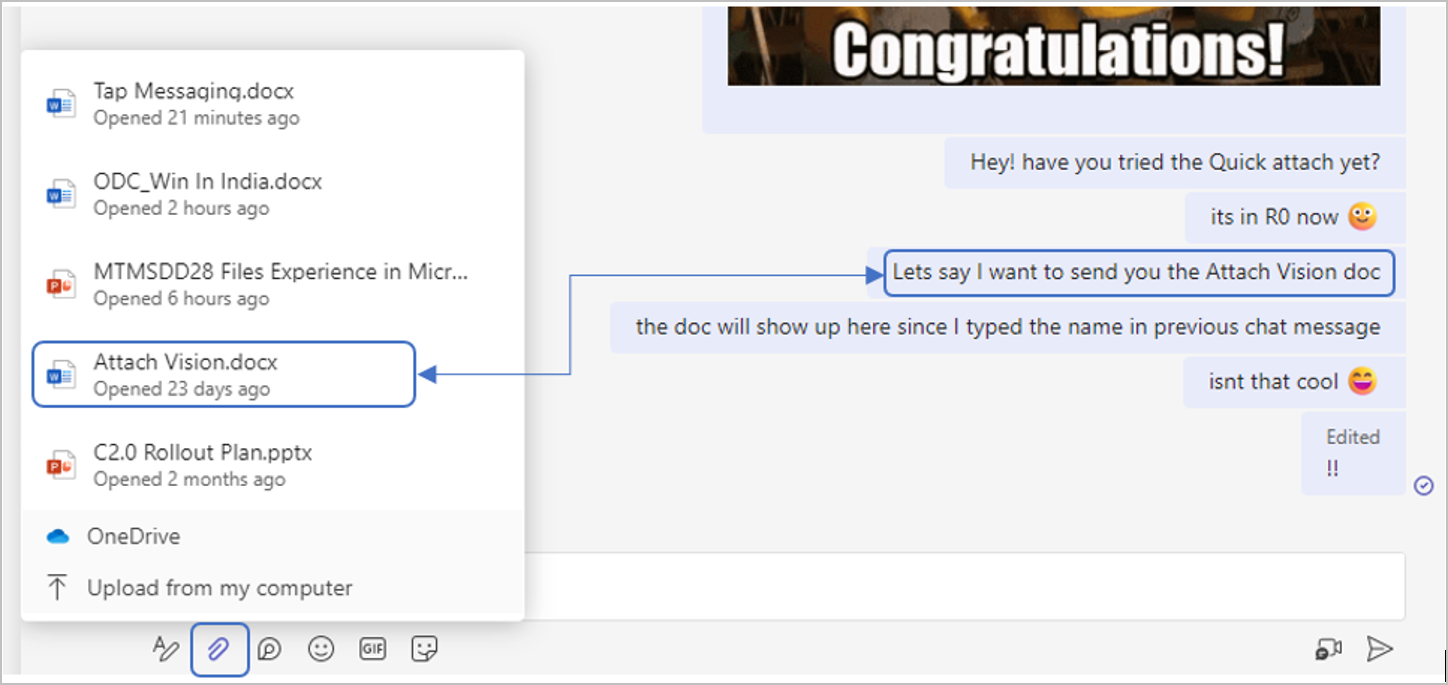
In Microsoft Teams, we are excited to bring you Quick attach, which will display your most recent and contextually relevant files when you select the paperclip to attach a file to a Teams chat or channel post. This new feature will save time when attaching files. This feature is related to MC513664 (Updated) Suggested Files in 1:1 Chats (November 2023).
[When this will happen:]
Targeted Release: We started rolling out mid-February 2024 and expect to complete by late March 2024. General Availability: Worldwide, GCC, GCC High, and DoD: We will begin rolling out mid-April 2024 and expect to complete by early May 2024. [How this will affect your organization:]
This rollout does not affect existing file attachment options.
This rollout does not apply to:
[What you need to do to prepare:]
No action is needed from you to prepare for this rollout. You may want to notify your users about this change and update any relevant documentation as appropriate. |
| Machine Translation |
Microsoft Teams では、ペーパークリップを選択して Teams チャットまたはチャネル投稿にファイルを添付すると、最新のコンテキスト関連ファイルが表示されるクイック添付が導入されました。この新機能により、ファイルを添付する際の時間が節約されます。 この機能は、 1 対 1 のチャットでの MC513664 (更新) 提案ファイル (2023 年 11 月) に関連しています。
[これがいつ起こるか:]
対象指定リリース: 2024 年 2 月中旬 にロールアウトを開始し、2024 年 3 月下旬までに完了する予定です。 一般提供: 全世界、GCC、GCC High、DoD: 2024 年 4 月中旬にロールアウトを開始し、2024 年 5 月上旬までに完了する予定です。 [これが組織に及ぼす影響:]
このロールアウトは、既存のファイル添付オプションには影響しません。
このロールアウトは、次のものには適用されません。
[準備に必要なこと:]
このロールアウトの準備のために、お客様による操作は必要ありません。この変更についてユーザーに通知し、必要に応じて関連ドキュメントを更新することをお勧めします。 |