| Message Content |
What is being announced?
- With MC718748 on Feb 28, 2024 (New Teams rollout schedule for Commercial and EDU customers), we informed customers about the new Microsoft Teams rollout schedule with updated timelines. We encourage you to update users in your organization to new Teams as quickly as you can, because all new feature development will only be available in new Teams. Comprehensive documentation on new Teams rollout and experience: End of availability for classic Teams client – Microsoft Teams | Microsoft Learn.
- This communication is a reminder post to reaffirm that after March 31, 2024, any existing values for new Teams client policies will no longer be valid for non-VDI (Virtual Desktop Infrastructure) customers (Teams for desktop, for the web, for Mac, and for Education) and after June 30, 2024 for VDI customers. After March 31, 2024, Microsoft will begin rolling out new Teams for non-VDI customers in stages per the below timeline. (VDI timelines).
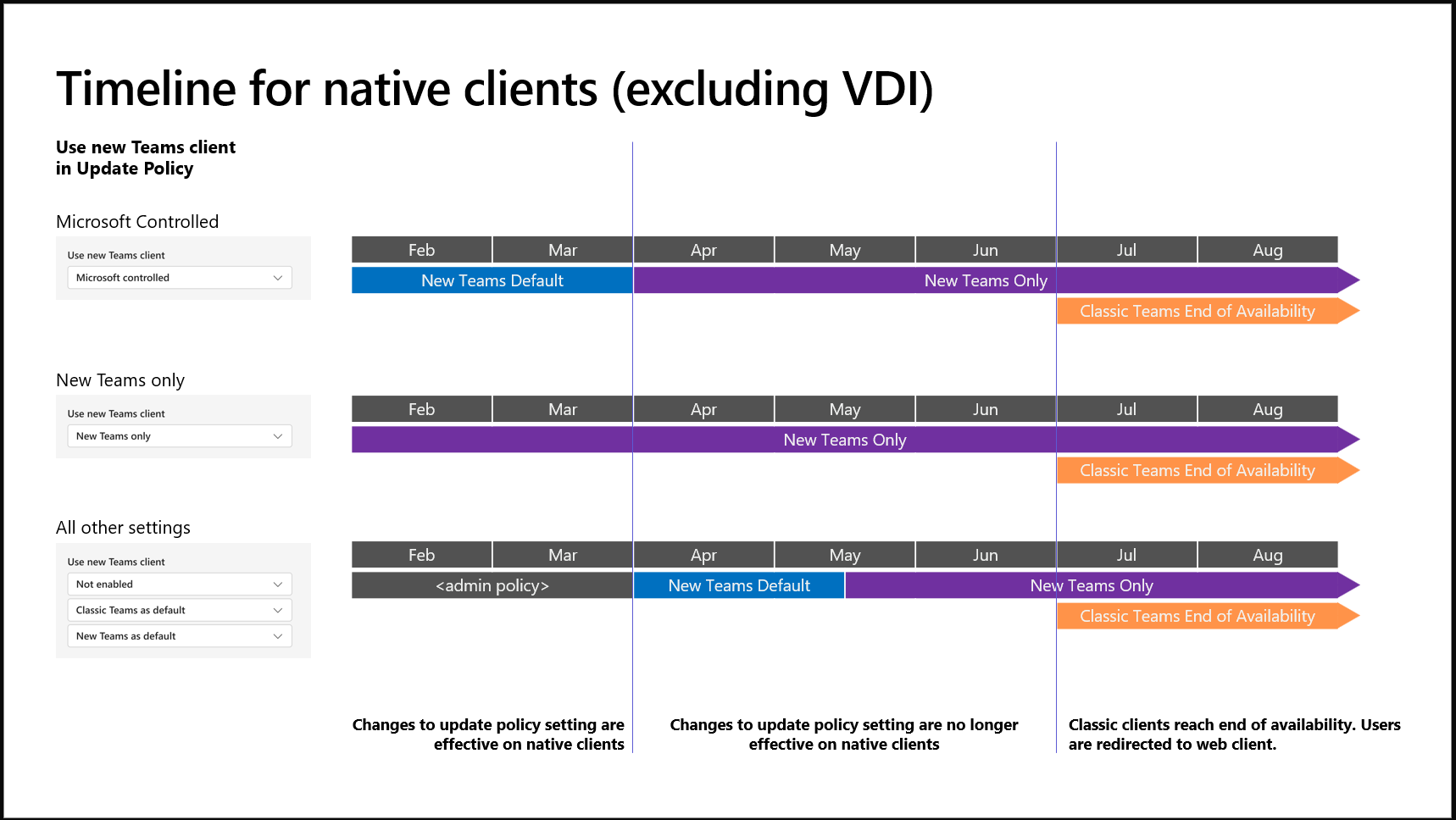
- The “New Teams only” policy is now available in the Teams admin center (TAC). Updating to this policy will update classic Teams users to new Teams as their default client and remove the toggle to return to classic Teams. After users have transitioned to new Teams, Microsoft will attempt to uninstall classic Teams after 14 days. If this uninstallation is blocked for any reason (for example, by machine configuration, etc.), uninstallation will not be attempted again, and you will have the option to manually remove classic Teams.
- We have introduced the new Teams usage report in the Teams admin center, which provides an overview of Teams desktop clients in use in your organization. It highlights platforms (Windows or Mac), app version, and user type (preview or production) to help you better understand the current state of your user’s desktop clients.
- Starting in late March 2023, users who are still on classic Teams but are eligible to switch to new Teams will begin seeing our informational campaigns to switch to new Teams.
How can I prepare for a seamless update to new Teams?
- To ensure the best transition experience for your organization, we strongly advocate admins gradually roll out TAC policies. We recommend you begin with a small group, ensure a healthy deployment, and then gradually roll out to the entire organization.
- Minimum operating system for new Teams: Users must have Windows 10 version 10.0.19041 or above or macOS Big Sur (11). Update your OS to ensure healthy functioning of the new Teams client.
- Configs and policies: Ensure users are not blocked from app installation due configuration issues. If users do not have install permissions, plan to leverage deployment options such as bulk deployment.
- The classic Teams for Virtualized Desktop Infrastructure (VDI) will reach end of availability on June 30, 2024.
- New Teams does not support Windows Server 2016. The new Teams client will not run on Windows Server 2016. VDI customers should plan to update to Windows Server 2019 (10.0.17763) or Windows Server 2022 (10.0.20348) or higher to get started on their new Teams journey. Learn more about VDI system requirements.
Thank you for being a valued user of Teams!
References
|