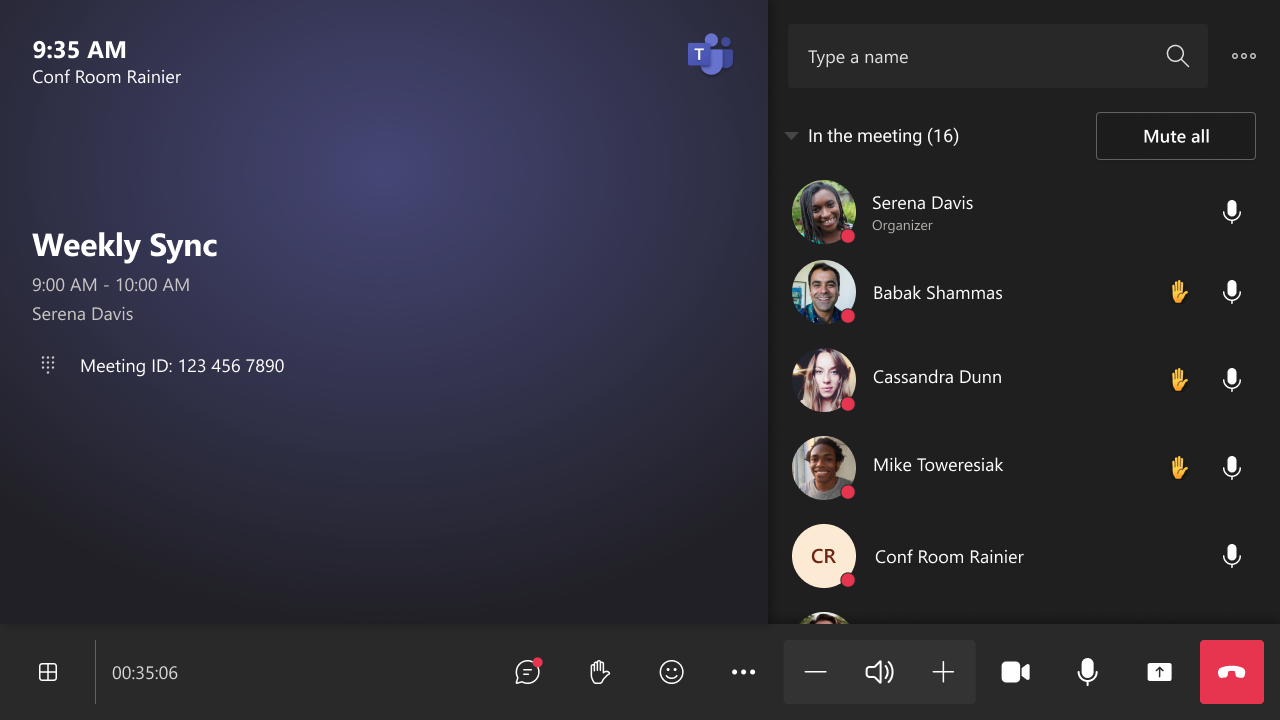
| MC752516 | Microsoft Teams: Meeting Chat shown by default in Gallery View with Teams Room |
|---|
| Classification | stayInformed |
|---|---|
| Last Updated | 03/22/2024 23:43:54 |
| Start Time | 03/22/2024 23:43:46 |
| End Time | 06/10/2024 07:00:00 |
| Message Content |
Meeting Chat is shown by default in Teams Room on Windows in Gallery view, making it easier to see incoming chat messages on the front-of-room display. IT admins can configure the default chat experience for a room, and users can make in-meeting changes to show or hide the chat using the touch console. This message is associated with Microsoft 365 Roadmap ID 332424. [When this will happen:] General [How this will affect your organization:] This update enables users to have visibility of a meeting chat on the right panel in Gallery view during a meeting. In addition to the layout change, the chat icon button to show/hide the chat panel is moved from the view switcher to the uBar. Chat panel in Gallery view
Chat button on uBar
The default chat experience in Gallery view can be configured via Teams Admin Center or XML setting <OpenMeetingChatByDefault>. The default value is ‘true.’ Please note that the existing <ShowMeetingChat> setting hides the meeting chat completely from all in-meeting layouts as well as the chat button in-meeting. Therefore, <ShowMeetingChat> overrides <OpenMeetingChatByDefault>. [What you need to do to prepare:] There is no action needed to prepare for this change. You may want to notify your users about this change and update any relevant documentation as appropriate. |
| Machine Translation |
会議チャットは、ギャラリー ビューの Windows 上のTeams Roomに既定で表示されるため、ルームの前面ディスプレイで受信チャット メッセージを簡単に確認できます。IT 管理者はチャットルームの既定のチャット エクスペリエンスを構成でき、ユーザーはタッチ コンソールを使用してチャットを表示または非表示にするミーティング中の変更を行うことができます。 このメッセージは、Microsoft 365 ロードマップ ID 332424に関連付けられ ています。 [これがいつ起こるか:] 全般 [これが組織に及ぼす影響:] この更新により、ユーザーはミーティング中にギャラリー ビューの右側のパネルにミーティング チャットを表示できるようになります。レイアウトの変更に加えて、チャットパネルを表示/非表示にするチャットアイコンボタンがビュースイッチャーからuBarに移動しました。 ギャラリービューのチャットパネル
uBarのチャットボタン
ギャラリー ビューの既定のチャット エクスペリエンスは、Teams 管理センターまたは XML 設定 <OpenMeetingChatByDefault> を使用して構成できます。デフォルト値は「true」です。既存の <ShowMeetingChat> 設定では、すべてのミーティング内レイアウトとミーティング中のチャット ボタンからミーティング チャットが完全に非表示になることに注意してください。したがって、<ShowMeetingChat> は <OpenMeetingChatByDefault> をオーバーライドします。 [準備に必要なこと:] この変更に備えるために必要なアクションはありません。この変更についてユーザーに通知し、必要に応じて関連ドキュメントを更新することをお勧めします。 |