| MC761235 | Microsoft Teams Phone devices: Enable call forwarding directly from the device’s Home screen |
|---|
| Classification | stayInformed |
|---|---|
| Last Updated | 03/29/2024 01:08:22 |
| Start Time | 03/29/2024 01:08:02 |
| End Time | 09/13/2024 07:00:00 |
| Message Content |
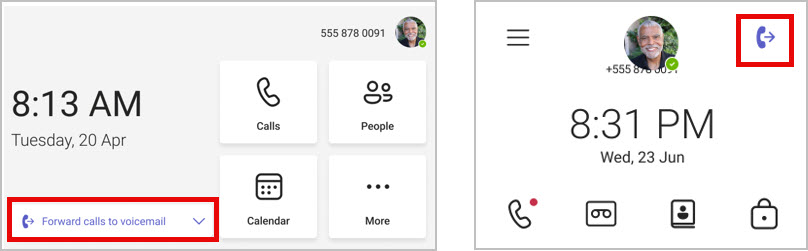
Note: If your organization does not use Teams phone devices, you can disregard this message. Coming soon: Users of Microsoft Teams certified phone devices will be able to enable call forwarding directly from a Teams phone device Home screen with just a few clicks. The feature will be supported on both personal and common area phones, including touch and non-touch phones. This message is associated with Microsoft 365 Roadmap ID 388490. [When this will happen:] General Availability (Worldwide, GCC): We will begin rolling out early May 2024 and expect to complete by late May 2024. GCC High: We will begin rolling out late June 2024 and expect to complete by late July 2024. [How this will affect your organization:] Enabling call forwarding from a Teams phone device Home screen:
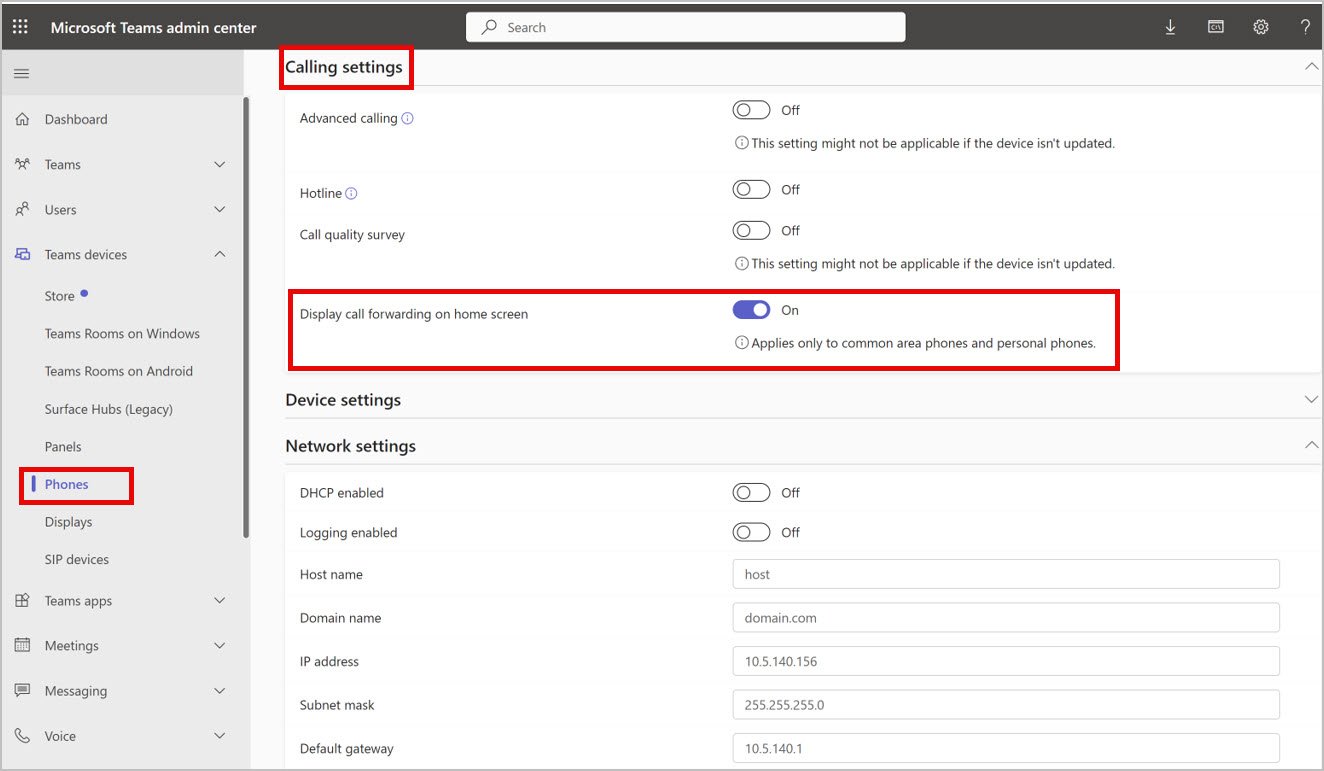
As admins, you will be able to enable call forwarding on the Home screen for your users through Teams admin center > Teams devices > Phones > configuration profile > Calling settings or on the Teams phone device through Calling settings.
[What you need to do to prepare:] Please ensure your Teams phone devices are updated with the latest application from the Teams admin center to get access to the new feature. This rollout will happen automatically by the specified date with no admin action required. You may want to notify your users and admins about this change and update any relevant documentation as appropriate. Learn more: What’s New in Microsoft Teams | Enterprise Connect 2024 Edition – Microsoft Community Hub. |
| Machine Translation |
注: 組織で Teams 電話デバイスを使用していない場合は、このメッセージを無視できます。 近日公開予定: Microsoft Teams 認定電話デバイスのユーザーは、数回クリックするだけで、Teams 電話デバイスのホーム画面から直接通話転送を有効にできるようになります。この機能は、タッチ電話と非タッチ電話を含む、パーソナル エリア電話と共通領域電話の両方でサポートされます。 このメッセージは、Microsoft 365 ロードマップ ID 388490 に関連付けられています。 [これがいつ起こるか:] 一般提供 (全世界、GCC): 2024 年 5 月上旬にロールアウトを開始し、2024 年 5 月下旬までに完了する予定です。 GCC High: 2024 年 6 月下旬にロールアウトを開始し、2024 年 7 月下旬までに完了する予定です。 [これが組織に及ぼす影響:] Teams 電話デバイスのホーム画面からの着信転送を有効にする:
管理者は、Teams 管理センター > Teams デバイス、電話>>構成プロファイル>通話設定、または Teams 電話デバイスで [通話設定] を使用して、ユーザーのホーム画面で通話転送を有効にすることができます。
[準備に必要なこと:] 新機能にアクセスするには、Teams 管理センターから最新のアプリケーションで Teams 電話デバイスが更新されていることを確認してください。 このロールアウトは、管理者のアクションを必要とせずに、指定された日付までに自動的に行われます。この変更についてユーザーと管理者に通知し、必要に応じて関連ドキュメントを更新することをお勧めします。 詳細情報: Microsoft Teams の新機能 |Enterprise Connect 2024 エディション – Microsoft コミュニティ ハブ。 |