| MC772554 | Microsoft Teams: Access other apps and websites while using annotations |
|---|
| Classification | stayInformed |
|---|---|
| Last Updated | 04/08/2024 23:32:35 |
| Start Time | 04/08/2024 23:32:19 |
| End Time | 10/03/2024 07:00:00 |
| Message Content |
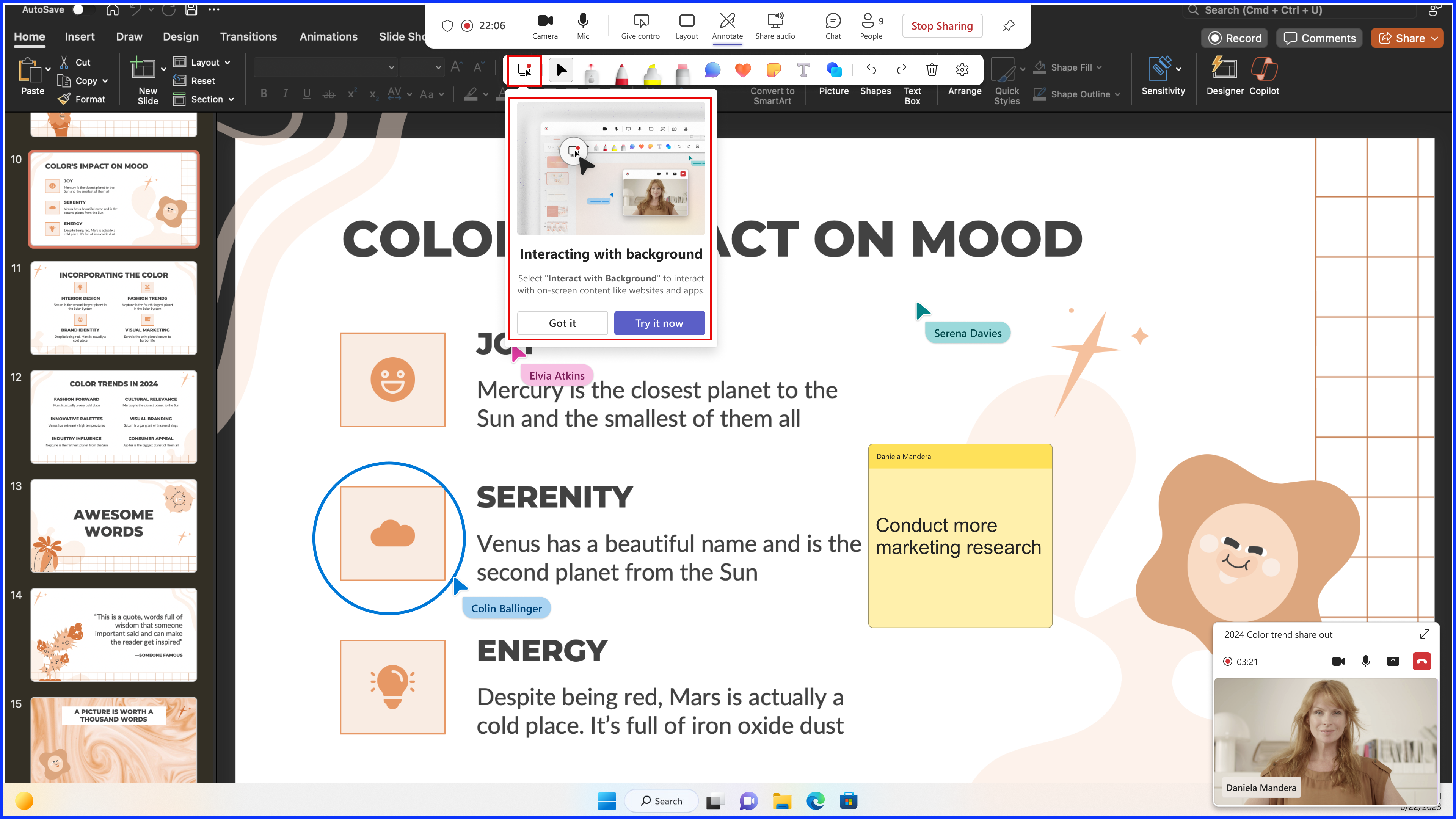
Coming soon in Microsoft Teams: We are rolling out an enhancement to the annotations feature in Microsoft Teams that will allow screen sharers to interact with underlying content without stopping the existing annotation session. This message is associated with Microsoft 365 Roadmap ID 127900. [When this will happen:] General Availability (Worldwide, GCC, GCC High, DoD): We will begin rolling out in early May 2024 and expect to complete by late May 2024. [How this will affect your organization:] After the rollout, presenters who are annotating during a screen-sharing meeting can interact with their own content and the annotation session will continue. Before the rollout, the annotations session would end if presenters interacted with other content on their screen (other apps and websites) during the session. When a presenter shares their screen in Teams meetings and select Start annotation in the presenter toolbar, they will see a new button called Interacting with background in the annotations toolbar that allows them to interact with other content on their screen (other apps and websites) without stopping the existing annotation session. Try Interacting with background to interact with content like websites and other apps during an annotations session in a Teams meeting:
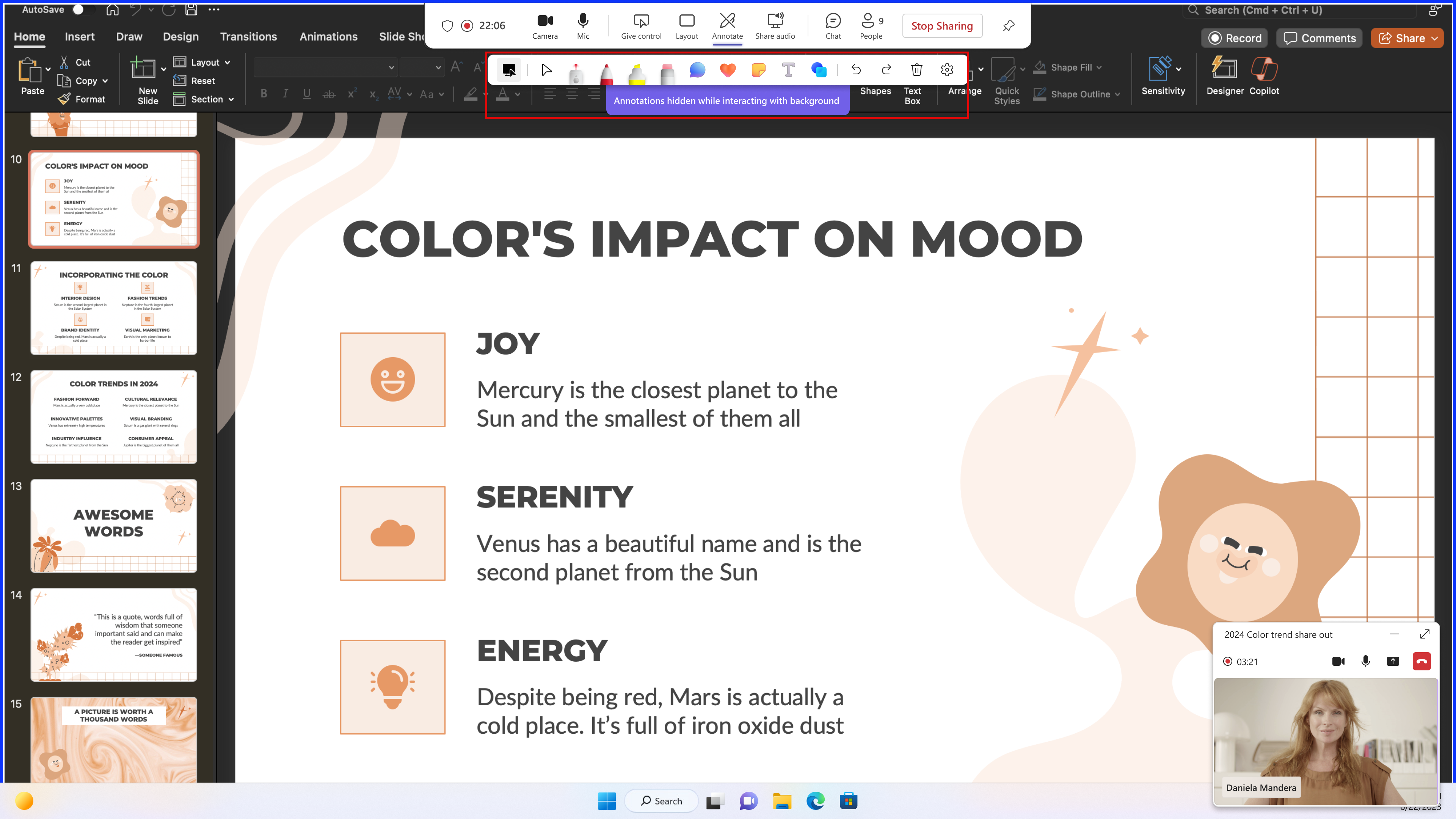
While you interact with content like websites and other apps, annotations in the meeting are hidden. Select any annotation tool (like the laser pointer or inking tools) to return to the annotation session:
[What you need to do to prepare:] This rollout will happen automatically by the specified dates with no admin action required before the rollout. You may want to notify your users about this change and update any relevant documentation as appropriate. Learn more: Use annotation while sharing your screen in Microsoft Teams – Microsoft Support (We will update this comm before rollout with revised documentation) Watch: How to use Collaborative Annotations in a Microsoft Teams meeting (2022) |
| Machine Translation |
Microsoft Teams で近日公開予定: Microsoft Teams の注釈機能の強化を展開し、画面共有者が既存の注釈セッションを停止することなく基になるコンテンツを操作できるようにします。 このメッセージは、Microsoft 365 ロードマップ ID 127900 に関連付けられています。 [これがいつ起こるか:] 一般提供 (全世界、GCC、GCC High、DoD): 2024 年 5 月上旬にロールアウトを開始し、2024 年 5 月下旬までに完了する予定です。 [これが組織に及ぼす影響:] ロールアウト後、画面共有会議中に注釈を付けているプレゼンターは、自分のコンテンツを操作でき、注釈セッションは続行されます。ロールアウト前は、プレゼンターがセッション中に画面上の他のコンテンツ(他のアプリやWebサイト)を操作すると、注釈セッションが終了していました。 発表者が Teams 会議で画面を共有し、発表者ツール バーで [ 注釈の開始 ] を選択すると、注釈ツールバーに [ 背景の操作 ] という新しいボタンが表示され、既存の注釈セッションを停止せずに画面上の他のコンテンツ (他のアプリや Web サイト) を操作できます。 Teams 会議の注釈セッション中に Web サイトや他のアプリなどのコンテンツを操作するには、 バックグラウンドを操作し てみてください。
Web サイトや他のアプリなどのコンテンツを操作している間は、ミーティングの注釈は非表示になります。任意の注釈ツール(レーザーポインタやインクツールなど)を選択して、注釈セッションに戻ります。
[準備に必要なこと:] このロールアウトは、指定された日付までに自動的に行われ、ロールアウト前に管理者のアクションは必要ありません。この変更についてユーザーに通知し、必要に応じて関連ドキュメントを更新することをお勧めします。 詳細情報: Microsoft Teams で画面を共有しながら注釈を使用する – Microsoft サポート (ロールアウト前にこの通信を更新し、ドキュメントを改訂します) ウォッチ: Microsoft Teams 会議で共同注釈を使用する方法 (2022) |