| MC776193 | Microsoft Viva Engage: Delegates and admins can close conversations in Storylines and Communities |
|---|
| Classification | stayInformed |
|---|---|
| Last Updated | 04/12/2024 23:09:05 |
| Start Time | 04/12/2024 23:08:48 |
| End Time | 10/01/2024 07:00:00 |
| Message Content |
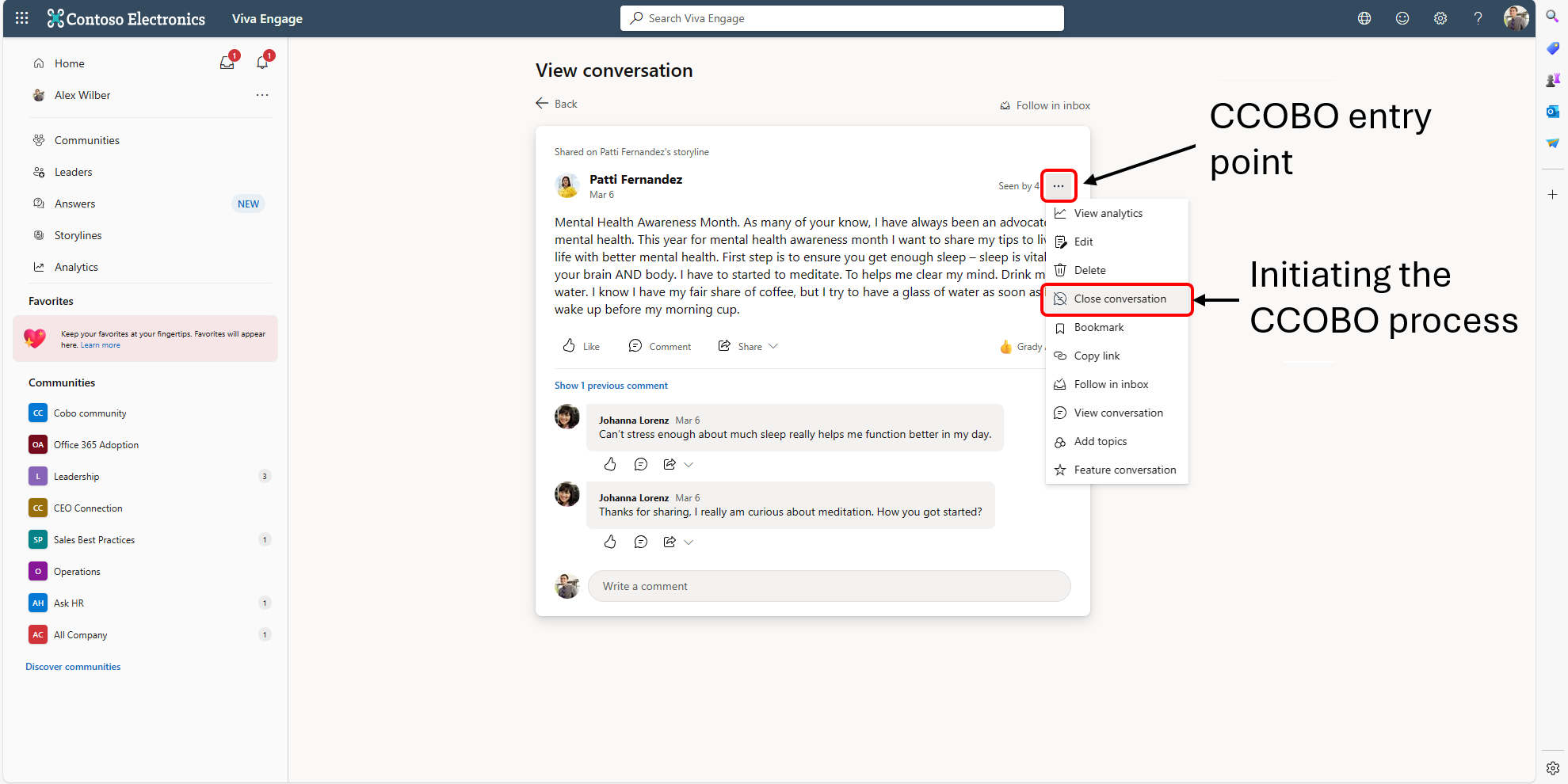
Coming soon in Microsoft Viva Engage: For Storyline and Community posts, delegates will have the ability to close conversations on behalf of (CCOBO) the delegator and Global and Engage admins can close conversations on behalf of any user. This message is associated with Microsoft365 Roadmap ID 382930. [When this will happen:] General Availability (Worldwide): We begin rolling out early April 2024 and expect to complete by mid-April 2024. [How this will affect your organization:] Before the rollout, only a post creator can close conversations in Storyline and only the Community admins can close conversations on behalf of members in Communities. We are expanding the ability for delegates, delegate managers, Global admins, and Engage Admins to moderate Viva Engage content. Delegates and delegate managers will be able to close conversations on behalf of the delegator, and Global and Engage admins will be able to close conversations on behalf of any content creator. This capability will be available in both Communities and in support of our psychological safety goals. Conversations may also be reopened. Delegates (with Storyline access) only may reopen the conversation for their delegators on Storyline. Global and Engage admins will be able to reopen conversations in Communities and on Storyline. This feature will be available on the Viva Engage website and in Teams Viva Engage clients. Screenshot 1: The entry point for how to close a conversation from the three-dot menu on a post. This option is only visible to users that have the relevant delegate permissions and/or Network admin permissions to close the conversation on behalf of another user:
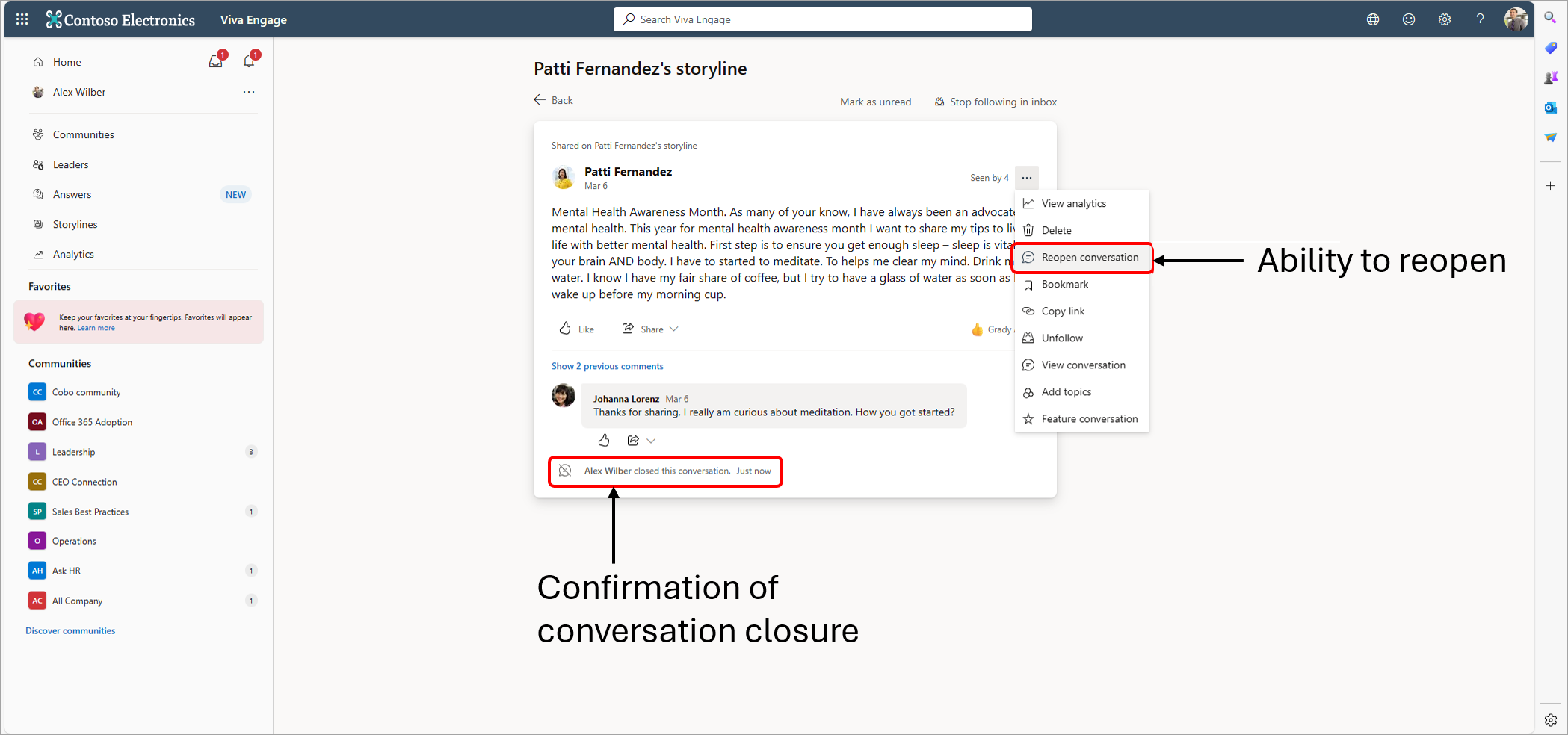
Screenshot 1: The message on a post indicating that the conversation has been closed as well as the name of the user that closed the conversation. The user can reopen the conversation from the three-dot menu:
[What you need to do to prepare:] No action is needed from you to prepare for this rollout. You may want to notify your users about this change and update any relevant documentation as appropriate. Delegation in Viva Engage – Microsoft Support (We will update this comm before rollout with revised documentation.) |
| Machine Translation |
Microsoft Viva エンゲージで近日公開: ストーリーラインとコミュニティの投稿の場合、代理人は委任者 (CCOBO) に代わって会話を閉じることができ、グローバル管理者とエンゲージ管理者は任意のユーザーに代わって会話を閉じることができます。 このメッセージは、Microsoft365 ロードマップ ID 382930 に関連付けられています。 [これがいつ起こるか:] 一般提供 (全世界): 2024 年 4 月上旬にロールアウトを開始し、2024 年 4 月中旬までに完了する予定です。 [これが組織に及ぼす影響:] ロールアウト前は、ストーリーラインで会話を閉じることができるのは投稿作成者のみで、コミュニティのメンバーに代わって会話を閉じることができるのはコミュニティ管理者のみでした。代理人、代理人マネージャー、グローバル管理者、Engage 管理者がViva Engageコンテンツをモデレートする機能を拡張しています。 代理人と代理人マネージャーは委任者に代わって会話を終了でき、グローバル管理者とEngage管理者はコンテンツ作成者に代わって会話を終了できます。この機能は、コミュニティと心理的安全性の目標をサポートするために利用できます。 会話を再開することもできます。デリゲート(ストーリーラインへのアクセス権を持つ)は、ストーリーラインでデリゲーターの会話を再開できます。グローバル管理者と Engage 管理者は、コミュニティとストーリーラインで会話を再開できます。 この機能は、Viva Engage Web サイトとTeams Viva Engageクライアントで使用できます。 スクリーンショット 1: 投稿の 3 ドット メニューから会話を閉じる方法のエントリ ポイント。このオプションは、別のユーザーに代わって会話を閉じるための関連する代理人権限やネットワーク管理者権限を持つユーザーにのみ表示されます。
スクリーンショット 1: 会話が閉じられたことを示す投稿のメッセージと、会話を閉じたユーザーの名前。ユーザーは、3ドットメニューから会話を再度開くことができます。
[準備に必要なこと:] このロールアウトの準備のために、お客様による操作は必要ありません。この変更についてユーザーに通知し、必要に応じて関連ドキュメントを更新することをお勧めします。 Viva エンゲージでの委任 – Microsoft サポート (ロールアウト前に、改訂されたドキュメントでこの通信を更新します)。 |